Review replenishment recommendations and rules
Check the demand basis, warehouse scope and timing behind a suggested purchase before acting on it.
In this lesson
Review replenishment recommendations and rules
Before you begin
Have the exact item and unit, warehouse, dated demand and eligible supply. Expected receipts may still need receiving, quality and putaway before they can satisfy demand.
Understand the recommendation
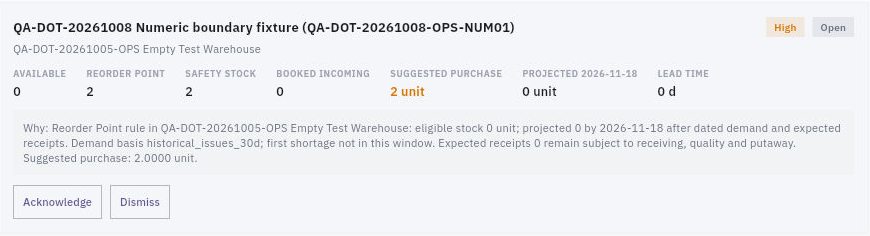
1. Open Inventory → Replenishment → Recommendations. Match the item and warehouse on the card; do not combine cards for different warehouses into one stock position. 2. Read Available, Reorder point, Safety stock, Booked incoming, Suggested purchase, projection date and Lead time. Read Why alongside those numbers to identify the rule and demand basis. 3. Compare the recommendation with dated demand and supply. A receipt after the need date does not cover that earlier need. Historical issues are not automatically future firm demand, and a recommendation can restore a buffer even when known orders are covered. 4. Avoid double-counting allocations: do not subtract a reservation from opening stock and then subtract the same reserved demand again. Keep held stock excluded once, according to the starting quantity you use.
Check the result
Check the planning policy
5. Open Rules. Match the warehouse and any item category, then read method, cover days, review cycle and active state. A disabled rule is not active policy; a category rule takes priority over a warehouse-wide rule. 6. If an agreed rule is missing, choose New rule. Select the exact warehouse and intended category scope, method, applicable cover-day values, review cycle and active state. Leaving category blank broadens the rule to every category. For Reorder Point, the helper uses each item's reorder point and safety stock under Items; do not enter stock quantities into day-based cover fields. 7. Review the full scope, then choose Save rule once. Reopen the matching rule and verify its retained settings, then compare the recommendation's actual basis. If the intended rule already exists, do not create another one. 8. Open Purchase Requirements to inspect any resulting source requirement and its Procure reference. Sent to Procure is a handoff, not an approved purchase or received stock. Do not interpret Acknowledge or Dismiss on a recommendation as ordering supply. 9. Use Planning risks for listed shortages, overstock or delayed supply, and Bin replenishment for internal pick-face replenishment. These are different from an external purchase.
Check the result
You can explain what the recommendation is based on and whether its timing meets the real need. Keep an unresolved shortage with an owner and next action rather than dismissing it to clear the card.
Continue learning
In this series: Manage stock — guide 12 of 17.
Turn what you learned into the way the team works.
Mark this lesson complete once the workflow exists in your workspace—not simply when you reach the bottom.