Compare stock planning scenarios
Test forecast, receipt-delay and capacity assumptions without treating a scenario as an operational commitment.
In this lesson
Compare stock planning scenarios
Before you begin
Identify the planning basis, relevant demand and expected receipts. Keep a baseline so you can explain what changed. A scenario is an analysis, not a physical stock movement or a promised delivery date.
Run a comparison
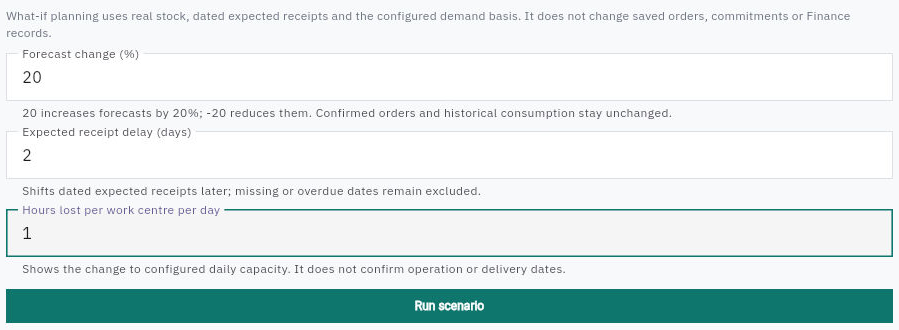
1. Open Inventory → Replenishment → What-if. Read the scope notice and current input values. The view uses real stock, dated expected receipts and the configured demand basis; it does not change saved orders, commitments or Finance records. 2. Start with a baseline, then change one assumption at a time before combining them:
- Forecast change (%) changes included forecasts, not confirmed orders or historical consumption. Enter 20 for a 20% increase or -20 for a 20% decrease.
- Expected receipt delay (days) moves dated expected receipts later; missing or overdue dates remain excluded.
- Hours lost per work centre per day reduces the compared daily capacity of each centre; it does not book or reschedule operations. 3. Review the signs and units, then choose Run scenario once. If Running is displayed, wait for the settled result before reading it.
Check the result
Interpret the result
4. Read the number of items analysed, stock projections changed and items with forecast quantities included. If no forecasts were included, a forecast increase has not tested a populated forecast set. Zero changed projections is not proof that every receipt can safely be delayed. 5. If the result has no apparent effect, review the demand basis and eligible dated receipts. Do not change underlying orders or settings just to force a response. 6. Compare each work centre's baseline and scenario hours separately. The same one-hour loss is 12.5% of an eight-hour day but 25% of a four-hour day. Convert queued minutes to hours before comparing like units. 7. For an operation or customer deadline, obtain a finite schedule using the actual materials, calendars, dependencies and competing work. A small queue or spare daily capacity is not a start or completion commitment. 8. Record the inputs, observation time, result counts and centre rows before leaving or reloading. The demonstrated comparison is transient; do not rely on a saved-scenario history being available.
Check the result
You can explain which assumptions changed, which data were included and what the comparison does not answer. Use the result to identify the next planning decision—not to claim an order, receipt or saved capacity was changed.
Continue learning
In this series: Manage stock — guide 13 of 17.
Turn what you learned into the way the team works.
Mark this lesson complete once the workflow exists in your workspace—not simply when you reach the bottom.