Review inventory valuation and cost movements
Read valuation scope, compare signed movement values, and keep quantity corrections separate from cost adjustments.
In this lesson
Review inventory valuation and cost movements
Before you begin
Choose the exact item or stock population, currency and reporting cutoff. Have the opening quantity/cost and relevant receipt or issue references available.
Read the valuation basis
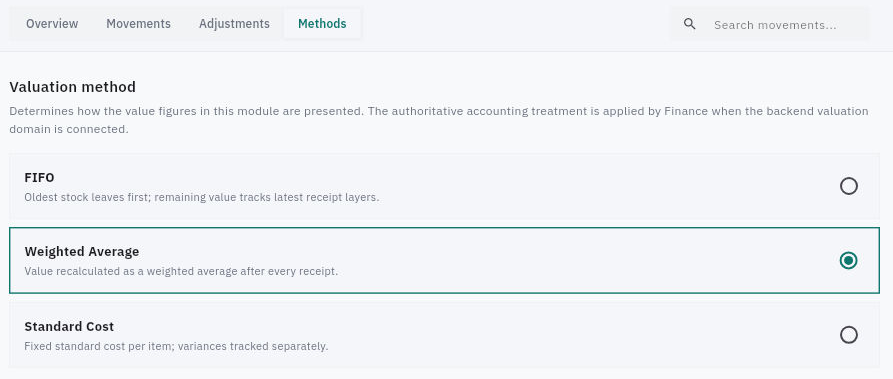
1. Open Inventory → Valuation → Overview. Read Total Inventory Value, Units Valued, Warehouses and Method with their helper text. Compare the header with the complete warehouse and category breakdowns. 2. If totals differ, preserve the displayed scope and time and ask for the included item rows, costs and rounding basis. Do not change stock or cost policy merely to make the cards agree. 3. Open Methods. Read the selected method and its description. The screen distinguishes presentation of Inventory values from authoritative Finance accounting treatment; a method label does not establish a posted ledger result. Leave policy unchanged during a review.
Check the result
Reconcile source movements
4. Open Movements and check the warehouse filter, search and available rows. Match Date, SKU, Kind, Qty, Unit value, Total value and Reference to the source. Obtain the complete relevant interval before treating an excerpt as a ledger. 5. Keep signed quantities and values. Opposite sides of an internal movement can net to zero across the combined scope; adding absolute values would double-count the relocation. A separate receipt remains a separate event. 6. Check the exact item's saved cost fields through Items, not a blank New Item default. Preserve the stock unit, currency and whether a receipt cost is final or provisional. 7. Compare quantity and cost separately. Reconcile opening quantity plus supported additions/removals to closing quantity, then reconcile opening value plus receipt costs, issue costs and approved value changes to closing value. Use a same-scope, same-currency and same-cutoff Finance record for the financial comparison.
Keep corrections in the correct workflow
8. Inspect Adjustments for the exact existing reference if relevant. A blank value-impact field or clipped status is not a verified zero or posting. 9. New Adjustment opens a stock-quantity form with Item, Warehouse, signed Quantity change, Reason and Notes. It is not a demonstrated cost-only write-down form. Cancel during this review. Resolve count differences through the count process and cost-only changes through the financial owner's approved route; damaged stock still physically present is not automatically a negative quantity.
Check the result
You can explain the displayed valuation basis and trace its relevant quantities and costs. Any unresolved difference has a specific source question, not an invented adjustment or assumed Finance posting.
Continue learning
In this series: Manage stock — guide 14 of 17.
Turn what you learned into the way the team works.
Mark this lesson complete once the workflow exists in your workspace—not simply when you reach the bottom.