Read inventory reports and verify an export
Choose the right stock report, preserve its scope, and check exported data before using it.
In this lesson
Read inventory reports and verify an export
Before you begin
Define the item or population, warehouse, unit, time basis and question. A current stock balance, movement history and on-time delivery rate answer different questions.
Select the report and scope
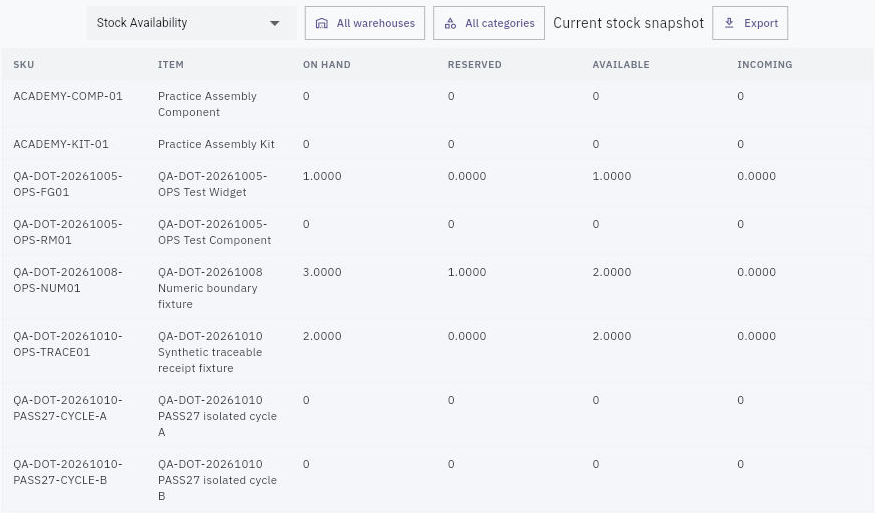
1. Open Inventory → Reports → Stock Availability for the current recorded On hand, Reserved, Available and Incoming quantities. Note the observation time; a Current stock snapshot is not an arbitrary historical snapshot. 2. Use the warehouse selector to find the exact warehouse by name, code or city. Check its selected chip. The neighbouring All warehouses control resets the filter; its presence does not mean the selected warehouse was ignored. 3. Use the category selector if needed and verify the intended category. Match exact SKUs before interpreting the rows. Zero-quantity rows can remain visible, so row count is not stored quantity. 4. For events, choose Stock Movement and read its actual warehouse, category and period. The observed date choices include All time, Last 7 days, Last 30 days, Last 90 days and Year to date. Keep Date, SKU, Movement, Warehouse, Location, signed Qty and Reference together.
Check the result
5. Do not turn movement labels or a sum of visible rows into an On hand balance without the opening position and defined stock effects. Trace a transfer's source, transit and destination separately, and keep an unrelated held receipt outside that transfer's quantity. 6. Choose other report families only for their relevant question. Check their actual columns and definitions before interpreting age, expiry, slow-moving stock, stockouts or valuation. A report name alone does not establish its formula.
Export and check the result
7. Confirm the data and intended audience, then choose Export once. When Download CSV appears, select it and locate the actual resulting file through the normal download route. If no file is available, leave the export incomplete rather than inventing a filename or calling a manual transcription the export. 8. Open the actual file and compare its headers, row count, exact SKUs/references, locations, signed quantities and active scope with the selected report. Retain the raw export separately from calculations. 9. For any percentage, state numerator and denominator—for example, fully accepted on-time demand lines out of all included demand lines. Keep missing evidence distinct from zero and unfinished work distinct from a completed duration.
Use the finding
Choose one supported issue, name its owner and agree the next check. At a later review, compare like-for-like populations and actual outcomes. A better-looking percentage does not itself resolve a held lot, count difference or missed delivery.
Continue learning
In this series: Manage stock — guide 16 of 17.
Turn what you learned into the way the team works.
Mark this lesson complete once the workflow exists in your workspace—not simply when you reach the bottom.