Goals course 02 — Building the hierarchy and assigning accountability
A useful hierarchy preserves the intended scope, period, ownership and measure. This chapter maps New Goal, Add Objective and Add Key Result. Use an approved practice hierarchy; the illustrated records are examples rather than templates to overwrite.
Part of Goals module course
In this lesson
Hierarchy preparation and responsible ownership
A useful hierarchy preserves the intended scope, period, ownership and measure. This chapter maps New Goal, Add Objective and Add Key Result. Use an approved practice hierarchy; the illustrated records are examples rather than templates to overwrite.
In this chapter
- Create the goal with deliberate scope and period
- Add the objective under the correct parent
- Define the key result's measurement fields
- Verify accountability rather than infer it
- Check the saved framework
Create the goal with deliberate scope and period
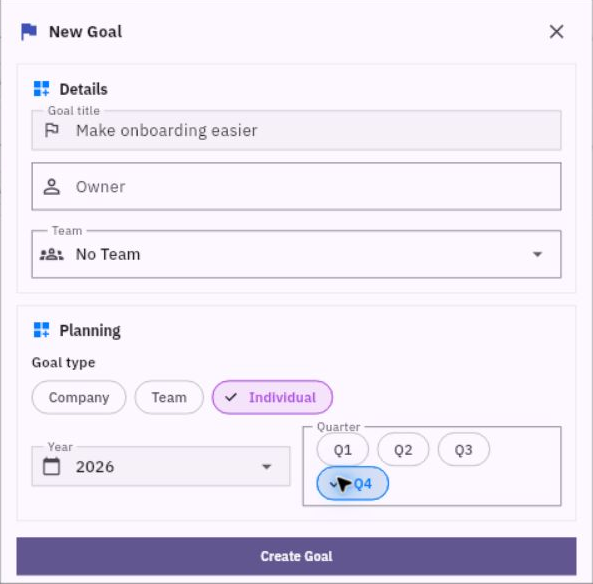
Open Goals > Goals > New Goal. The form has Goal title, Owner and Team. Planning offers Company, Team and Individual, with separate Year and Quarter selections.
Team assignment and key result design
A Team goal type and an actual Team assignment are separate values. The inspected blank form defaulted to Team, No Team and Q1 even though the observation was in Q4. Read and choose the intended values rather than assuming the current date supplied them.
For the practice example, use a distinguishable title such as “Make the welcome instruction understandable” with your suffix. Choose the approved scope and cycle. Select an actual eligible owner only when that responsibility is agreed and assignment is authorized. A fictional role name is not a person to select from the member list.
Use Create Goal once, then retrieve the exact goal independently and compare its full title, type, year, quarter, owner and team. A disappearing form or increased count is not enough to verify identity.
Add the objective under the correct parent
From the goal detail, choose Add another objective. Add Objective contains Objective title, Parent goal, Owner, Start date and End date. The parent is established by the goal you opened; check it before entering the objective.
The practice objective can be “Prepare and validate the welcome instruction.” Keep its dates aligned with the agreed review period. An unsaved date label can omit the year, so read the saved timeline after creation rather than assuming a default's exact year or duration.
The objective's owner is not automatically proven by the goal's owner. Keep the accountability plan explicit: who arranges the work, who observes the checks and who reviews the final evidence? In a one-account simulation, label the roles honestly instead of claiming independent review.
Use Add Objective when authorized, return to the goal and expand it, then open the objective to confirm the parent, complete title, dates and ownership.
Define the key result's measurement fields
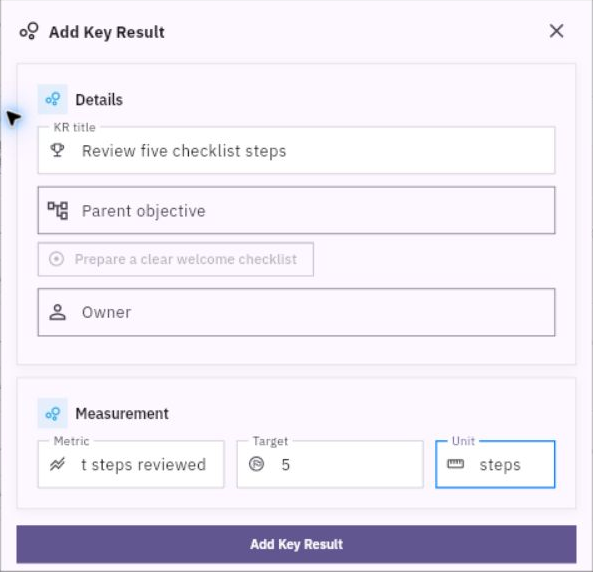
From the objective detail, choose Add another key result. Add Key Result has KR title, Parent objective, Owner, Metric, Target and Unit. The inspected blank form used Metric Count and Target 10; neither is a recommendation for your measure.
Measure definition and saved hierarchy checks
For the practice KR, use a title such as “Three independent readers identify materials and first action.” Metric should explain the successful independent checks, Target should be 3, and Unit should be checks. Preserve the full pass rule and version/evidence plan in the agreed supporting context; a short metric label cannot carry every qualification.
Choose Add Key Result once. Open its detail after the hierarchy settles and compare the complete measurement, target, unit, owner and parent chain. If you need to correct an existing definition, Edit exposes the measurement fields and Save Changes; changing the measure requires an agreed decision, not merely a desire for a better percentage.
Verify accountability rather than infer it
The accountable owner explains the result and arranges next steps. A contributor performs a task. An observer records an attempt. A reviewer checks whether the observation satisfies the rule. These roles can overlap in a small exercise, but they are not interchangeable.
Unassigned means no owner is recorded. It does not mean the signed-in user, document author or watcher has accepted the role. A proposed review time is not an agreed appointment. Resolve ownership and review commitments before relying on them operationally.
If a creation response is uncertain, inspect the existing exact hierarchy before retrying. If the parent is wrong, use the authorized supported correction route rather than creating a duplicate that hides the problem. If access is denied, retain the specification and ask the responsible owner for the supported arrangement; do not change permissions to complete the exercise.
Check the saved framework
At this stage you should have either a verified practice hierarchy or a complete written specification with its unavailable native step identified. Creation stores the framework, not a successful result. Leave Progress, Confidence and Status as actually observed until a supported checkpoint justifies an update.
Turn what you learned into the way the team works.
Mark this lesson complete once the workflow exists in your workspace—not simply when you reach the bottom.