Goals course 03 — Linking contributing work and recording justified progress
Goals becomes useful when the measure, supporting work and observed result can be traced together. This chapter explains Board-to-Goals links and the direct progress control without assuming that links calculate results automatically.
Part of Goals module course
In this lesson
Work relationships and progress evidence
Goals becomes useful when the measure, supporting work and observed result can be traced together. This chapter explains Board-to-Goals links and the direct progress control without assuming that links calculate results automatically.
In this chapter
- Give contributing work its own output
- Use the structured link dialog
- Distinguish a reference from execution evidence
- Prepare the checkpoint before touching Progress
- Use P and C deliberately
- Correct the measure without manufacturing an error
Give contributing work its own output
For the welcome-instruction example, one Board task can produce the complete instruction and another can run the three independent checks. The writing task's completion condition is a usable version; the checking task's output is the complete response register. Neither task should be titled only “Improve goal.”
A contribution statement makes the relationship clear: “Revising the materials sentence supports reader understanding by making the required items explicit before independent testing.” This explains why the task matters without claiming that the improvement already occurred.
Choose the intended relationship level before linking. A task can support the wider Goal, a particular Objective or the specific Key Result. A similarly named item at another level is not the same destination.
Use the structured link dialog
Open the exact authorized Board task and locate Linked Entities > Add link. In Link Entity, select Goals under Select Module, then Goal, Objective or Key Result under Select Entity Type. Search for the complete intended destination and compare its identity before selecting it.
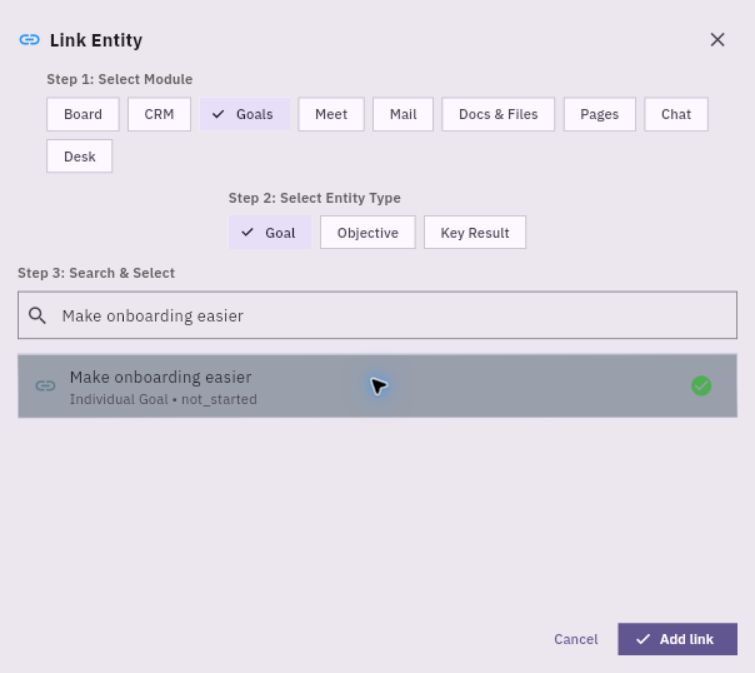
Exact relationship checks and progress entry
A blank search showing No entities found is not proof that the workroom has no goals. Enter the supported exact query and allow results to settle. Do not select a lookalike or create another goal simply to obtain a result.
Use Add link once when authorized. The demonstrated association route saved through that dialog without an additional Update Task. Verify the actual retained card before repeating any action. Reopen the task independently, follow the card's Open control and match the destination's full title, type and parent chain.
A saved link does not grant access, complete the task or update the measure. If the destination is denied, keep the exact access result and use the permitted escalation route rather than bypassing it.
Distinguish a reference from execution evidence
The key-result detail also exposes Link work, while the expanded KR row shows Execution Evidence and Link artifact. These are distinct visible surfaces from a Board task's generic Linked Entities reference. A task linked to the wider Goal does not establish that the KR contains an execution artifact, that an artifact was scored, or that progress changed. Read the actual Execution Evidence list before making those claims. The selectors and save effects for Link work and Link artifact are not established by their visible labels, so this course does not supply an invented linking procedure for them.
Prepare the checkpoint before touching Progress
Use a small register with reader identity within the practice, instruction version, complete response, assistance flag, time, classification and reason. Count each agreed check once. A repeated observation of the same response is not another reader.
At checkpoint 1, A passes, B omits the pen and C is unperformed: 1/3 valid checks. At checkpoint 2, B independently repeats the check and now names paper, pen and all three labels; C still has not attempted it. Under an agreed latest-valid-retest rule, the current result is 2/3. Retain B's earlier finding and the new observation rather than erasing the history.
State the rule before using it. Do not assume every team's measure replaces prior attempts. If the population or pass rule changes, record a revised measurement decision instead of silently comparing incompatible percentages.
Use P and C deliberately
Open Goals > Goals, expand the exact goal and objective, and confirm the KR's complete measurement. Locate P, the progress control on the left, and distinguish C, confidence on the right. Choose the intended direct percentage using P and read the numeric value, not just the approximate slider position.
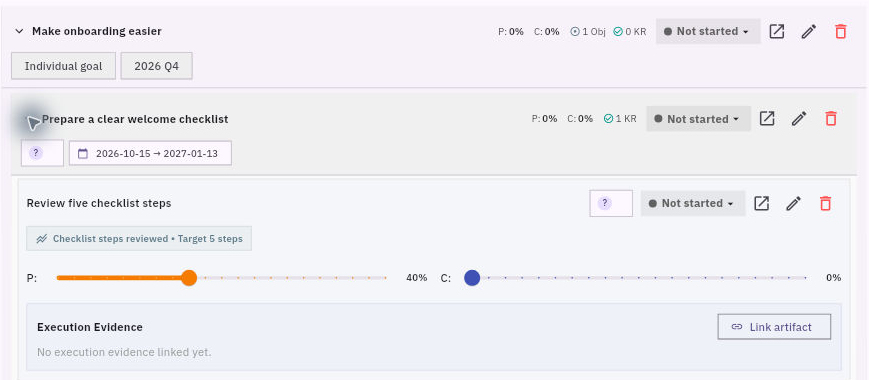
Calculation precision and evidence readback
The direct-control evidence demonstrates percentage entry, not a raw-count auto-calculation or universal precision contract. For a repeating fraction such as 2/3, preserve the exact count and agreed rounding in the checkpoint note and use only precision the current control supports. Do not alter the denominator to fit the slider.
Let the detail settle after an authorized update. A transient zero during loading is not proof of failure. Leave and retrieve the same KR independently, then compare Progress with the intended checkpoint. Read Status and Confidence separately, and open the objective and goal to compare their own values. Do not repeatedly update because a parent did not roll up.
Correct the measure without manufacturing an error
If a later review discovers that B was prompted, the independence rule invalidates that pass. Preserve the correction and recalculate from the remaining valid responses. A lower supported percentage is more useful than a higher unsupported one.
First inspect the actual current native value. If it already matches the supported result, no correction is needed merely because a fictional exercise describes a mistaken proposal. Change only the authorized exact record and verify its retained value afterward.
You are ready to continue when you can explain the count, its evidence, the precise linked destination and the difference between a direct progress update and a completed business outcome.
Turn what you learned into the way the team works.
Mark this lesson complete once the workflow exists in your workspace—not simply when you reach the bottom.