Produce course 05 — Subcontracted production and source linked receipts
Subcontracting distinguishes the supplier's promised output, company-owned materials sent out, actual receipts and accepted stock. Supplier-provided inputs and company-provided inputs require different custody and quantity stories.
Part of Produce module course
In this lesson
Supplier production and company-owned materials
Subcontracting distinguishes the supplier's promised output, company-owned materials sent out, actual receipts and accepted stock. Supplier-provided inputs and company-provided inputs require different custody and quantity stories.
In this chapter
- Prepare the source and material ownership
- Issue only the authorised company quantity
- Follow Open RCV to the right receipt
- Separate physical arrival from acceptance
- Close only the scope that is reconciled
Prepare the source and material ownership
Open Produce → Subcontracting. Match source code, supplier, manufactured product, expected/commissioned output, received and accepted/rejected figures. A Completed row for one subcontract is not evidence that another partial or Quality Hold row is resolved.
New Subcontract Order has Select manufactured product, Select Procure supplier, Expected output, Expected return, Materials to send, Supplier provides all materials and Scope / notes. Select the exact eligible supplier and output SKU/unit. Expected return is a plan, not an arrival.
For company materials, identify each component SKU/unit and quantity. For supplier-provided inputs, use the corresponding ownership mode without inventing a company-material issue. Selecting a component can disable the supplier-provides-all-materials checkbox. Resolve the ownership model before entry rather than trying to combine contradictory modes.
The material helper says planned quantities are reserved and issued only when Issue Components is selected. Saving the plan does not prove stock is available, reserved or dispatched. After an authorised create, reopen the order and compare supplier/product, quantity, date, ownership mode, scope and every component line.
Issue only the authorised company quantity
Before Issue Components, verify exact available eligible stock, source location/tracking and the approved scope. Preserve the before-state and intended quantity. Afterward, independently inspect the issued record and Inventory result, including any supported supplier-custody meaning. A timeout does not justify issuing again.
A fictional supplier requires eight cards and four sleeves for four sets. Sending those materials is not consumption or four finished outputs. If three outputs return and one remains expected, retain the outstanding material/output responsibility rather than describing the entire source as complete.
Follow Open RCV to the right receipt
Use Open RCV from the intended subcontract source and verify the receipt's Source reference before trusting its quantities. The receipt belongs to that subcontract, not to another production order that happens to manufacture the same product.
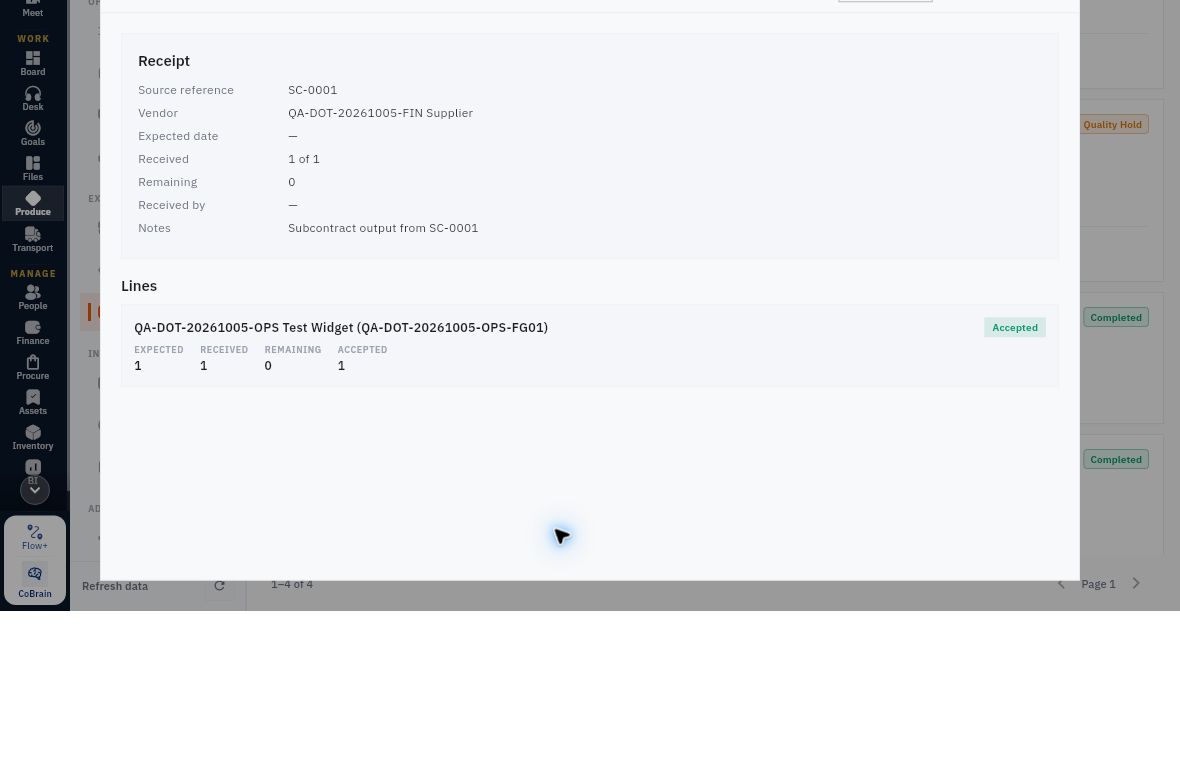
Subcontract quantity and acceptance reconciliation
Subcontract receipt with its source reference and separate expected, received, remaining and accepted line quantities.
Read Expected, Received, Remaining and Accepted on the exact line. Expected 1, Received 1 and Accepted 1 describe the same unit, not three. Missing expected date or receiver remains unverified; do not borrow the subcontract's planned date or infer a person from the session operator.
Receive Output is for actual supported arrivals, not the supplier promise. Inspect the current eligible form and its quantity semantics before entry. After an authorised receipt, reopen it and compare expected/received/remaining, quality and stock references. A receipt still under quality review is not eligible finished stock.
Separate physical arrival from acceptance
For a fictional four-output subcontract, three arrive. Two meet the complete criteria; one has an unreadable lot mark and remains held. The result is received three, accepted two, held one and expected remainder one. Eligible new stock is two only after the required location/putaway checks. Do not count the held output twice as both accepted and pending or report the missing fourth as received.
A supplier remedy or replacement needs its own source and decision. Preserve the original defect and material ledger. A no-charge replacement is not automatically an extra bill, credit or financial settlement. Supplier performance can distinguish first-pass quality from eventual acceptance; later success must not erase the earlier exception.
Close only the scope that is reconciled
Before closeout, compare promised output, actual received/accepted/rejected/held quantities, company inputs issued, supported use/loss/unused return and remaining supplier obligations. A source link alone does not establish the destination opened; a Completed badge alone does not establish every physical or financial outcome.
If a permitted route is unavailable, preserve the valid partial result and ask for the supported next step. Do not borrow an unrelated receipt, create replacement stock or bypass a denied control to produce a clean screenshot. A useful handoff identifies the exact subcontract, its linked receipts, remaining quantity and owner responsible for the unresolved result.
Turn what you learned into the way the team works.
Mark this lesson complete once the workflow exists in your workspace—not simply when you reach the bottom.