Record and approve a supplier bill
Create a supplier bill, complete its review and check the resulting payable and accounting entry.
In this lesson
Record and approve a supplier bill
Create a supplier bill, complete its review and check the resulting payable and accounting entry.
Before you start: You need the supplier’s bill, confirmation of what was received or accepted, the correct supplier record and finance-approved coding. Resolve quantity, price or receipt disagreements before approving the charge.
Steps
1. Open Finance → Vendor bills → Vendor bills. Search the supplier and Bill number and inspect likely matches before selecting New. If the same bill already exists, skip steps 2–4 and continue with the state-appropriate review in step 5. A bill number must come from the source document, not a new label invented to bypass a duplicate.
2. Enter Bill number, Notes, Bill date, Due date, Currency and the applicable Exchange rate. Select the exact Vendor. Add the Purchase order and Goods receipt references when they are part of this purchase; use an independent bill only when that is the correct route.
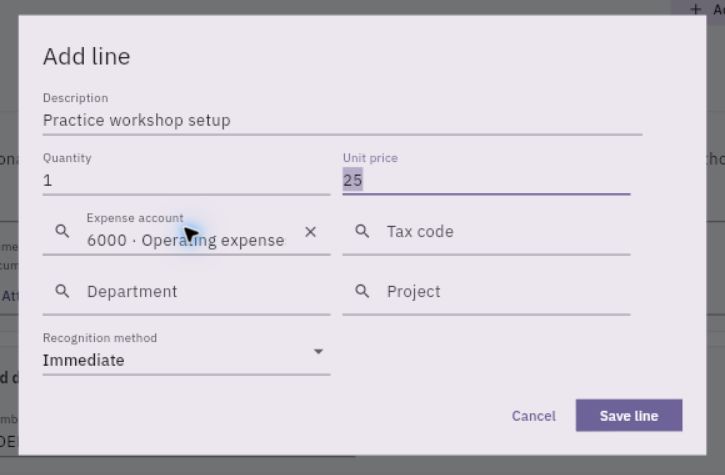
3. Select Add line. Enter the description, quantity and unit price, then choose the correct Expense account, tax code and applicable department or project. Review Recognition method against the intended accounting treatment.
Check the result
4. Select Save line, add any further lines and reconcile the complete bill with the supplier document. Select Create record once, then find the saved bill in the register and check its generated identity, values and lines.
5. When the draft is ready for review, use Workflow actions → Submit and confirm the correct record. Reopen it and check the current review state and amount.
6. The designated reviewer checks the supplier, accepted goods or services, source references, coding, dates, tax and total. If the bill is awaiting approval and the review is complete, they select Approve and confirm the decision. If it has already progressed beyond that stage, skip approval and check the payable and journal below. Follow your organisation’s separation of preparation and approval roles.
7. Open Finance → Payables and find the bill reference. Check the supplier, currency, original amount, outstanding amount and due date. The payable tells you what remains owed.
8. Open Accounting → Journals → Journals and locate the bill’s source journal. Compare its source reference, amount, accounts and accounting period with the approved bill.
Expected result
The bill is approved and its resulting payable and journal can be traced back to the supplier document.
Common pitfalls
- This bill workflow posts through approval; do not invent a separate invoice-style Issue step or add a duplicate manual journal.
- An approved bill or open payable is not a completed supplier payment. Payment has its own preparation and review workflow.
Continue learning
In this series: Manage business finances — guide 7 of 15.
Turn what you learned into the way the team works.
Mark this lesson complete once the workflow exists in your workspace—not simply when you reach the bottom.