Prepare a supplier payment
Create a payment draft with the correct supplier, cash account and bill allocations for Finance review.
In this lesson
Prepare a supplier payment
Create a payment draft with the correct supplier, cash account and bill allocations for Finance review.
Before you start: You need the payment amount, exact open payable, supplier identity, intended cash account and supporting documents. Use your organisation’s payment process for authorisation and any actual movement of funds.
Steps
1. Open the supplier’s payable and check its current outstanding balance. Review any credits, earlier payment attempts or changes before preparing another payment.
2. Open Finance → Payments in the Cash section, then select Vendor payments. Search for an existing payment with the same supplier, amount, date and provider reference. If it already exists, skip steps 3–8: open it and check the saved supplier, cash account, amount, allocations and evidence without selecting Create record. Preserve its current workflow state rather than starting the payment again.
3. For a new draft, select New. Enter Payment date, Amount, Currency, the applicable Exchange rate and Payment method. Select the exact Vendor and source Cash account. Use Notes to explain the bills and purpose.
4. Enter the actual Provider reference when one is available from the payment source. Do not invent a bank-success reference for a planned payment.
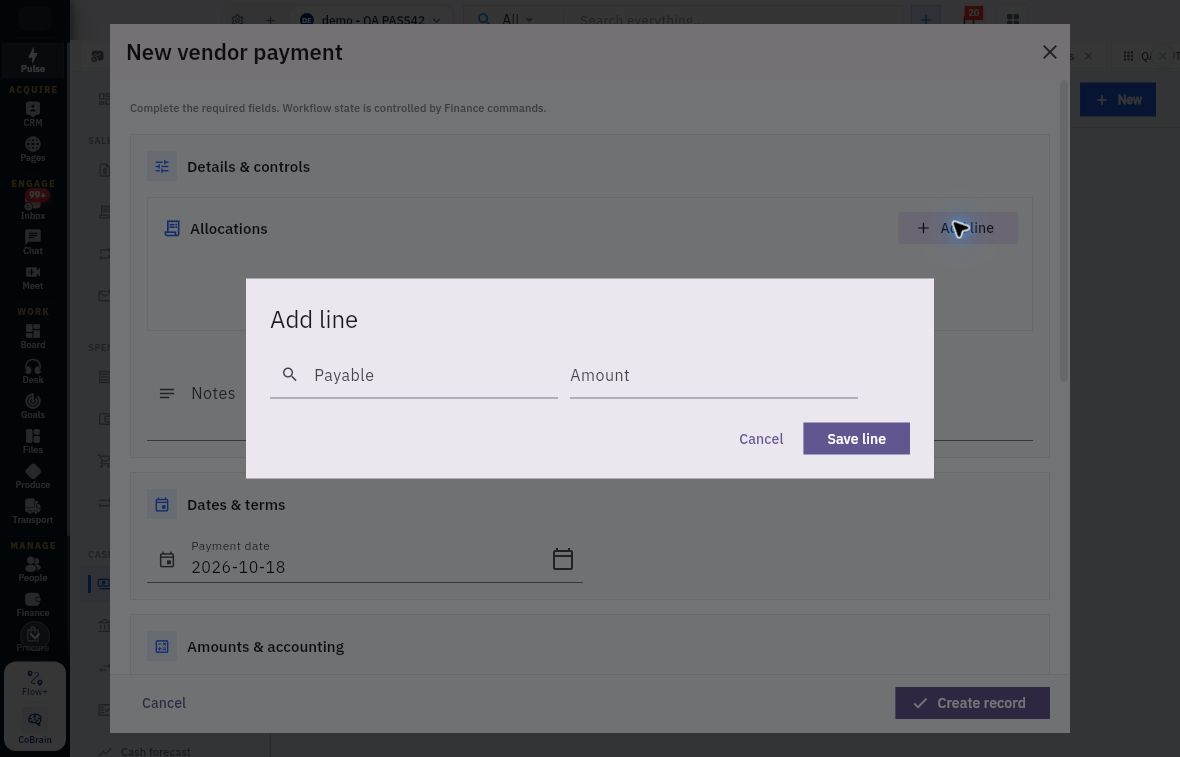
5. Under Allocations, choose Add line. Select the exact Payable, enter the amount to apply and select Save line. Confirm the supplier, bill reference, currency and current balance behind the selected payable; a generic label alone is insufficient.
Check the result
6. Repeat for any other payables included in the same payment. Add the allocations and compare them with the header amount. Check the expected remainder on a partially paid bill and avoid allocating the same payable twice.
7. Use Payment evidence → Attach from Vault or Upload file for the appropriate supporting document. Confirm the retained attachment and readable contents; choosing a filename is not proof that it attached.
8. Review the complete draft and select Create record. Return to Vendor payments, reopen the generated payment number and check the supplier, source reference, cash account, amount and allocations. Resolve missing evidence before moving the payment into its later review or release workflow.
Expected result
The proposed payment is saved as a traceable draft with the intended bill allocations. Finance can review it without reconstructing which supplier obligation it belongs to.
Common pitfalls
- Saving a draft or seeing Unapplied 0 does not prove that money moved or the payable was reduced. Check actual completion and settlement separately.
- If the save result is uncertain, reopen the register and inspect the original attempt before retrying. Do not change the reference to disguise a possible duplicate.
Continue learning
In this series: Manage business finances — guide 8 of 15.
Turn what you learned into the way the team works.
Mark this lesson complete once the workflow exists in your workspace—not simply when you reach the bottom.