Create and post a balanced journal
Prepare a manual adjustment, complete its review and trace the posted journal to the general ledger.
In this lesson
Create and post a balanced journal
Prepare a manual adjustment, complete its review and trace the posted journal to the general ledger.
Before you start: Have the source-backed adjustment, entry date, currency, accounts and line amounts agreed with Finance. Use your assigned preparation, review and posting permissions; a balanced total alone does not make an entry correct.
Steps
1. Open Finance → Accounting → Journals → Journals. Search the source reference, date and narration. If the intended journal already exists, skip steps 2–5 and continue only at its current workflow stage below. If it is Posted, go directly to step 9.
2. Check that the accounting period permits the entry. Select New, choose Kind → Adjustment, and check Entry date. Enter a clear Narration describing the purpose and source, then select the Transaction currency. Use a posting-rule reference only if the agreed procedure requires it.
3. Select Add line. Search Account and select the exact named result—not just typed text. Enter Debit, Credit, Description and any required dimensions, then select Save line.
4. Add the remaining lines. Independently total debits and credits and confirm a zero difference. Recheck account identities, dates, currency and the business explanation, including whether another source or recognition event already recorded the adjustment.
5. Select Create record once. Reopen the saved draft by its date and full narration and compare the retained lines with the source.
6. When the journal is a complete Draft, select Workflow actions → Submit and confirm. Check that it is awaiting approval. Skip this action if it has already progressed.
7. The designated reviewer checks the source, period, accounts and amounts. Only while the journal awaits approval, select Approve and confirm the decision. Approval is separate from posting.
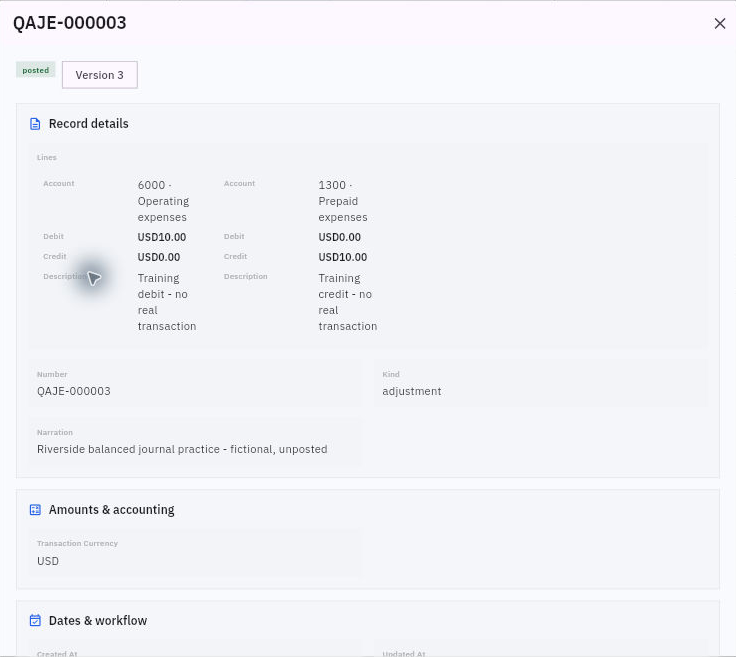
8. For an Approved journal ready to enter the ledger, the responsible operator selects Post. Read the warning that posted entries are immutable, confirm once and reopen the journal. Check its Posted state, assigned journal number and retained lines.
Check the result
9. Open Finance → Accounting → General ledger with the relevant date scope. Match the exact journal number to its account rows, debit and credit amounts, descriptions and entry date.
Expected result
The adjustment is posted once and its journal number connects the source, approved lines and general-ledger movements.
Common pitfalls
- Do not repeat Post or create a second journal after an uncertain response. Search the original journal and ledger first.
- An account’s running balance can include other journals. Compare this journal’s individual lines, not the whole account balance.
- Use Finance’s controlled correction process for a posted error; do not treat the posted journal as an editable draft.
Continue learning
In this series: Manage business finances — guide 11 of 15.
Turn what you learned into the way the team works.
Mark this lesson complete once the workflow exists in your workspace—not simply when you reach the bottom.