Resolve and close a ticket at the right time
Use the ticket lifecycle after the agreed outcome has been met.
Part of Hand off support and verify resolution
In this lesson
Resolve and close a ticket at the right time
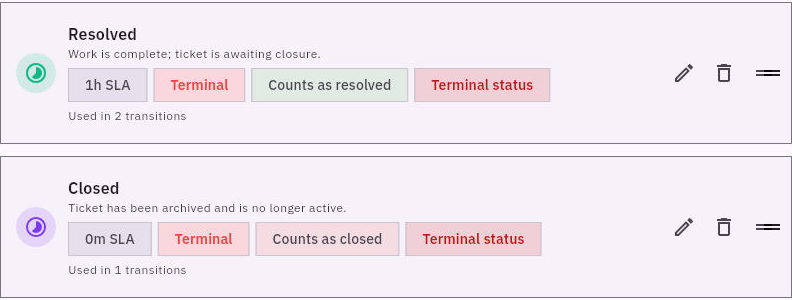
Resolution and closure are different decisions. Resolved means the substantive work is complete under your service process; Closed ends the remaining handling process after any required closure review.
Before you start: You need permission for the ticket transition. Check the request’s completion criteria, returned work and any required customer confirmation.
Decide whether the ticket is ready
1. Open the exact ticket and read its context, recent responses, review notes and linked work. Confirm that no in-scope requirement remains unresolved.
2. Keep the decision tied to the actual request. If the customer needs access through a particular page, verify that route. If the agreed task was only to review text, do not add unrelated requirements before finishing it.
3. Keep a useful outcome summary on the ticket through the appropriate note or response route. Describe what changed, what was checked and any remaining follow-up. A linked task marked Done does not replace this review.
Use an allowed transition
4. Check the ticket’s current state and offered lifecycle actions. The demonstrated route uses Move to Open from New, then Move to Resolved from Open. Use the actions offered for your ticket and your desk’s process; do not assume every state can jump directly to every other state.
5. When the requirements are met, select the appropriate transition once. Return through Desk → Tickets, find the same reference and reopen it to confirm the saved status and intact context. If the immediate result was unclear, check the record before clicking again.
6. Stop at Resolved if closure still needs a separate review. Use Move to Closed only when that review is complete and your role permits it. Closing a ticket does not prove that a response was delivered or that an SLA target was met.
Handle a later problem honestly
If the original outcome fails again, preserve the new information and use your desk’s supported recovery process. Do not assume a Reopen button or reverse transition exists, and do not create a duplicate merely to avoid finding the correct route.
Your result is a ticket whose saved state matches the actual support outcome. Read service clocks and history separately; changing a status is not a way to erase a missed target.
Continue learning
In this series: Handle support requests — guide 12 of 14.
Turn what you learned into the way the team works.
Mark this lesson complete once the workflow exists in your workspace—not simply when you reach the bottom.