Review a quote and its current version
Check a commercial document’s customer, pricing, terms and revision history before relying on it or sharing it.
In this lesson
Review a quote and its current version
Check a commercial document’s customer, pricing, terms and revision history before relying on it or sharing it.
Before you start: You need access to the CRM space and the existing commercial document you want to review. Have the customer’s requested scope and agreed pricing basis available.
Steps
1. Open CRM → Commercial → Quotes. Locate the document by its number and customer Account. Read its type, version, state and amount. The Quotes workspace can contain different document types, including Estimates and Order forms.
2. Expand the document using the row’s right-hand chevron. Read Revision history and identify the Current and Superseded versions. Compare the version with the one the customer is discussing; the newest version is not automatically the version they accepted.
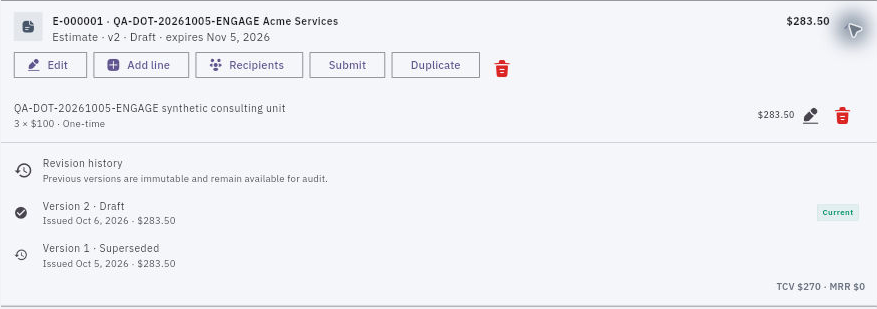
Check the result
3. Select Edit to inspect the header. Check the document type, Account, Deal and primary contact, along with issue and expiry dates. Read payment terms, commercial terms, document notes and comments. When you are only reviewing, close the editor with Cancel.
4. Use the pencil beside a line to inspect its description, Quantity, Unit price, currency, Billing frequency, Discount type, discount value and Tax %. Close with Cancel if you are not making a pricing change.
5. Recalculate the price from the line inputs. Distinguish a fixed discount from a percentage, and check the tax basis and any other charges. For example, three units at 100 with a 10% discount give a discounted subtotal of 270 before any applicable tax. Use your actual agreed amounts and tax treatment.
6. Compare the line totals, document total and any summary values. Read TCV and MRR in their stated context rather than assuming they represent an invoice total, payment or earned revenue.
7. Finish the review with a clear decision: ready for the intended next step, or a specific correction needed. Keep the exact document number and version with that decision so colleagues do not act on a superseded copy.
Expected result
You know which version you are reviewing and whether its customer references, scope, complete price and terms agree.
Common pitfalls
- A Sent state or issue-date field does not prove customer acceptance. Check the actual decision against the exact version.
- Do not fix a missing link by selecting a similarly named customer or unrelated deal. Resolve the identity first.
Continue learning
In this series: Manage customer relationships — guide 7 of 15.
Turn what you learned into the way the team works.
Mark this lesson complete once the workflow exists in your workspace—not simply when you reach the bottom.