Prepare a customer renewal
Create a renewal record for an existing customer arrangement, with the right source, owner, dates and next action.
In this lesson
Prepare a customer renewal
Create a renewal record for an existing customer arrangement, with the right source, owner, dates and next action.
Before you start: You need permission to manage renewals and an existing recurring arrangement to review. Have its accepted terms, current service period, decision date and proposed changes available.
Steps
1. Open CRM → Accounts and find the customer. Review the relevant Contacts, Deals, commercial documents and open work. Check whether an unresolved service issue or a new buying decision affects the renewal.
2. Open Commercial → Renewals. Use Search renewals and the date or status filters to check whether this arrangement already has a renewal. If the correct renewal already exists, skip the creation actions in steps 3–7 and perform only the saved-record checks at the end of step 7, without choosing Save. This guide does not cover editing an existing renewal.
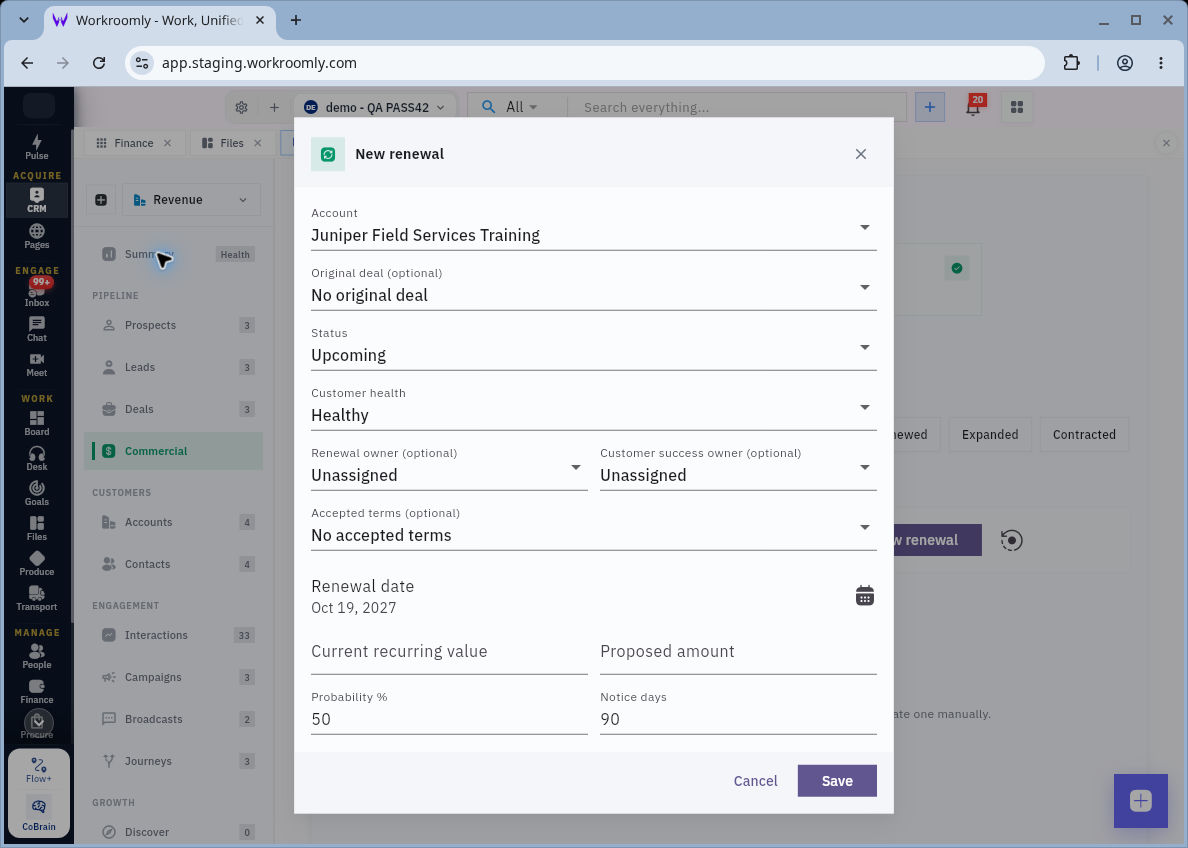
3. For a new renewal, select New renewal. Confirm Account instead of accepting a preselected customer. Choose the correct Original deal when one exists, and link Accepted terms only to the version that genuinely belongs to this arrangement.
4. Choose a truthful Status and Customer health. Assign the Renewal owner and, where relevant, the Customer success owner. These roles can have different responsibilities; decide who will drive the commercial decision and who will handle the relationship.
5. Enter the Renewal date and check Notice days against the actual agreement. Review Current recurring value, Proposed amount and Probability %. Confirm the currency and period basis your team uses before entering amounts; a bare number does not explain whether it is monthly or annual.
Check the result
6. Add a specific Next action and any supported Risk reasons. For example, identify the scope question to resolve or the customer discussion to arrange, rather than writing only “follow up”.
7. Review the complete form and select Save. Find the renewal again in the list and check the customer, source arrangement, owner, dates and next action. Keep proposed terms distinct from the customer’s eventual decision.
Expected result
The renewal is recorded as a planned customer decision with an owner and a useful next action, rather than an assumed continuation of billing.
Common pitfalls
- A one-time purchase or a new request is not automatically a renewal. Start from the actual recurring arrangement.
- Default status, health, probability and notice days are starting values. They do not establish that the customer has been contacted or accepted new terms.
Continue learning
In this series: Manage customer relationships — guide 12 of 15.
Turn what you learned into the way the team works.
Mark this lesson complete once the workflow exists in your workspace—not simply when you reach the bottom.