Check your CRM space and pipeline
Confirm where your team works and understand the stages an enquiry or deal should follow.
In this lesson
Check your CRM space and pipeline
Confirm where your team works and understand the stages an enquiry or deal should follow.
Before you start: You need CRM access. To see shared lifecycle settings, your role also needs access to Config. Ask your CRM administrator which space and pipeline your team uses if you are unsure.
Steps
1. Use the top-bar workroom selector to open the correct workroom, then open CRM and check the space name. Keep this space selected as you work through customer records.
2. Open Leads, Contacts and Deals. Check that you can find the records needed for your work. If a list is empty, check the space, search and filters before assuming your team has no records.
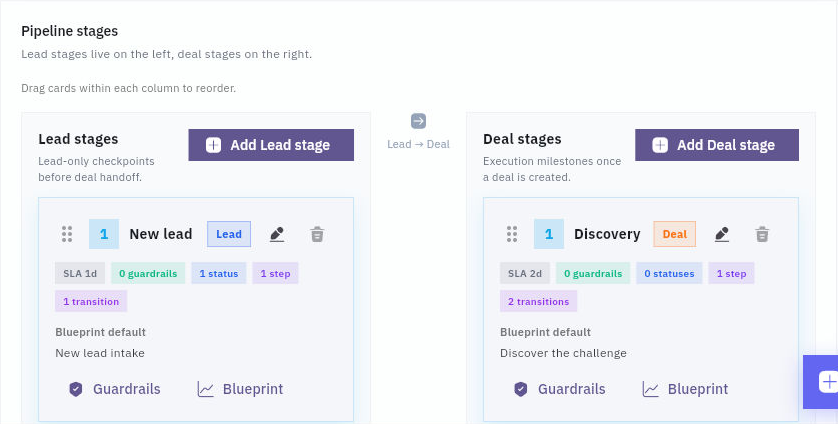
3. If Config is available to you, open Config → Lifecycle flow. Read the Lead stages and Deal stages separately. Note which stages your team uses for new enquiries, investigation and qualified opportunities.
Check the result
4. Look at the steps within a stage. A stage is a broad checkpoint; a step is the activity within it. For example, a Discovery stage may include a step called Discover the challenge. Your team’s labels may differ.
5. Open an existing lead or deal and compare its current stage, step and status with that lifecycle. Status is a separate value: changing it is not a substitute for moving a record to another stage.
6. Agree what is needed before the next stage. A useful rule names the customer information required, the person responsible and any review needed. If a stage or action is missing from your view, ask the CRM administrator to check the configuration and your role rather than creating a duplicate space.
Expected result
You know which CRM space to use, how its lead and deal stages differ, and what your team needs before moving a record forward.
Common pitfalls
- A visible action does not mean every colleague has the same access. Shared configuration and day-to-day record work can use different permissions.
- Do not rename or rearrange a shared lifecycle just to match an example. Make configuration changes with the team that uses it.
Continue learning
In this series: Manage customer relationships — guide 2 of 15.
Turn what you learned into the way the team works.
Mark this lesson complete once the workflow exists in your workspace—not simply when you reach the bottom.