Review a sprint before closing it
Account for the sprint’s work and preserve unfinished tasks before recording the end of the period.
In this lesson
Review a sprint before closing it
Closing a sprint ends a planning period. It does not automatically mean every task or project is complete.
Review the sprint
1. Open Board → Sprints and find the exact sprint. Check its full name, dates and current status. 2. Expand its left chevron. Compare the listed tasks with the work your team committed to this period. 3. Open each task that affects the closeout. Check its result, review decision and remaining work rather than relying only on the status label. 4. Record what was completed and what remains in your team’s agreed review location. For open work, agree the next owner, timing and next step. Keep the original task and its history.
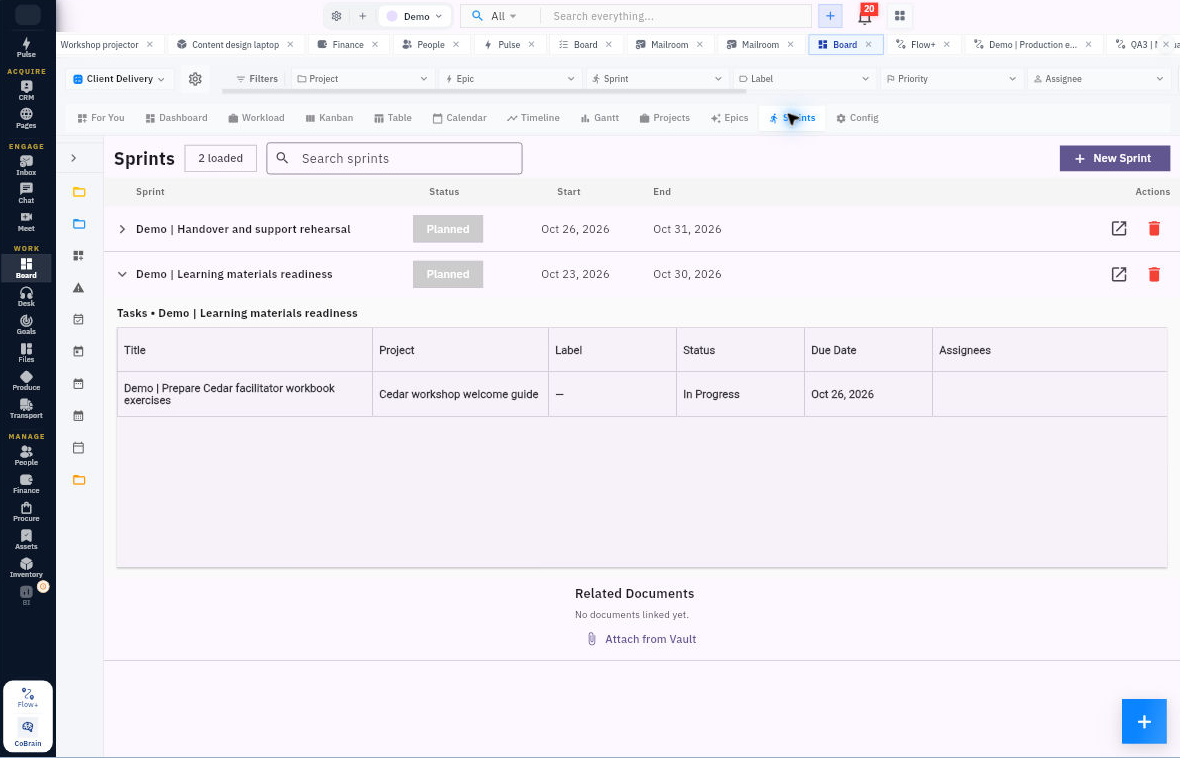
Check the result
Record the lifecycle decision
5. Open the sprint’s detail form. Review the Status choices—Planned, Running and Closed—and your team’s closeout policy. 6. When the period is ready to close, select Closed and use Update Sprint if available for your role. Read any warning before confirming. If the control is unavailable, ask the sprint administrator rather than recreating the record. 7. Return to Sprints, reopen the same sprint and check its retained status and membership. Inspect the still-open tasks separately.
Expected result: the sprint’s state matches the lifecycle decision and unfinished work has a clear continuation plan.
Tips: Do not assume closure moves tasks to another sprint or changes task/project statuses. Keep a task open when its required result is unfinished, even if the sprint period has ended.
Continue learning
In this series: Plan and deliver work — guide 14 of 17.
Turn what you learned into the way the team works.
Mark this lesson complete once the workflow exists in your workspace—not simply when you reach the bottom.