Review asset values and depreciation
Read an asset’s financial fields and compare them with the appropriate review and Finance records.
In this lesson
Review asset values and depreciation
Before you begin
Use the exact asset and a common reporting cutoff. Have the approved cost, currency and depreciation policy available; operational registration is not financial approval.
Read the asset-side values
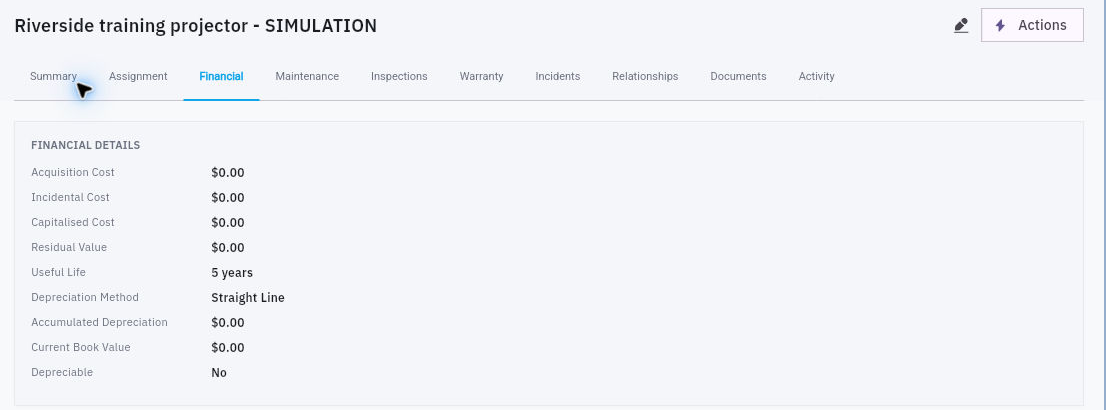
1. Open Assets → Register → the exact asset → Financial. Read Acquisition Cost, Incidental Cost, Capitalised Cost, Residual Value, Useful Life, Depreciation Method, Accumulated Depreciation, Current Book Value and Depreciable separately. 2. Confirm whether Depreciable is enabled. A visible method and useful life do not by themselves mean depreciation is running. A zero field is the displayed value, not proof of a reconciled Finance balance. 3. If you have access, inspect Settings → Module policy for the asset currency, capitalisation threshold and default depreciation method. Compare them with the asset-specific approved policy. Do not change shared settings merely to make a comparison match.
Check the result
Review the related records
4. Open Value → Capitalization review and find the same asset. Read its amount, exception and actual state. Send any unresolved source-cost or policy question to the financial reviewer; do not use Approve or Reject simply to clear a warning. 5. Open Depreciation. Compare retained entries with the asset's approved first charge date and included periods. An empty view is not proof that Finance has no depreciation. If a calculation is needed but no supported control is available, ask the financial owner for the correct process. 6. Compare the asset-side value with a same-currency, same-cutoff Finance record. Explain differences separately, including pending review or unposted changes. Keep original cost, accumulated depreciation and current book value distinct.
Prepare a valuation or impairment review
7. In Valuations → New valuation, the visible fields include Asset, Amount, Reason, Valuation method, Valuer, Reference and Effective date. Prepare the supporting assessment and both the proposed new value and adjustment. Confirm which value Amount expects before entering it; a form default is not proof of an appraisal. 8. In Impairments → Record Impairment, prepare the exact Asset, Amount, Reason and Effective date. Keep the proposed reduction separate from the resulting book value. Confirm amount meaning, currency, approval and effective period with the financial owner before any submission. Cancel if those are unresolved.
Check the result
You can explain the asset's recorded value and any outstanding review or Finance difference. A saved valuation, impairment or asset badge alone would not establish a ledger posting or cash movement.
Continue learning
In this series: Manage asset custody — guide 11 of 15.
Turn what you learned into the way the team works.
Mark this lesson complete once the workflow exists in your workspace—not simply when you reach the bottom.