Maintain asset definitions and relationships
Check reusable definitions, link the correct assets, and verify supporting documents without confusing these with custody or Finance changes.
In this lesson
Maintain asset definitions and relationships
Before you begin
Confirm whether the change concerns one asset, a reusable definition or future defaults. Have the exact asset numbers/serials and the approved relationship or document version ready.
Check definitions
1. Open Assets → Settings. Review Asset categories, Asset types, Asset locations and Condition scale as needed. Match existing definitions before proposing a new one; similar wording can create duplicates or change the meaning of older records. 2. If an approved category is genuinely missing, open Asset categories → Add category. Enter Name, Description, optional Parent category, Default useful life and Depreciable choice, then Create. Reopen the definition to check it. A changed default does not prove existing assets were updated. 3. For a missing approved location, use Asset locations → Add location, enter Name, Address, optional Parent location and Shared office reference, then Create and verify the saved location. A location definition does not assign custody.
Review or add a relationship
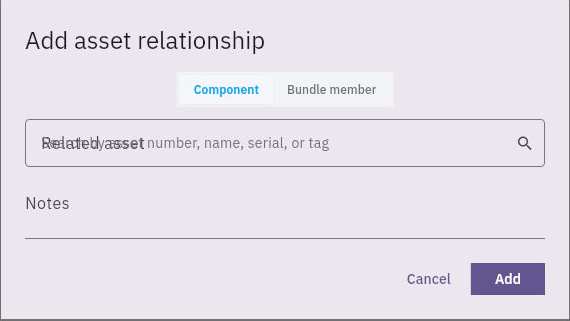
4. Open Register → the exact asset → Relationships. Check Components & bundles for the intended link. If it already exists, verify it and skip steps 5–6 rather than adding a duplicate. 5. Choose Add relationship. Select the appropriate Component or Bundle member, resolve the exact Related asset, and enter the supporting Notes. Confirm the intended relationship meaning before saving; listed accessories under Assignment are a separate view.
Check the result
6. Choose Add once, then navigate away and reopen Relationships. Check the correct two assets, relationship type and retained notes. If the displayed direction or meaning does not match the intended structure, resolve it with the asset owner before relying on the link.
Check supporting documents
7. Open Documents on the same asset. Match each entry to the required source and version. Use its open-arrow to read the complete document; a filename or tag alone does not establish its contents. 8. Confirm the intended reviewer can access the approved version. Upload & Link and Link from Vault are document entry points, not evidence that a file is already readable by others. If access is denied, ask the document owner for the supported access review rather than bypassing the restriction or widening access unnecessarily.
Check the result
The saved definition or relationship matches the intended scope, and supporting documents are readable by the right people. Keep the asset's earlier history. These changes do not by themselves move custody, complete maintenance or update financial treatment.
Continue learning
In this series: Manage asset custody — guide 13 of 15.
Turn what you learned into the way the team works.
Mark this lesson complete once the workflow exists in your workspace—not simply when you reach the bottom.