Assets course 02 — Assignments transfers and returns as custody workflows
Custody records who is accountable for an asset and what was issued with it. Request, approval, issue, acknowledgement, transfer and return are separate events. A location change or an Active asset does not establish that a person received the equipment.
Part of Assets module course
In this lesson
Custody stages and accountability
Custody records who is accountable for an asset and what was issued with it. Request, approval, issue, acknowledgement, transfer and return are separate events. A location change or an Active asset does not establish that a person received the equipment.
In this chapter
- Prepare an assignment with the full issued set
- Transfer the existing custody relationship
- Track due returns without assuming closure
- Request a return then verify inspection and review
- Receive and review the exact custody return
Prepare an assignment with the full issued set
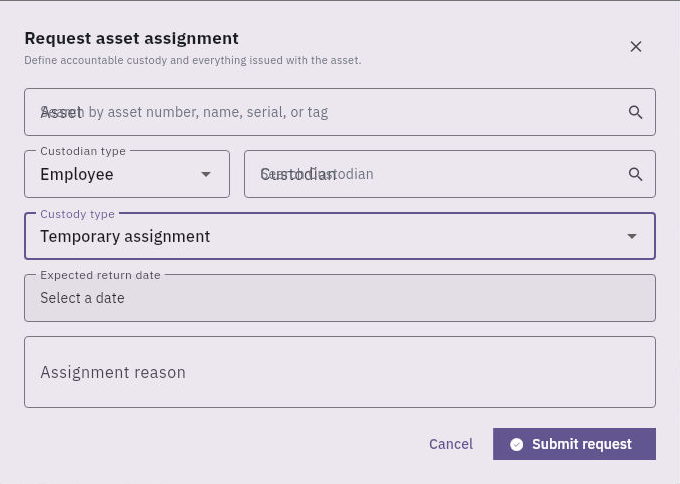
Open Assets → Custody → Assignments → Request Assignment. Request asset assignment has an Asset lookup by number, name, serial or tag; Custodian type; Custodian; Custody type; and Assignment reason. Custodian types include Employee, Department, Project and Office. Custody types include Permanent custody, Temporary assignment and Loan.
Issue transfer return and retained custody
Temporary assignment reveals an expected-return date; the request is separate from approval, issue and receipt.
Temporary assignment exposes Expected return date, a date-only calendar. Keep precise handover or return times in the approved supporting record rather than claiming the calendar stored them. Resolve the exact custodian; a name typed into search is not a selected identity. Overlapping empty labels in the source image do not mean a value is selected.
Selecting an asset can expose Issued accessories and Add accessory. The accessory dialog has Name and optional Identifier, with Cancel and Add; it does not show quantity or condition. Keep the complete count/condition ledger and verify the supported saved accessory result rather than assuming one entry means three identical items were issued.
The demonstrated assignment stages are Requested → Approved → Issued → Active. Approval permits the issue; issue records handover preparation/action; acknowledgement establishes the relevant saved receipt stage. Each needs its own actual outcome. After authorised work, reopen the exact asset's Assignment history and compare custodian, custody type, assigned date, expected return, reason and accessories.
Transfer the existing custody relationship
Custody → Transfers → New Transfer opens Request asset transfer with Asset with active custody, Destination type, Destination and Reason, ending in Request transfer. Destination types are Employee, Department, Project and Office. Match the active assignment, not merely the asset's display name.
The helper says custody changes only after destination receipt. The observed intermediate transfer nevertheless showed the old assignment Closed at Dispatch, the transfer In transit and no new recipient assignment yet in All. Preserve the actual intermediate state instead of inferring that the old custodian remains Active until receipt. The demonstrated route includes Dispatch and Confirm receipt, then a Completed transfer and separately checked new assignment. Do not claim physical movement or another person's acknowledgement from an administrator's software-only action.
After transfer, compare Assignments → All, the asset's Assignment history, Placement and current custody/operational fields independently. Activity may not expose every transition in the inspected view; absence there is not proof that no event exists elsewhere. Search before requesting another transfer.
Track due returns without assuming closure
Assignments → Overdue Returns is a filtered view alongside Active, Returned and All. No overdue rows means no matching rows in that scope/time, not that equipment is physically back. An expected return date is an obligation, not a receipt or automatic extension. No separate extension control is established in the inspected route; obtain the supported owner process for revised terms.
Request a return then verify inspection and review
Use Return on the exact active assignment. The request dialog identifies the asset and says custody remains assigned until return is inspected and reviewed. Handover notes is the entry field; Request Return creates the request. It does not yet capture condition, serviceability or store placement.
A resulting Return Requested row with Return Initiated means that stage is retained, not that inspection or final review completed. Match the current custodian rather than an older closed assignment of the same asset. A later Returned history should be compared with actual asset/serial, accessory counts, received condition, remaining issues, closure date and placement through the supported return process.
For a fictional camera issued with a bag, cable and remote, a handover of the camera and bag leaves two accessory obligations. A return request cannot erase them. Preserve the actual received set and route missing/damaged items to the responsible owner; do not mark the whole set returned to clear an overdue list. A maintenance closeout can also coexist with a pending custody return. The practical endpoint is a reconciled assignment and physical handover, not just a completed badge.
Receive and review the exact custody return
After Request Return, reopen the same Return Initiated assignment. Receive Handover records the receiving note and changes its return stage to Handed Over while the assignment remains Return Requested. Record actual identity, accessories, condition, place and time; a software-only training note does not stand in for physical receipt.
Start Inspection advances that return to Inspecting. Review Assessed condition, Serviceability and Resulting route against the evidence. The supported good-condition simulation used Good, Serviceable and Return to Available. Damage or missing-item details, Attach return evidence and Review notes preserve findings and support. Its absence of physical evidence was specific to a declared simulation, not proof that evidence is optional for all real returns or that damaged routes behave identically.
Submit Review moved that exact assignment to Returned. Verify it under Returned rather than treating disappearance from Active as success. Independently reopen the asset's Assignment history and Summary: assignment closure, operational availability, custodian, condition and financial review status are separate. A returned custody record does not approve a pending financial review.
Turn what you learned into the way the team works.
Mark this lesson complete once the workflow exists in your workspace—not simply when you reach the bottom.