Assets course 01 — Registering assets and maintaining reliable definitions
Assets follows an individually accountable resource through registration, custody, care, cover, value and end of life. A record can be Lifecycle Active, Operational In Use, Custody Assigned and Financial Review Pending at the same time. Read each dimension instead of treating one green badge as proof of every outcome.
Part of Assets module course
In this lesson
Asset identity and registration boundaries
Assets follows an individually accountable resource through registration, custody, care, cover, value and end of life. A record can be Lifecycle Active, Operational In Use, Custody Assigned and Financial Review Pending at the same time. Read each dimension instead of treating one green badge as proof of every outcome.
In this chapter
- Navigate the register and review queue
- Map identity and acquisition accurately
- Maintain supporting definitions
- Keep relationships and documents distinct
Navigate the register and review queue
Open Assets under Manage. Its sidebar has Overview, Register, Custody, Care, Cover & Compliance, Value, End of Life, Analytics and Settings. Register separates All Assets from Registration Review, with search, filters and New Asset. A pending registration is not yet an accepted asset number; the form says the number is assigned after registration review.
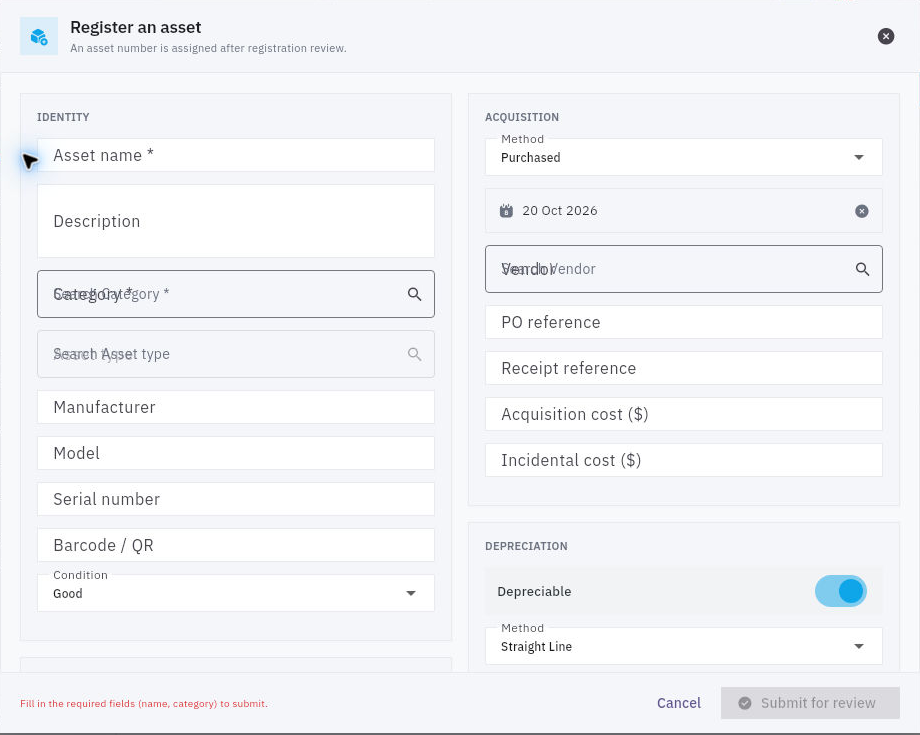
New Asset → Register an asset requires Asset name and Category, but two populated fields are not a complete reliable registration. Prepare the source identity and acquisition evidence before submitting.
Definitions duplicates and retained profile checks
Registration separates identity, acquisition and depreciation; overlapping empty selector labels are preserved from the original UI.
Map identity and acquisition accurately
Identity fields are Asset name, Description, Category, Asset type, Manufacturer, Model, Serial number, Barcode / QR and Condition. Manufacturer differs from vendor; model differs from the unique serial; an internal tag differs from both. Condition choices are New, Excellent, Good, Fair, Poor, Damaged and Unserviceable. Good can be a default, not an actual assessment.
Acquisition Method offers Purchased, Leased, Donated, Transferred, Built and Other. Compare the acquisition calendar date with the actual source; today's default is not the order or receipt date. Vendor, PO reference, Receipt reference, Acquisition cost ($) and Incidental cost ($) have distinct meanings. A typed PO reference does not attach a document or prove a validated cross-module link. No separate invoice/payment/tax control is shown in this initial form.
Placement includes Department, Location, Cost centre and Project. These describe organisation and place, not a custodian's receipt. Depreciation includes Depreciable, Method, Useful life (years) and Residual value ($). Warranty start and expiry are separate dates; do not derive them from acquisition without the source terms. Confirm module currency before entering amounts: a dollar symbol does not authorise copying a GBP source amount.
After Submit for review, find the exact pending candidate in Registration Review before considering another submission. An authorised Review & accept needs comparison of identity, source and condition. After acceptance, reopen the actual assigned asset number and its separate financial-review state; registration acceptance is not capitalization approval or payment.
Maintain supporting definitions
Settings → Asset categories → Add category has Name, Description, optional Parent category, Default useful life (years) and Depreciable. Five years and Depreciable On can be defaults. A category value does not prove an existing asset inherited or changed its life.
Asset types → Add asset type includes Category, Type name, Description, Manufacturer, Default model, Default inspection interval (days) and Default care plan. Required identifiers offers Serial number, Chassis number, Engine number, RFID, Vendor identifier, Source identifier and Other identifier. Verify actual selections and later enforcement rather than assuming a summary “1 required ID” tells you which one.
Asset locations → Add location has Name, Address, optional Parent location and Shared office reference. This is not an Inventory bin definition or custody assignment. Condition scale explains the available labels; it is a reference, not a new inspection of the resource.
Keep relationships and documents distinct
An asset's Relationships → Add relationship offers Component or Bundle member, Related asset and Notes. It does not show quantity, accessory condition or a requiredness switch. Assignment accessories are a separate record family. Do not infer physical movement or financial rollup from a relationship.
Documents exposes Upload & Link and Link from Vault. A listed file title and size do not prove its contents, approved version or reader access. If the viewer denies access, retain the exact asset/file and ask the document owner for the supported access review; do not bypass the restriction.
For a fictional camera, reconcile serial, internal tag, acquisition source and three accessories separately. A saved camera record with an accurate serial can still have pending accessory, custody and financial work. If a save is unclear, search the candidate and accepted register before creating a duplicate; if a definition is wrong, preserve affected relationships and obtain a controlled correction rather than renaming history.
Turn what you learned into the way the team works.
Mark this lesson complete once the workflow exists in your workspace—not simply when you reach the bottom.