Assets course 03 — Maintenance requests work orders and verification
Care separates the reported issue, triage decision, work scope, performed task and independent verification. Closing a work order is an administrative result; it must be supported by the actual work and must not silently close custody or financial obligations.
Part of Assets module course
In this lesson
Reported issues and work scope
Care separates the reported issue, triage decision, work scope, performed task and independent verification. Closing a work order is an administrative result; it must be supported by the actual work and must not silently close custody or financial obligations.
In this chapter
- Report the exact issue
- Triage and create the linked work order
- Plan work before recording performance
- Distinguish completion from verification
- Reconcile the remaining obligations
- Verify completion before closing the work order
Report the exact issue
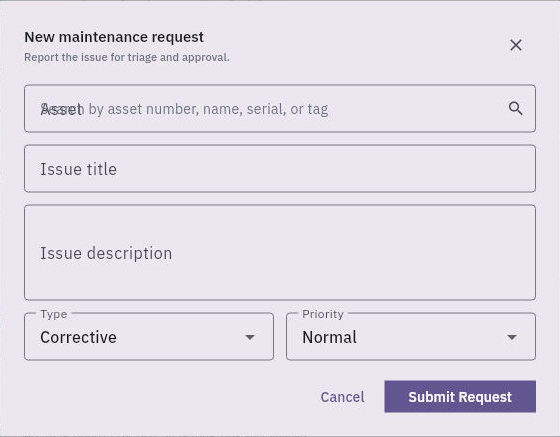
Open Assets → Care → Maintenance. Tabs are Requests, Work Orders and Schedules. New Request opens New maintenance request with Asset, Issue title, Issue description, Type and Priority. Asset search supports number, name, serial or tag.
Triage work order and verification checks
Maintenance request captures the exact asset, issue, type and priority before triage and work-order conversion.
Types are Preventive, Corrective, Scheduled, Emergency and Inspection. Priorities are Low, Normal, High and Urgent. Corrective and Normal are defaults, not triage conclusions. Describe the exact observation, time, place, affected accessories, unperformed tests and immediate restrictions. No separate date, cost, vendor, attachment or checklist field is shown in this initial form, so preserve essential facts in the description and approved supporting evidence rather than claiming an upload.
Submit Request is a change. Reopen the returned request/reference and compare its exact source and state before continuing. If the row title does not open the complete body, report that readback gap rather than assuming full text retention.
Triage and create the linked work order
The demonstrated request moves Submitted to Approved through Complete Triage, then Converted when a work order is created, and later Closed. Estimated-cost/note inputs belong to the triage stage. Do not invent a separate Approve click when the supported action is Complete Triage, or treat a default priority as permission for real work.
From an approved request, Create Work Order opens Create work order with the source request number and Scope of work. Internal exposes a Technician lookup; Vendor swaps it for a Vendor lookup. No separate date, cost or checklist field is shown in this creation dialog. Vendor selection is not proof of dispatch or authority for an external commitment.
Compare the prefilled scope with the approved task; it can carry an earlier software-only note that must not be misrepresented as a real repair. After creation, reopen the generated order and verify its request link, asset, scope and assignee.
Plan work before recording performance
Start / Resume Work opens Plan and start work. The demonstrated route adds a checklist and can include parts; Start Work moves the order from Draft to In Progress with the checklist initially incomplete. A checklist item should state a complete observable task, not simply “done.” Do not check it until the represented work has occurred.
Complete Work captures Work performed, required checklist results, Condition after work, Actual cost ($), Downtime hours, Next maintenance date and evidence where supported. Match each field to actual results. A zero cost must be supported, not copied from a training default; the currency basis needs confirmation. Technician work duration and asset downtime are different intervals, and a next-maintenance date does not prove a recurring schedule was created.
Distinguish completion from verification
The demonstrated order sequence is Draft → In Progress → Completed → Verification → Closed. Submit for Verification can produce Completed with checks complete, still before final verification and closure. The reviewer must compare scope, checklist and evidence, then use the supported verification/close actions under their authority.
After closure, independently reopen the order, linked request and asset Maintenance history. A closed order can lead to a Closed request without a separate Close Request action in the demonstrated route. Check the actual state instead of executing another closure merely to reproduce a label.
For a fictional reading task, it is legitimate to record that the supplied checklist was read and its limits explained. It is not legitimate to claim a physical equipment inspection or repair. For real equipment, use competent personnel and approved work instructions; a training course does not establish technical serviceability or safety certification.
Reconcile the remaining obligations
Suppose a technician works from 09:00 to 09:20 and an independent reviewer finishes at 09:40, with authorised service release at 09:45. Technician time is twenty minutes; downtime might run from an earlier fault report until 09:45. Do not use twenty minutes as downtime without the agreed interval. A successful work review does not prove an outstanding accessory was returned or a financial movement posted.
If the work scope changes, a part/vendor/cost becomes necessary or a hazard is found, stop at that boundary and obtain the responsible decision. If saving or closing is unclear, reopen the exact reference and current state before retrying. Preserve the original fault and failed tests alongside later successful results rather than rewriting the history to look continuously ready.
Verify completion before closing the work order
The supported final actions are Verify Completion, which moves the work order to Verification, followed by Close Work Order, which moves it to Closed. Read the exact work order and its completion evidence at each stage. These are separate decisions, not interchangeable labels for recording repair work. Reopen the same reference after an authorised action; a closed record does not by itself establish an independently observed physical repair.
Turn what you learned into the way the team works.
Mark this lesson complete once the workflow exists in your workspace—not simply when you reach the bottom.