Create a maintenance request and linked work order
Describe the observed issue, complete triage and convert the approved request into a clear work scope.
Part of Issue, return and maintain an asset
In this lesson
Create a maintenance request and linked work order
Start with the exact asset and observed problem. Separate symptoms from diagnosis, and keep the requested result and any operating restriction clear.
Submit and triage the request
1. Open Assets → Care → Maintenance → Requests. Search for the same asset and issue. If the request already exists, continue from its current stage instead of submitting another. 2. For a new issue, select New Request. Choose the asset and enter Issue title and Issue description. Include what was observed, when/where, relevant return or incident references and the required checks. 3. Choose the appropriate Type and Priority, review the record and select Submit Request. Reopen Requests and identify the saved reference and state. 4. On a Submitted request, use Triage Request as the responsible reviewer. Record a supported estimated cost and triage note, then select Complete Triage. Check the resulting state before conversion. If already triaged, inspect the existing decision rather than repeating it.
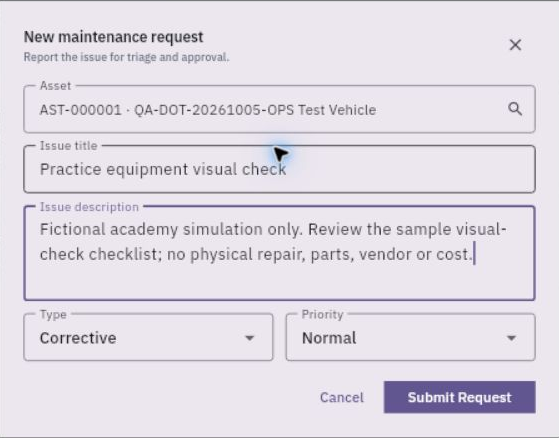
Check the result
Prepare the work order
5. On the exact Approved request, select Create Work Order. If it is already Converted, find its existing linked order, skip steps 6–7 and check its scope and handoff at step 8 instead. 6. Review Scope of work. Replace a title-only summary with the actual task, limits and completion criteria. For an internal job, choose Internal and the correct Technician. 7. Select Create Work Order once. Reopen Requests and Work Orders to check the request/order references, asset, scope and technician. A converted request is not completed work. 8. Give the technician the full uncompleted checklist, supporting sources and agreed limits. For a newly prepared order, keep it Draft until work is ready to start; do not use Start Work merely to save a preparation checklist. When reusing an order, preserve its legitimate current stage rather than resetting it.
Expected result: a traceable request and linked Draft work order with enough information to execute and review the job.
Tips: A technician name on the order does not establish their access or acceptance. Verify any vendor, budget or external-work requirement through your maintenance process. If conversion feedback is unclear, inspect both record lists before creating another order.
Continue learning
In this series: Manage asset custody — guide 7 of 15.
Turn what you learned into the way the team works.
Mark this lesson complete once the workflow exists in your workspace—not simply when you reach the bottom.