Transport course 02 — Delivery requests packages and capacity
A delivery request describes what must move and where; a trip describes the journey that will carry it. Prepare the source and the packed load before allocating either resources or timing. Package counts must not be confused with stock quantities.
Part of Transport module course
In this lesson
Movement source and packed load
A delivery request describes what must move and where; a trip describes the journey that will carry it. Prepare the source and the packed load before allocating either resources or timing. Package counts must not be confused with stock quantities.
In this chapter
- Choose the source before entering a delivery
- Explain every load field
- Calculate a load without confusing its units
- Read the saved request before assignment
Choose the source before entering a delivery
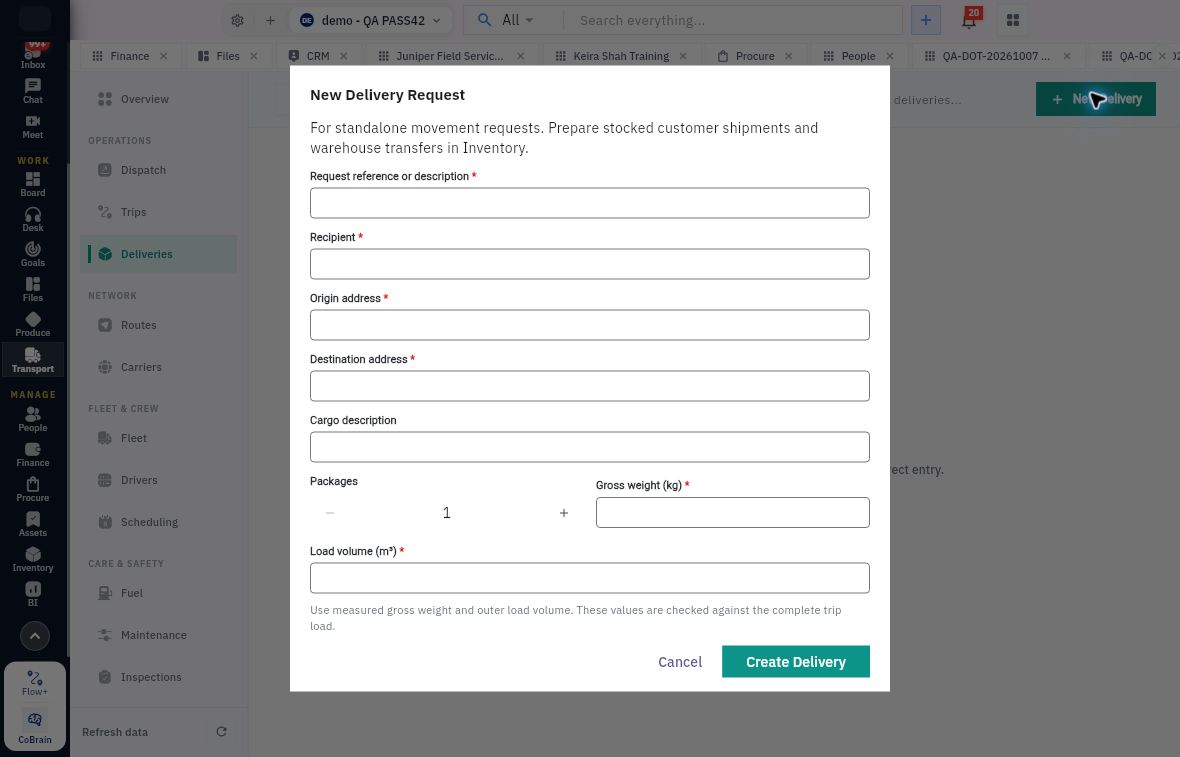
Open Transport → Deliveries and search by exact request or delivery reference. New Delivery opens New Delivery Request, explicitly for standalone movement requests. Stocked customer shipments and warehouse transfers must be prepared in Inventory. A free-text request that mentions a stocked item does not create its stock issue, reservation, lot allocation or transfer.
A delivery can show a source module and linked source reference. Follow that relationship when reconciling the intended movement. A source label such as Fulfilment Request on a standalone simulation does not transform it into an Inventory shipment.
Explain every load field
Package units capacity and source fulfilment
New Delivery Request is for standalone movements; packed gross weight and outer volume describe different capacity constraints.
| Field | Meaning and check |
|---|---|
| Request reference or description | Required business identity; choose a traceable request, not just a vague cargo label. |
| Recipient | Required intended receiving party; confirm who can accept the movement. |
| Origin address / Destination address | Required collection and delivery locations; do not infer them from a route name. |
| Cargo description | Optional context; does not establish an Inventory item or lot. |
| Packages | Handling-unit count, initially 1; verify the actual count. |
| Gross weight (kg) | Required complete packed weight, including packaging. |
| Load volume (m³) | Required outer packed volume, not the product's unpacked volume. |
The helper says measured gross weight and outer volume are checked against the complete trip load. This does not mean that merely typing a load is a successful allocation. Create Delivery saves a request; Cancel leaves the form unsaved. After an authorised creation, reopen the actual returned reference and compare all fields rather than relying on the dialog closing.
Calculate a load without confusing its units
For a fictional example, four crates weighing seven kilograms each total 28 kg. At 0.04 m³ each, their total outer volume is 0.16 m³. A vehicle with approved limits of 35 kg and 0.20 m³ meets both numerical limits; one limited to 25 kg and 0.30 m³ fails weight even though volume fits. This arithmetic does not establish restraint, compatibility, safe handling or physical readiness.
Convert packed dimensions to metres before multiplying length × width × height. Count the whole trip load, not just the new request. Distinguish gross from net weight and package units from item units. If two cartons contain twelve items each, Packages is two while the stock quantity may be twenty-four in the item's unit. Do not substitute one for the other.
If actual measurements are missing, obtain them before operational allocation. Classroom figures must be labelled hypothetical; they must not be represented as measurements of real cargo.
Read the saved request before assignment
The provided software-only example DLV-001 used one hypothetical package, 1 kg and 0.01 m³, with SIMULATION ONLY recipient and endpoints. Its initial Assignment & Package view showed Pending with Trip, Vehicle, Driver and Carrier all Unassigned. Proof & Exception and Activity hold different parts of the later history.
Record load measurements, Schedule and Assign Trip are visible actions, not facts that the corresponding work has occurred. Compare the saved package count and measurements when reopening after assignment; joining a trip must not silently change the business description.
Keep partial acceptance information at the correct level. If a recipient accepts three of four cartons, record which carton and its item/lot quantities were refused in the approved process. Do not mark the entire load successful to make a trip close or assume the standalone form supplies an unobserved partial-unit split feature. Where native handling is unclear, retain the exact facts and request the appropriate operational decision before changing outcomes.
Turn what you learned into the way the team works.
Mark this lesson complete once the workflow exists in your workspace—not simply when you reach the bottom.