Transport course 01 — Fleet drivers carriers and operational readiness
Transport coordinates resources and journeys; it does not replace Inventory stock preparation, People employee identities, Assets ownership or Finance accounting. Begin with the exact vehicle, driver and delivery references rather than matching similar display names.
Part of Transport module course
In this lesson
Transport resources and readiness boundaries
Transport coordinates resources and journeys; it does not replace Inventory stock preparation, People employee identities, Assets ownership or Finance accounting. Begin with the exact vehicle, driver and delivery references rather than matching similar display names.
In this chapter
- Find the right workspace
- Register the right kind of vehicle
- Link the driver and check the licence separately
- Read and prepare maintenance, inspection and fuel records
- Understand readiness settings and carriers
Find the right workspace
Open Transport. Overview and Dispatch support operational orientation; Trips and Deliveries hold journeys and movement outcomes. Routes and Carriers describe the network. Fleet, Drivers and Scheduling concern resources. Maintenance, Inspections, Fuel, Incidents, Expenses, Reports and Settings provide the related controls and readbacks. A count on an overview is a starting point: open its underlying record before making a resource commitment.
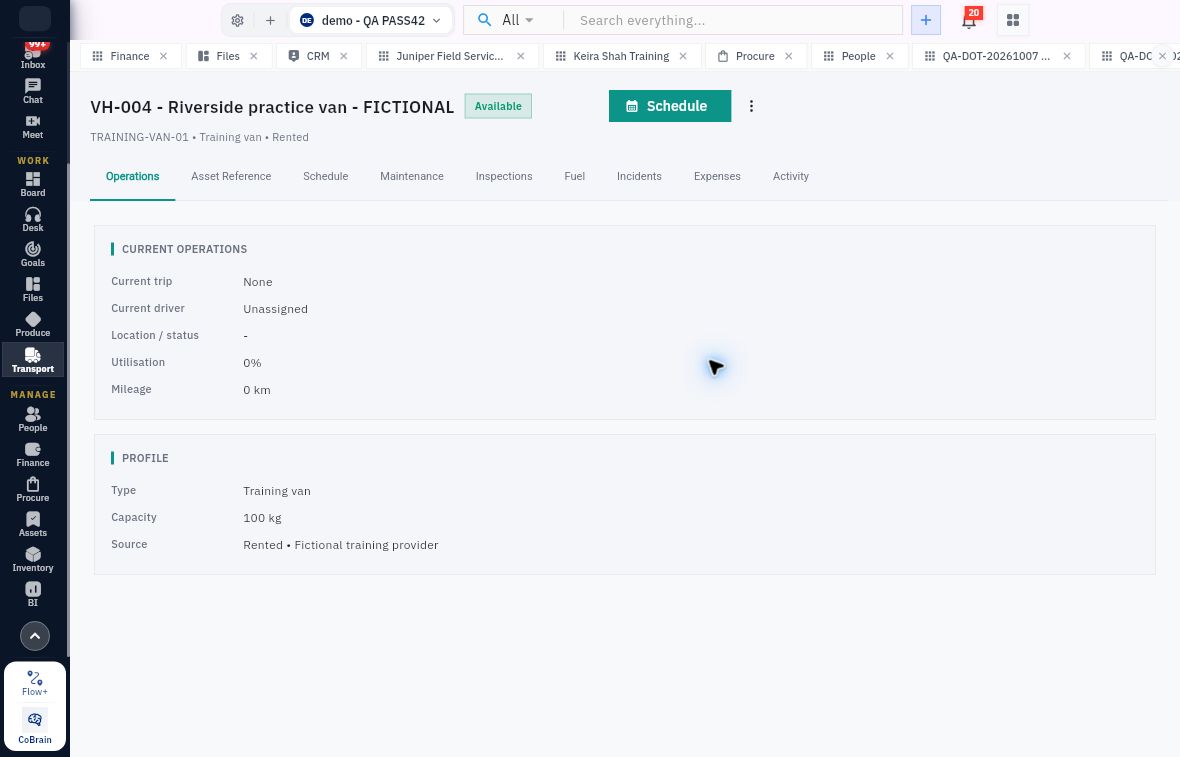
In Fleet, identify the registration as well as the vehicle reference. The vehicle's Operations page separates current trip, current driver, location/status, utilisation and mileage from its Profile. Schedule, Maintenance, Inspections, Fuel, Incidents, Expenses and Activity are distinct related views. An empty maintenance list is not a performed check.
Drivers carriers and operational checks
A fictional external vehicle: current trip and driver are separate from its profile, capacity and related readiness records.
Register the right kind of vehicle
Fleet → Add External Vehicle creates a Transport-only resource, not an owned Asset. The form's Vehicle and Registration establish identity; Source describes its origin, such as Rented; Type describes the vehicle; Capacity (kg) is a weight limit, not volume. Provider identifies the supplying party without booking or contacting them.
Review Contract reference, Contract start and Contract end against an actual agreement. A prefilled start date must not accidentally imply a rental agreement. The pictured fictional fixture deliberately left contract information blank. Add Vehicle saves the resource; reopen it through Fleet and compare name, registration, source, provider, type and capacity. If the save is uncertain, search before adding again.
Available and unassigned means what those fields say. It does not establish a passed inspection, physical readiness, a driver booking or an adequate load limit in every dimension.
Link the driver and check the licence separately
Drivers → Add Driver includes Driver type. The Internal Employee branch selects an existing People employee rather than creating another employee identity. Review Licence number, Licence class, Licence expiry and Phone. Do not use a training placeholder as an operational credential. A blank expiry displayed as Expiry not recorded is neither proof of validity nor a finding that the licence expired.
Read the saved driver's Profile, Licence & Availability, Assignments, Performance and Activity. Scheduling offers Add shift, Search bookings, Status, Order, Date range and Refresh bookings. No rows under one date/status filter does not mean unrestricted availability. Check the intended interval and current assignment on both driver and vehicle before allocating them.
Read and prepare maintenance, inspection and fuel records
Maintenance → Schedule Service opens Schedule Operational Maintenance. Select Vehicle and required Service. Mileage due (km) and Due date describe alternative due milestones: service is due when either is reached. Optional Service provider, Finance expense and Notes add operational and accounting context. A scheduled service is not completed maintenance.
Inspections → New Inspection selects Vehicle, Inspection type (initially Pre-trip Inspection), required Scheduled date, Scheduled time and optional Driver. Schedule Inspection creates the scheduled record, not a passed result. The Settings checklist is copied to the inspection; later checklist edits do not rewrite its history. A failed inspection makes the vehicle unavailable, so review the actual result before departure.
Fuel → New Fuel Record includes Vehicle, required Date, Odometer (km), Quantity (L), Quantity unit, Unit cost per L and Station. Time, Fuel type (initially Diesel) and optional Driver supply context. Select the vehicle before any optional trip and verify its configured currency. Odometer is a cumulative reading; quantity and unit cost must use the same displayed unit. A fuel entry is not a Finance payment.
Understand readiness settings and carriers
Settings includes inspection checklist entries such as Brakes, Tyres, Lights, Engine, Fluids, Safety equipment and Body condition, plus inspection validity. The source specimen uses 24 hours, Require passed inspection before departure off and Require proof of delivery on. These are sample configuration values, not recommendations. A switch being off does not make an unsafe vehicle ready; changing it is an administrative decision, not a dispatch workaround.
Carriers → Onboard Carrier requires Carrier name and Service type (initially Courier). Contact person, Contact phone and Email identify its contact. An optional Procure supplier link relates the carrier to supplier governance; it does not approve that supplier. Optional Initial agreement fields are Contract reference, Rate terms, Contract start, Contract end and Notes. Entered agreement information saves as a draft with the carrier. Review the carrier's Contracts tab before assuming activation or charges; onboarding alone establishes neither.
For a readiness readback, state the exact vehicle and driver, relevant interval, capacity basis, licence evidence, inspection result and any due maintenance. If one is missing, retain the planned record and resolve that gap with its owner instead of changing a status merely to proceed.
Turn what you learned into the way the team works.
Mark this lesson complete once the workflow exists in your workspace—not simply when you reach the bottom.