Produce course 04 — Output final quality holds and controlled rework
Operation throughput, good output recorded, finally accepted quantity and currently eligible finished stock can differ. Follow each output to its final inspection and Inventory lot before promising supply.
Part of Produce module course
In this lesson
Output identity and quality states
Operation throughput, good output recorded, finally accepted quantity and currently eligible finished stock can differ. Follow each output to its final inspection and Inventory lot before promising supply.
In this chapter
- Keep output entry attached to the exact order
- Read Final quality before selecting an outcome
- Choose a supported disposition
- Reconcile accepted stock with putaway
- Recover without losing the source history
- Reconcile order genealogy with output and quality
Keep output entry attached to the exact order
Before an authorised output action, inspect its Good, Scrap, Rejected, warehouse and lot fields and establish whether quantities are incremental or cumulative. Match the remaining order quantity and actual production evidence. A completed operation or worksheet total is not enough to invent output.
After saving, reopen the exact order and output history before any retry. Preserve the output lot and destination alongside the order reference. Inventory quality and Produce final inspection can have different identifiers; follow supported links and independently match their destinations rather than assuming similar numbering means the same record.
Read Final quality before selecting an outcome
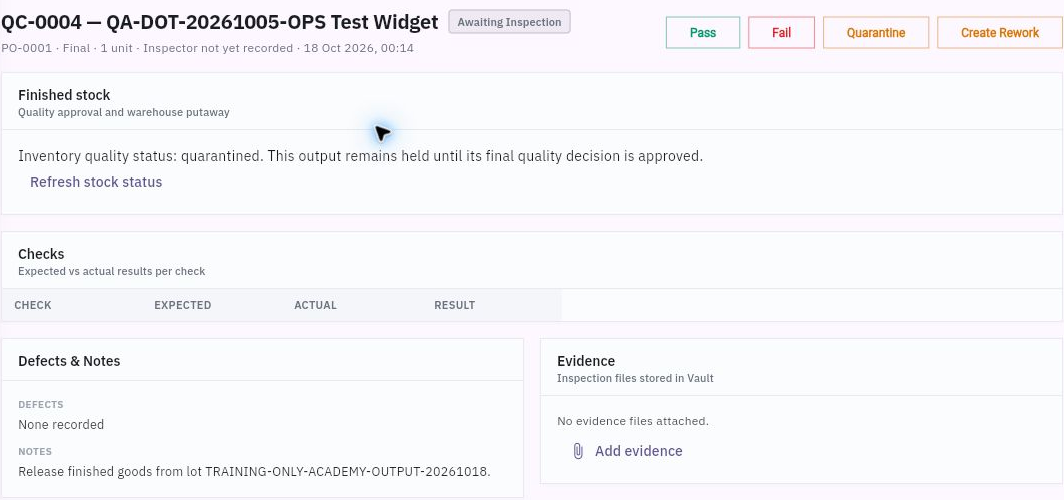
Open Produce → Quality → Final. Match inspection reference, production order, product, stage and quantity. A card can show Awaiting Inspection, inspector Unassigned and one unit while stock remains quarantined.
Quality decisions holds and rework evidence
Final inspection with an awaiting state, quarantined stock, blank check rows and separate outcome actions.
The detail separates Finished stock, Checks with Check/Expected/Actual/Result columns, Defects & Notes and Evidence. Refresh stock status refreshes the display; it is not a release. Blank check rows and “None recorded” defects do not establish a pass. A note saying “Release finished goods” is not an approved decision when the state remains Awaiting Inspection.
Read complete approved criteria and actual observations for the exact output. An earlier In Process pass does not replace the Final check. Add evidence needs the actual permitted source; a visible filename is not proof its contents were read or that a new attachment succeeded.
Choose a supported disposition
The inspection exposes Pass, Fail, Quarantine and Create Rework. Each is consequential. Establish the responsible inspector, exact quantity, criteria and observations before selecting an outcome. Do not release a held lot merely because another demand is short.
Create Rework shows the source inspection and quantity, Defect or hold reason, Rework instructions, Cancel and Confirm outcome. The first field explains the precise defect; the second describes the bounded authorised correction. The inspected form does not show separate quantity, warehouse, replacement-material or new-inspection fields and does not establish which linked records confirmation creates.
A fictional unreadable outer lot mark might be corrected only when the exact original identity is preserved and the owner authorises that narrow work. It is not permission to relabel an unknown unit, open a sealed product or fabricate an earlier pass. Preserve the failed observation, correction, later check and decision as separate events.
Reconcile accepted stock with putaway
After an authorised disposition, inspect the exact Inventory lot, quantity and quality state, then the supported putaway task and destination. Passing quality does not create a second receipt; putaway moves the accepted quantity rather than producing another output. A separate subcontract receipt or unrelated transfer cannot prove this lot's final release.
For a fictional eight attempted sets, seven good candidates are recorded. Six pass final inspection and one remains held; the eighth attempt was scrapped before receipt. Process good-output yield is 7/8, first-pass final acceptance is 6/7, and accepted-new-output yield is 6/8. State the denominator. The held one and unreceived scrap do not count as eligible finished stock.
Recover without losing the source history
If a quality or rework save is unclear, reopen the original inspection and any generated related record before another action. Check source linkage, state, quantity and Inventory effect. A negative output, stock adjustment, new BOM or fresh pass is not a generic undo button.
If the complete criteria, evidence or supported correction route is missing, keep the lot held and ask the responsible owner for that exact next step. You can explain the recorded output and remaining obligation accurately without claiming a final release. The completion policy can keep the production order open while final inspections are open or failed; changing that policy is not a valid way to finish the exercise.
Reconcile order genealogy with output and quality
Open Production Orders → the exact order and read Genealogy, Output and Quality together. The completion helper requires the remaining quantity of good output; scrap and rejected quantities do not fulfil the target. For the source example, planned five, produced one and remaining four are distinct from a completed five-unit operation.
Genealogy traces good quantity, scrap and the output lot, and makes missing component consumption important. Its one good unit and zero scrap with no recorded component consumption is an unreconciled chain, not permission to invent consumption. Output supplies its recorded quantity and timestamp; Quality distinguishes the separate in-process inspection from the final inspection of that output lot. A Passed in-process population does not release the one-unit final lot still Awaiting Inspection. Follow the exact lot into Inventory for its quarantine, final-quality and putaway gates.
Turn what you learned into the way the team works.
Mark this lesson complete once the workflow exists in your workspace—not simply when you reach the bottom.