Produce course 06 — Production costing reports and controlled closeout
Production costing and reports help explain recorded work, but their scopes differ from stock eligibility and Finance accounting. Complete a job only after its materials, operations, output, final quality and remaining obligations are reconciled.
Part of Produce module course
In this lesson
Costing scope and recorded production
Production costing and reports help explain recorded work, but their scopes differ from stock eligibility and Finance accounting. Complete a job only after its materials, operations, output, final quality and remaining obligations are reconciled.
In this chapter
- Read the Costing views on their own basis
- Preserve the assumptions behind a calculation
- Read the report's population before its number
- Check Settings without claiming execution
- Reconcile a complete endpoint
Read the Costing views on their own basis
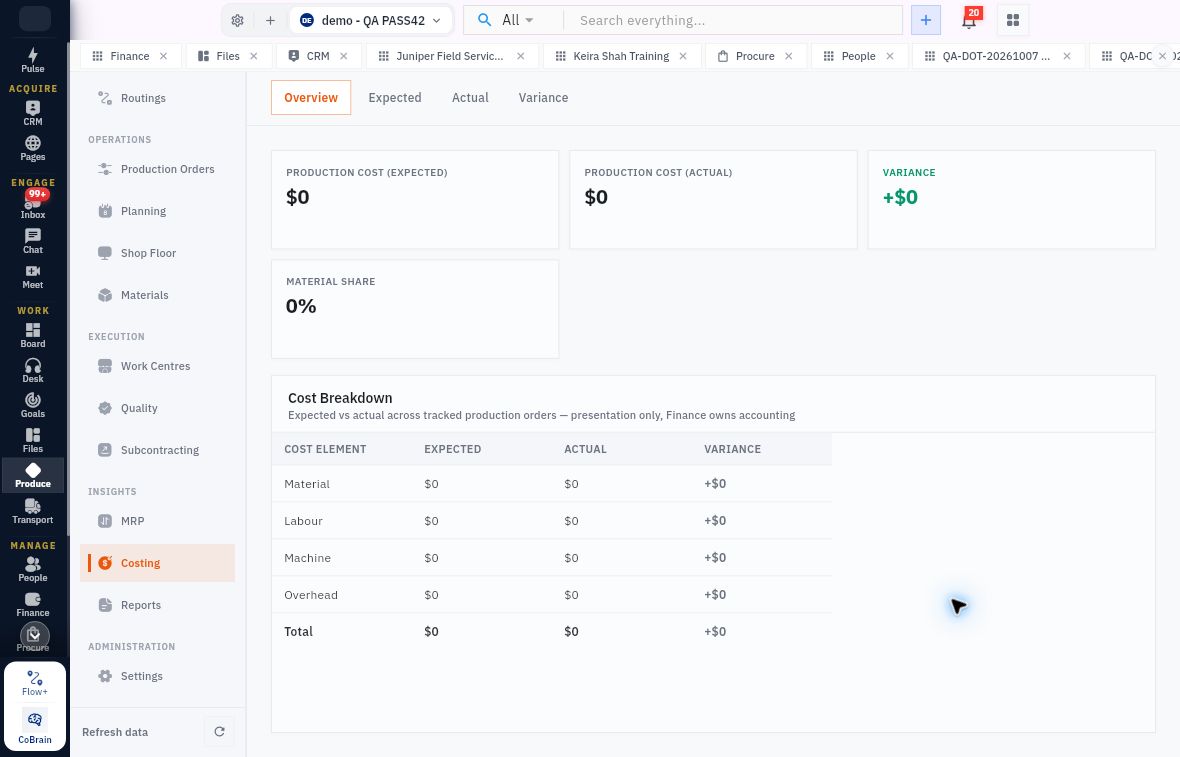
Open Produce → Costing. Tabs are Overview, Expected, Actual and Variance. Overview shows expected production cost, actual cost, variance and material share. Its breakdown separates Material, Labour, Machine, Overhead and Total.
Cost reports and production closeout
Costing Overview distinguishes expected and actual presentation values and explicitly leaves accounting ownership with Finance.
The helper describes expected versus actual across tracked production orders as presentation only, with Finance owning accounting. A dollar symbol alone does not establish an ISO currency. Do not compare it directly with a differently denominated teaching calculation.
Expected and Actual each use Cost by Order with Order, Product, Material, Labour, Machine, Overhead and Total. Variance has Order, Expected, Actual, Variance and Explanation. Empty order tables are not fully costed zero-value jobs. A zero aggregate and an empty report are different observations.
Preserve the assumptions behind a calculation
For a fictional job, use the approved material quantity/cost basis and actual labour or machine time/rates, with separately stated overhead. Expected cost uses the plan; actual cost needs performed and supported inputs. Do not copy planned time into actuals or assume an operator's hourly costing rate is their wage or a payroll instruction.
Explain variance on comparable scope. Extra material loss, rework time, held output and unused returns should remain visible. Dividing total cost by ten planned units when only six eligible units exist answers a different question from cost per accepted output. State which denominator you use and why; neither calculation creates a Finance journal.
Read the report's population before its number
Reports → Production Performance can report recorded good output over a stated recent period. That series is not proof of current available stock, final acceptance or delivery. Match the order/output and later quality/Inventory chain for those conclusions.
OEE can be unavailable when scheduled equipment time and first-pass good/rejected quantities are not linked to operations. Order totals are not a reliable substitute. Keep the metric unavailable rather than filling it with a simple quality percentage or manufacturing a downtime denominator.
Manufacturing Cost can show No data even while Costing Overview displays zero. Work in Progress describes remaining unreceived production supply in the inspected report. Those quantities are not material custody balances or monetary WIP valuation. The helper says received-output losses require separate replacement production; do not reopen planned supply mathematically without the supported replacement decision.
Check Settings without claiming execution
Settings shows standard cost basis as a rolling average of the last five completed orders and a default shift-hour value. These settings do not prove a particular order recalculated cost, had a staffed shift or completed. Auto-reserve, backflush and final-quality gates also need transaction-specific readbacks.
A job can remain Planned with zero produced, Pending operations and a material shortage despite favourable aggregate capacity. Reopen the exact order before proposing completion, not just the dashboard. Check required/reserved/issued/consumed quantities, operation progress, output history and final inspection state separately.
Reconcile a complete endpoint
A practical closeout should name the exact product, BOM and route versions, order and demand; reconcile material issue/use/loss/unused return; compare operation quantities and times; identify each output lot and final decision; verify accepted destination stock; and preserve subcontract or customer handoff obligations. Cost and Finance evidence are separate checks.
For a fictional eight-attempt job with seven good outputs, six final passes and one held candidate, the job is not proven complete by the seven good-output count. A customer needing eight still has a gap even if the operation card says eight completed. Release-to-current-cutoff elapsed time is the age of an open job, not completed lead time.
If a result is missing, retain the exact remaining obligation and owner. Do not close an order to improve a report, adjust stock to match a forecast, or invent cost entries to remove an empty table. After an authorised closeout, independently reopen the same order, material/Inventory trail and any actual Finance consequence. Completion is the reconciled outcome, not the final button alone.
Turn what you learned into the way the team works.
Mark this lesson complete once the workflow exists in your workspace—not simply when you reach the bottom.