Produce course 02 — Material planning production orders and release readiness
Planning asks how much must be produced and whether exact material and resource prerequisites exist. A material analysis, a planned order and a released job are different outcomes. Read the planning source before applying arithmetic.
Part of Produce module course
In this lesson
Planning demand and release prerequisites
Planning asks how much must be produced and whether exact material and resource prerequisites exist. A material analysis, a planned order and a released job are different outcomes. Read the planning source before applying arithmetic.
In this chapter
- Choose the correct MRP source
- Separate saved shortages from current procurement context
- Use Planning's four views deliberately
- Prepare the exact production order
- Release only when the prerequisites are real
Choose the correct MRP source
Open Produce → MRP → Requirements. Locate a saved analysis by reference and exact product; a user-entered planning title mentioning kits does not override a Widget product/SKU. Preserve the original snapshot and required date separately from current supply.
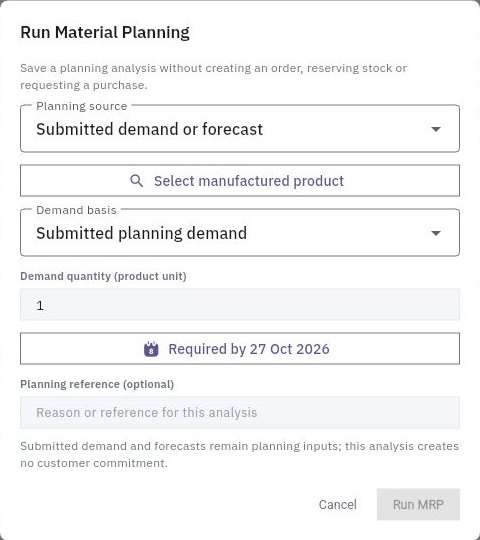
Run MRP opens Run Material Planning. For Submitted demand or forecast, fields include manufactured product, Demand basis, Demand quantity (product unit), Required by and optional Planning reference. The helper says saving an analysis does not create an order, reserve stock or request a purchase.
Orders reservations and controlled release
Run Material Planning separates a submitted-demand analysis from order creation, reservations and purchasing.
Existing production order is an alternative planning source. Its selector requires the exact saved order; the helper uses that order's saved materials, issued quantities and own reservations. It does not replace them with a newer BOM or deduct finished goods as a new demand analysis would. Keep these calculation modes distinct.
For fictional demand of twelve and two eligible finished units, the new production requirement is ten under that stated basis. If each new set needs two cards, gross cards needed are twenty before the relevant component supply calculation. Held finished goods and stock reserved for another demand are not eligible just because they are physically present.
Separate saved shortages from current procurement context
Material Shortages can show saved required/short quantities alongside current eligible stock, dated receipts and To Procure. Equal numbers do not make them the same cutoff. Request Procurement is a consequential action, not a way to inspect a short line.
Procurement Requirements preserves its own product/component, quantity, due date, destination and linked Procure request. Handed to Procure does not establish a supplier order or receipt. Match the exact component: another SKU's incoming supply cannot close this job's shortage.
Use Planning's four views deliberately
Planning → Demand concerns confirmed Inventory customer-demand lines and eligible finished stock. A submitted forecast reference does not create a customer line there. Material Availability compares open-order requirements and shows required, available, reserved, incoming, shortage and coverage. Capacity compares planned load and nominal availability. Production Plan shows the planned orders and dates.
Rounded capacity hours and a whole-percent utilisation should not be recomputed from already rounded values as if they were precise inputs. Four nominal hours/day with a small queue is not a staffed conflict-free interval. Verify the actual calendar, operator availability, assets and sequence, including transfer time between operations.
Prepare the exact production order
The order form contains Select manufactured product, Effective BOM, Routing, Quantity, Priority, Planned Start, Planned Completion, optional Demand source and Notes. Use default effective BOM and Use inherited routing are options, not proof that the intended version was selected.
In the demonstrated form, changing dates reset the BOM selection and choosing the BOM reset routing. Recheck both versions after the final edit. Date controls are not staffed clock-time appointments. A blank Demand source and a default demand-class label do not create a linked customer request.
Create Order produces the draft preparation; Plan is a separate action. Reopen the exact generated order and compare product, versions, quantity, dates, operations and materials. Planned five, produced zero, Pending operations and zero issued material is a valid incomplete state, not execution.
Release only when the prerequisites are real
Before Release, independently inspect exact component stock and incoming supply, required reservations/issue route, approved instructions, quality plan and resource readiness. A planned job requiring ten components with available zero remains short even if the centre is Idle. Do not create an opening balance, substitute another component or schedule a count to manufacture supply.
If a selector or permission blocks release, keep that precise dependency open. After an authorised release, reopen the same order and Inventory/material records to establish actual reservation and state effects rather than assuming a settings switch performed them. A timeout needs reconciliation before another release or issue action.
Turn what you learned into the way the team works.
Mark this lesson complete once the workflow exists in your workspace—not simply when you reach the bottom.