Procure course 01 — Purchasing navigation policies and budget controls
Procure follows a purchase from need through supplier selection, order, receiving and financial reconciliation. The same supplier can appear in many unrelated purchases. Follow exact request, order and receipt references rather than joining records by a familiar name.
Part of Procure module course
In this lesson
Purchasing records and control boundaries
Procure follows a purchase from need through supplier selection, order, receiving and financial reconciliation. The same supplier can appear in many unrelated purchases. Follow exact request, order and receipt references rather than joining records by a familiar name.
In this chapter
- Find the correct record family
- Understand settings before changing behaviour
- Prepare categories and policy scope
- Read the approval route
- Reconcile budget stages
Find the correct record family
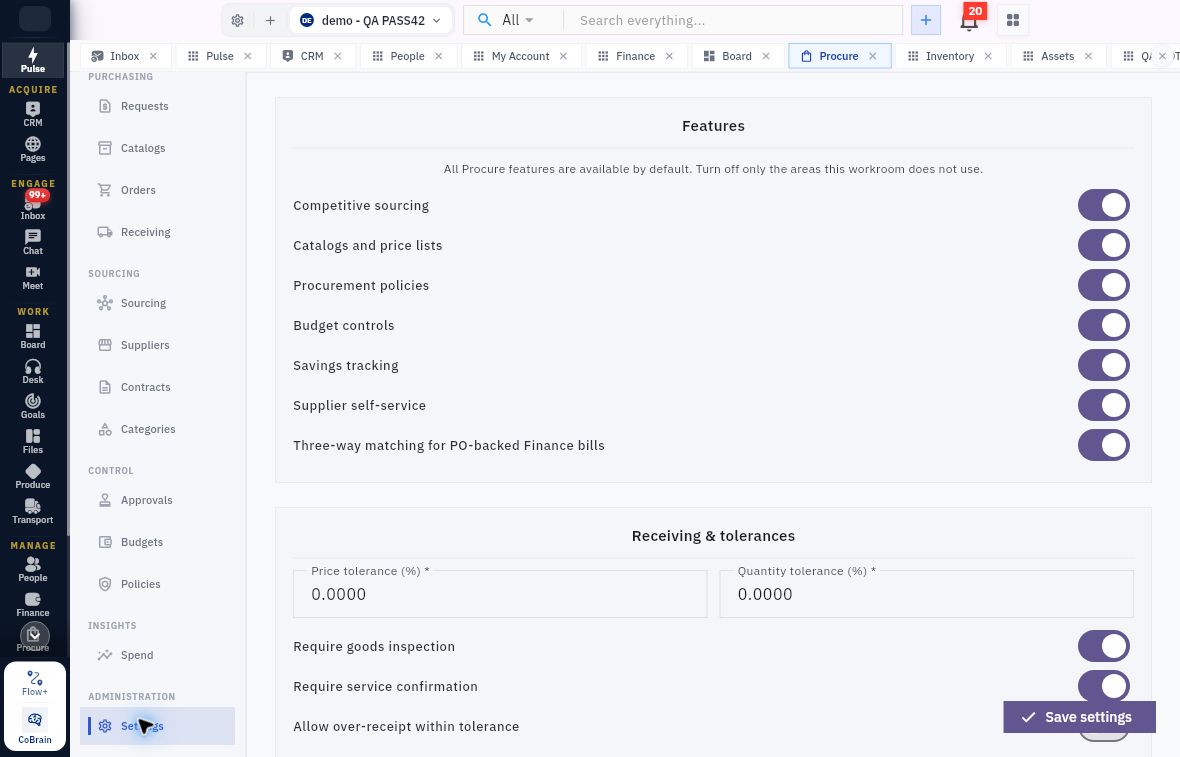
The sidebar groups Requests, Catalogs, Orders and Receiving under Purchasing; Sourcing, Suppliers, Contracts and Categories under Sourcing; Approvals, Budgets and Policies under Control; Spend under Insights; and Settings under Administration. A request expresses the need. An order states the authorised purchase. A receipt records delivery, while acceptance records the quality decision. Finance holds the bill, payable and payment.
Policy tolerances and budget workflow
Procure sidebar and Settings showing feature switches, tolerances and receiving requirements.
Understand settings before changing behaviour
Settings exposes Competitive sourcing, Catalogs and price lists, Procurement policies, Budget controls, Savings tracking, Supplier self-service and Three-way matching for PO-backed Finance bills. A switch makes an area available or configures behaviour; it does not prove that a specific supplier, transaction or workflow meets the business's requirements.
Receiving & tolerances includes Price tolerance (%), Quantity tolerance (%), Require goods inspection, Require service confirmation and Allow over-receipt within tolerance. Read percentage values in their intended scope. A zero tolerance is not permission to accept an unexplained difference, and an enabled over-receipt option is not business approval to buy more. Configuration changes can affect later work, so use the approved owner and verify the saved setting and a permitted representative outcome separately.
Prepare categories and policy scope
In Categories → Categories → New Category, Category code and Category name are required. Compare existing code, name and parent before adding a duplicate. An optional Accounting code is described as a Finance mapping; entering text is not proof that an account exists or that later postings use it. Agree the mapping with Finance and check the supported relationship.
Policies separates Purchase Rules, Approval Rules, Supplier Rules and Receiving Rules. A rule is more than its title: check code, category/amount/currency scope, dates, active state and the actual requirement. Approval rules can require approval within scope; supplier rules can require eligible qualification; receiving rules can require inspection before acceptance. Do not assume a saved rule applies to every record or that opening the form proves enforcement.
The category form also has Category owner, Competitive sourcing threshold and Active. Owner can start Unassigned, threshold at zero and Active On. Confirm the eligible owner and intended state. Threshold accepts an exact amount up to four decimal places, but its currency basis and enforcement need verification; do not infer precedence over a separate policy or inheritance from a parent category.
Policy forms share Rule code, Rule name, category scope, optional Minimum amount and Maximum amount, Currency, Effective from, optional end date, Priority and Active. The amount boundaries are inclusive. Priority can default to 100 and Active On; the truncated priority helper does not establish a tie-break algorithm. Resolve overlaps and category scope before activation.
Purchase Rules' Rule type offers Competition and Contract. Competition adds Minimum supplier quotes, Allowed sourcing methods, an exception requirement for direct/sole-source buying and an exception requirement for late responses. The quote-count helper requires at least one; a default three is not your policy. Method choices include Rfi, Rfq, Rfp, Tender, Reverse Auction, Direct and Sole Source. Check actual selected choices. Contract adds Require a contract within this scope. A form's visible controls do not prove the rule has been saved or exercised.
Read the approval route
Approvals has My Queue, Submitted, All Approvals, Delegations and Workflows. An empty My Queue says nothing about another approver's work. Open the exact source reference before deciding. Request approval and order approval are distinct decisions, and an approved order still needs a separate issuance outcome.
New workflow contains Workflow name, Record type, Purpose, Minimum amount, Maximum amount, Currency and Request source. Empty amount bounds apply to every value according to the helper. No harmless inactive-draft switch is shown in this form, so do not create a workflow merely to inspect it. An empty custom-workflow list can still use default routing; verify the actual eligible reviewer for the intended case.
New delegation contains Delegate to, Approval scope, Starts and Ends. Its helper limits the delegate to approvals already assigned to you during that period. Check the actual member, scope and dates; delegation is not a general grant of purchasing authority.
Reconcile budget stages
Budgets has Availability, Commitments and Exceptions. Availability shows department/account, budget reference and dates alongside Budget, Requested, Reserved, Committed, Actual and Available. These describe different stages and may overlap. Do not add them all together as if they were independent spending.
In a fictional isolated budget of 100, an authorised commitment of 30 would leave 70 only if that budget's calculation treats the commitment that way and no other obligations apply. A request estimate of 30 alone is not proof of that commitment. Follow the exact request and budget allocation, inspect the resulting commitment and later Finance consequence, and explain any exception instead of changing the budget to hide it.
If a list fails to load, distinguish connection failure from a genuine empty register. If an approval save is unclear, reopen the exact source and queue before deciding again. A second click is not a safe substitute for a retained-result check.
Turn what you learned into the way the team works.
Mark this lesson complete once the workflow exists in your workspace—not simply when you reach the bottom.