Inventory course 01 — Items units tracking and activation
Inventory records what an item is, where quantities are held, which quantities are eligible and how movements change them. Start with the exact SKU and stock unit. A similarly named finished kit is not its component, and a definition is not a stock balance.
Part of Inventory module course
In this lesson
Inventory identity and stock-unit decisions
Inventory records what an item is, where quantities are held, which quantities are eligible and how movements change them. Start with the exact SKU and stock unit. A similarly named finished kit is not its component, and a definition is not a stock balance.
In this chapter
- Find the item and its separate views
- Define units before quantities
- Choose tracking and expiry deliberately
- Complete planning and cost inputs
- Use Draft as the definition checkpoint
Find the item and its separate views
Open Inventory → Items in the intended workroom. Search the exact SKU, then open its Overview, Stock and Movements views as needed. Overview totals, location-specific Stock cards and the movement trail answer different questions. Incoming is not received; reserved is not issued; quarantined is not freely available. Read the actual labels rather than inventing a physical total from unrelated cards.
New Item opens a definition form with required SKU, Item name and Stock unit. Description should identify the item and its relevant specification. Optional Category, Brand and Barcode add classification or identification, not quantity. Item type offers Finished good, Raw material, Consumable, Equipment and Spare part. Equipment here does not establish an Assets custody record.
Define units before quantities
Item fields activation and quantity checks
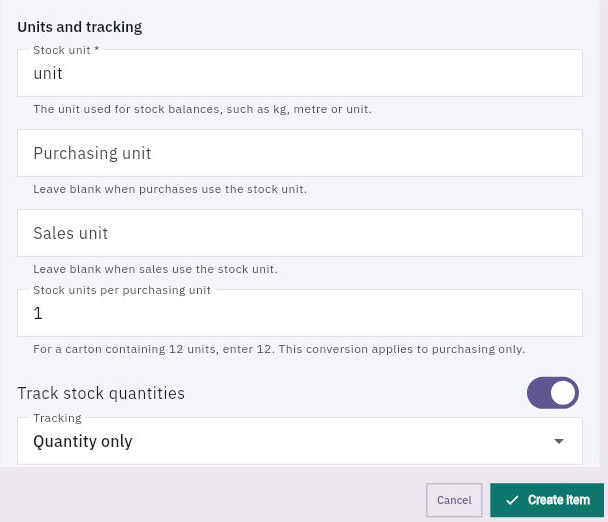
Item units and tracking: the purchasing conversion is separate from stock unit and tracking method.
Stock unit is a text field: it defines the unit used in balances. Purchasing unit and Sales unit may be blank when those transactions use the stock unit. Stock units per purchasing unit applies to purchasing only. If a carton contains twelve stock units, the conversion is twelve; this does not establish a sales conversion. The displayed one is only a starting value.
For a fictional sealed pack, define one stock unit as one complete pack. Do not change it to box merely because a supplier ships boxes. Preserve the approved contents and quality criteria alongside the item description. Quantity ten then means ten packs, not ten sheets, cartons or kilograms.
Choose tracking and expiry deliberately
Track stock quantities controls stock tracking. Tracking offers Quantity only, Lot / batch and Individual serial numbers. Temporary observation labels are not automatically serial numbers. Track lot expiry dates requires the relevant lot-tracking basis; an expiry requirement must come from the actual specification, not a nearby field or another SKU.
Default warehouse and Default location are convenience relationships, separate from a transaction's required location. The location control can remain grey until a warehouse is selected. An unset item default does not mean any bin is suitable, and setting a default is not a receipt or movement.
Complete planning and cost inputs
The form also exposes Replenishment action, Reorder point, Safety stock, Minimum stock, Maximum stock, Reorder quantity, Order multiple, Supply lead time, Standard cost per stock unit, Currency and Preferred supplier name. Obtain the applicable approved values, including deliberate blanks or zeros, before submission.
Reorder point and safety stock are quantities; cover-day settings elsewhere are time. Order multiple differs from minimum quantity. Standard cost needs a currency and stock-unit basis; zero is not evidence that an existing item is valueless. A preferred supplier note does not create a qualified supplier, purchase request or purchase order. Confirm the actual selection choices and helpers rather than assuming a field performs a wider workflow.
Use Draft as the definition checkpoint
The lifecycle helper says to keep the item in Draft until units and tracking are correct; activation fixes the definition. After an authorised Create Item, independently reopen the exact SKU and compare all intended fields. The supported activation route is Edit → Status → Active — available for operations → Save changes, only after the separate activation decision.
Active or referenced definitions can lock SKU, units and tracking to protect history. Do not use Discontinued as an assumed unlock, reinterpret old quantities or bypass a lock. Preserve the incorrect definition and seek the inventory owner's approved correction or distinct-SKU plan, including existing references.
Activation alone creates no stock. Verify Overview and Stock separately: a newly prepared empty definition should not be reported as ten available units because its reorder quantity is ten. If Create returns an uncertain result, search the exact SKU and reopen any match before retrying. A duplicate item fragments future receipts and traceability.
For practice, explain a finished pack with stock unit unit, Quantity only, tracking on, expiry off and deliberately unset defaults. Identify the fields still needing approved planning/cost choices. Then state separately whether the definition is saved, active, stocked and eligible. Those are four different outcomes.
Turn what you learned into the way the team works.
Mark this lesson complete once the workflow exists in your workspace—not simply when you reach the bottom.