Create and activate an Inventory item
Define the item’s identity, units and tracking correctly before activation fixes the stock definition.
In this lesson
Create and activate an Inventory item
Decide what one stock unit means before creating an item. Have the unique SKU, item type, tracking requirements, purchasing conversion and applicable cost/planning choices ready.
Create the draft
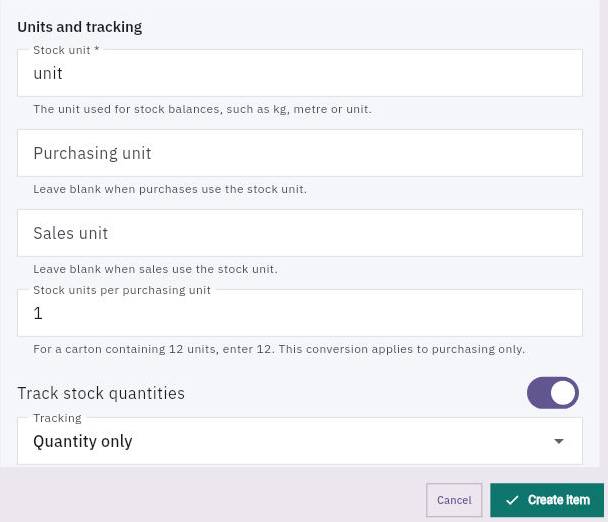
1. Open Inventory → Items and search the exact SKU. If the intended item exists, skip steps 2–6 and inspect it at step 7 instead of creating another. 2. Select New Item. Enter SKU, Item name, a useful description and the correct Item type. Add Category, Brand or Barcode where needed. 3. Set Stock unit to the unit used for balances, such as unit, kg or metre. Leave Purchasing unit or Sales unit blank when it is the same as the stock unit. 4. If purchases use a different unit, enter the agreed Stock units per purchasing unit. For example, a carton of 12 stock units uses 12. This conversion is for purchasing; do not assume it also defines sales conversion. 5. Set Track stock quantities and Tracking: Quantity only, Lot / batch or Individual serial numbers. Use lot tracking when you need to record lot expiry dates. 6. Review Stock planning, Cost and defaults against your organisation’s decisions. Do not treat a zero or default currency as an approved value just because it is prefilled. Keep Status: Draft — setup in progress, then select Create Item.
Check the result
Check and activate
7. Return to Items and reopen the exact SKU. Compare identity, units, conversion, tracking, expiry and defaults with the intended definition. 8. For a checked Draft that is ready for use, open Edit → Status → Active — available for operations and select Save changes. If the item is already Active, preserve that state and continue at step 9 without an activation write. 9. Reopen the item and check its Active status. Read Overview and Stock separately to see whether stock exists.
Expected result: one correctly defined active item—not an invented opening balance.
Important: activation fixes key definition fields. An active or referenced item can have SKU, units and tracking locked to protect history. Do not try to bypass that restriction or discontinue an item merely to unlock it. Resolve a definition change with the Inventory owner. Item defaults are not completed receipts or movements.
Continue learning
In this series: Manage stock — guide 2 of 17.
Turn what you learned into the way the team works.
Mark this lesson complete once the workflow exists in your workspace—not simply when you reach the bottom.