Inventory course 06 — Stock counts adjustments valuation and reports
A count compares a physical observation with a recorded quantity at a defined cutoff. Valuation adds a cost basis. Reports summarise a chosen population. None should be used to hide a missing movement or to make quantities agree by unsupported adjustment.
Part of Inventory module course
In this lesson
Physical count and valuation boundaries
A count compares a physical observation with a recorded quantity at a defined cutoff. Valuation adds a cost basis. Reports summarise a chosen population. None should be used to hide a missing movement or to make quantities agree by unsupported adjustment.
In this chapter
- Define the count scope and time
- Align movements before declaring a variance
- Understand the adjustment boundary
- Read valuation by basis
- Scope reports before using the headline
Define the count scope and time
Open Inventory → Stock Counts. Tabs are All, Scheduled, Counting, Review, Approved and Posted, with Schedule Count as the launcher. Identify the exact count reference before opening a generic “Stock count” detail. Compare warehouse, scope, scheduled date, line count, counted count, variances and attribution.
Count recording adjustments and reporting checks
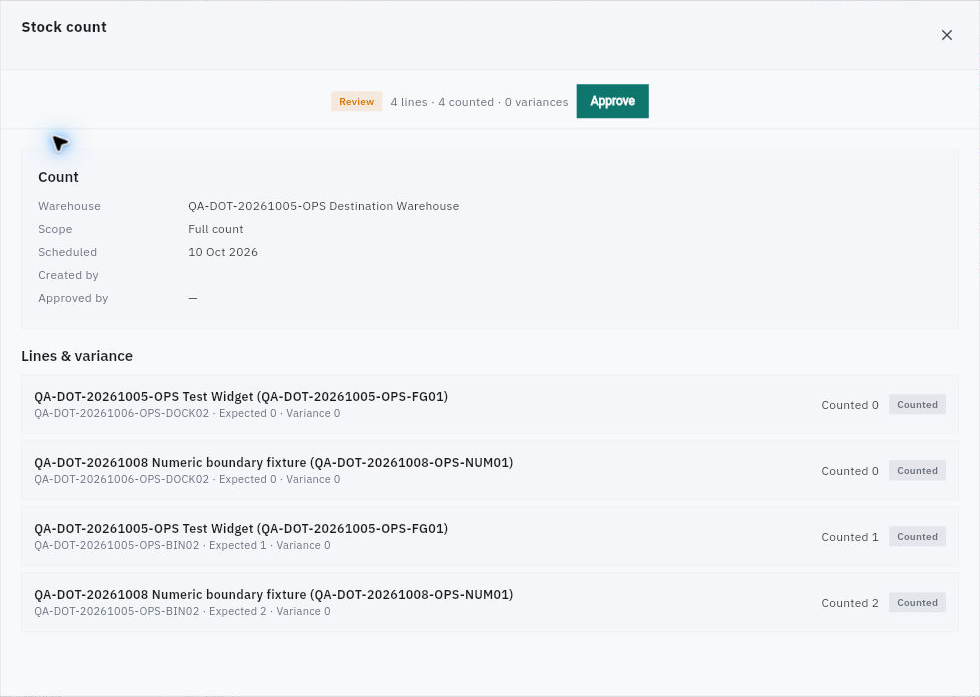
Stock-count detail separates line counts, expected/count quantities, variance and the still-unused approval action.
A count with four counted lines and zero variances describes four item/location records, not four units of one item. Read each line's exact SKU and location, Expected, Counted and Variance. A bare quantity without unit needs the item definition. A scheduled date is not necessarily the physical observation time, and a blank Created by or Approved by field does not establish an independent counter or reviewer.
The Review detail can expose Approve without Post. Historical Posted rows and a Posted tab do not prove whether approval automatically posts, whether another action follows or how Finance is affected. Do not click Approve merely to reveal the next step.
Schedule Count opens Schedule Stock Count with required Warehouse, Limit to Zone A initially off, and the helper Otherwise every stocked location is counted. Cancel and Schedule are separate controls; Schedule is disabled in the untouched blank form. No exact-item selector, arbitrary bin/zone picker, schedule-date, count-owner or approval-route input is exposed initially. Do not use this broader warehouse/zone scope as if it scheduled an isolated SKU/bin count. Verify the actual populated form and approved scope before any submission.
Align movements before declaring a variance
For a fictional bin, the recorded snapshot at 12:00 is two units and a 12:15 count finds one. The raw difference is minus one across different times. A claimed 12:05 issue could explain it only after its exact item/location, authority, quantity and receipt are verified. Keep the variance unresolved until all intervening movements are reconciled; arithmetic agreement alone does not validate a story.
If the issue is verified, compare the count with the adjusted expected position at 12:15. Do not subtract the same issue again from the count-time snapshot. Check other locations separately: minus one in Store and plus one in Hold does not prove a transfer or quality release.
Understand the adjustment boundary
Valuation → Adjustments → New Adjustment opens New Stock Adjustment with required Item, Warehouse and Quantity change. Its helper says negative reduces stock. Reason can default to Count Variance; Notes, Cancel and Submit are also present. The initial form has no location, lot, cost-only amount or unit-cost field.
Do not use a warehouse-level quantity adjustment as an assumed exact-bin correction or to fix a cost discrepancy. Establish the approved correction, affected scope and supported route first. A default reason is not evidence that a physical loss occurred. After an authorised adjustment, reopen the same record and verify movements, stock and relevant financial consequence separately.
Read valuation by basis
Valuation has Overview, Movements, Adjustments and Methods. Read the actual method description, scope and cost basis before comparing values. Standard cost per stock unit and Currency on an item are separate definition fields; a new form's zero cost and NGN default do not establish an existing item's cost.
A quantity of ten at a supplied unit cost of three gives a teaching value of thirty on that stated basis. It does not establish a posted Finance inventory balance, a purchase invoice, a tax treatment or a tested cost-method calculation. Compare the relevant Inventory movement/source with the Finance record rather than changing physical quantity to force value agreement. Retain the original method and source assumptions when comparing alternative costing calculations.
Scope reports before using the headline
Reports → Stock Availability shows SKU, Item, On hand, Reserved, Available and Incoming with warehouse/category scope and Current stock snapshot. No historical as-of control is shown in this view. Record when you observed it rather than labelling it as an earlier snapshot.
The warehouse selector searches name, code or city. A selected warehouse chip can coexist with an All warehouses reset control; the reset label does not mean the selection disappeared. Verify the actual selected scope and resulting rows. Report-family names such as Expiring Inventory, Stockout Report, Warehouse Performance and Inventory Valuation do not establish their formulas or thresholds; read each view's columns and helpers.
For a practical service measure, distinguish full-on-time demand lines from on-time units. If two of four lines are fully on time, the line rate is 50%. That can differ from the percentage of all units arriving on time. Preserve original deadlines and late remedial deliveries, and report the numerator and denominator rather than choosing the more flattering result.
When a report fails or totals disagree, keep the last known scope and observation, retry only the read through the supported route, and reconcile intervening transactions. Repeating receipts or saving blank quantities is not report recovery.
Turn what you learned into the way the team works.
Mark this lesson complete once the workflow exists in your workspace—not simply when you reach the bottom.