Define a goal you can measure
Turn an intended improvement into a clear objective and a key result your team can check.
Part of Measure a delivery improvement
In this lesson
Define a goal you can measure
Turn an intended improvement into a clear objective and a key result your team can check.
Before you start: Choose one improvement and the period in which you want to assess it. You can define the measure before creating records.
Separate the result from the work
A goal states the improvement you want. An objective narrows it to a result for a period. A key result makes that result measurable. A task is work that contributes to it.
For example, “Make customer handovers clearer” is a goal. “Use a complete handover checklist this month” is a narrower objective. A key result could count handovers that contain every required detail. Writing the checklist is a task; completing that task does not tell you how many handovers meet the standard.
Define your measure
- Name the items that may count, such as handovers due during the month. Decide how duplicates and repeat attempts will be treated.
- Describe what a successful item must contain or achieve. Another teammate should be able to apply the same rule.
- Choose the unit, target and period. Record a starting value if you want to report improvement from a baseline.
- Decide where the supporting information will be kept and who will review it.
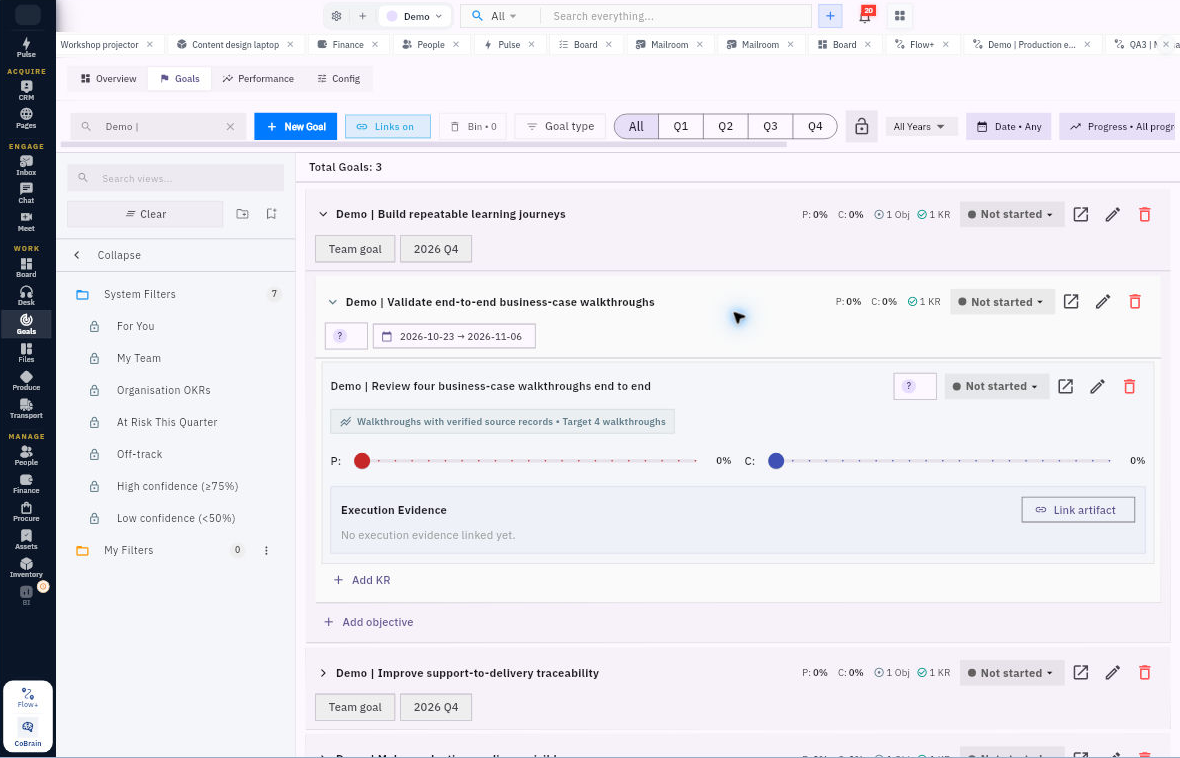
Recognise the hierarchy in Goals
Open Goals → Goals, check the period filters, then expand a goal and its objective. Use the key result’s Open detail control to read Measurement, Owner and Team, Progress, Confidence, Status and Execution Evidence.
Expected result
You have a measure with a clear population, counting rule, unit, target, period and information source.
Remember
Progress and confidence answer different questions. A completed task or a percentage on screen cannot replace the information needed to calculate the key result.
Continue learning
In this series: Set and track goals — guide 1 of 6.
Turn what you learned into the way the team works.
Mark this lesson complete once the workflow exists in your workspace—not simply when you reach the bottom.