Prepare a customer subscription draft
Create a subscription draft that connects the customer’s agreement to the correct plan, quantity and billing dates.
In this lesson
Prepare a customer subscription draft
Create a subscription draft that connects the customer’s agreement to the correct plan, quantity and billing dates.
Before you start: Have the agreed service dates, quantity and unit, billing contact, billing schedule and an existing approved subscription plan. This guide prepares a draft without enabling automatic invoices.
Steps
1. Open Finance → Customer subscriptions → Plans. Open the intended plan and check its code, service description, billing cycle, price, currency, tax treatment, revenue account and active state. Resolve an unsuitable plan before creating the subscription.
2. Open Customer subscriptions → Subscriptions and search for the customer, plan and overlapping service dates. If the intended subscription already exists, skip steps 3–6 and inspect its retained details in step 7 without creating another.
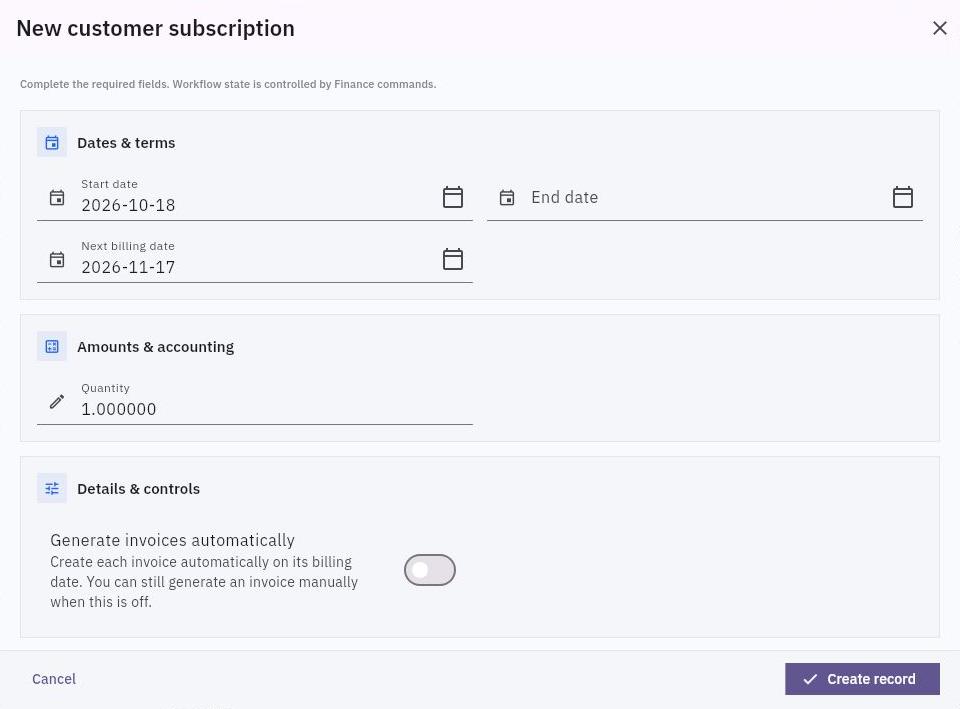
3. Select New. Set Start date, End date and Next billing date to the agreement. Do not accept today’s defaults without checking the service and first billing dates.
4. Enter Quantity using the plan’s actual unit, such as a seat or service package. Select the exact Customer, Billing contact and Plan references. Currency and unit price are not separate inputs in this creation form; check the selected plan instead.
Check the result
5. Leave Generate invoices automatically off for this draft preparation workflow. Review the quantity-times-plan-price expectation and any applicable tax or adjustments against the agreement.
6. Select Create record once, then return to the subscription list and open the saved subscription by its actual number and customer.
7. Compare the retained plan, customer, quantity, unit price, currency, start/end dates, next billing date and automatic-invoice setting with the agreement. Check the current workflow state before handing it to the person responsible for subscription review and billing.
Expected result
The subscription draft holds the intended customer, plan and schedule. It is ready for your subscription review process, not represented as already activated, billed or paid.
Common pitfalls
- Creating a subscription does not itself prove an invoice was generated or a payment collected. Check those records separately.
- Do not create a duplicate subscription because an invoice is late. Inspect the existing subscription, billing-run activity and invoice list for the same service period.
- Editing a shared plan can affect more than one customer. Use the agreed change process rather than changing a plan to fix one draft.
Continue learning
In this series: Manage business finances — guide 14 of 15.
Turn what you learned into the way the team works.
Mark this lesson complete once the workflow exists in your workspace—not simply when you reach the bottom.