Add an account to your chart of accounts
Create a missing ledger account with the right code, classification and currency, then find the saved definition again.
In this lesson
Add an account to your chart of accounts
Create a missing ledger account with the right code, classification and currency, then find the saved definition again.
Before you start: You need access to the chart of accounts and the account specification agreed by your finance team: unique code, name, account type, normal balance, currency and any required control purpose.
Steps
1. Open Finance → Chart of accounts. It is in the Accounting section of the Finance sidebar; scroll the sidebar if needed.
2. Use Search accounts for the intended code and press Enter. Open any match and compare its purpose and configuration. If it is already the right account, reuse it and skip creation rather than splitting activity across duplicates.
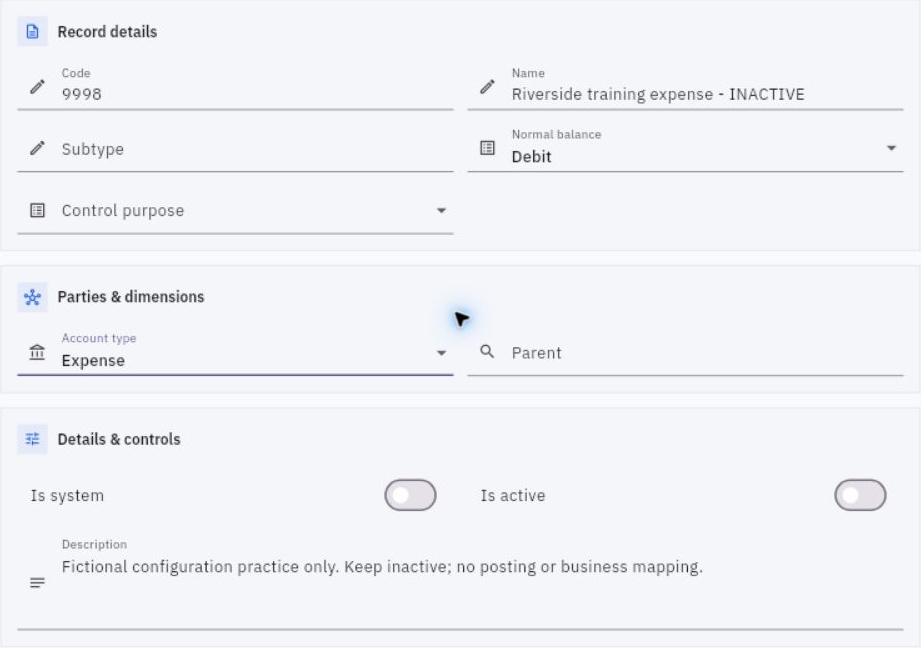
3. For a missing account, select New to open New ledger account. Enter the agreed Code, Name and a description that explains what belongs in the account.
4. Select Account type and Normal balance from the specification. The income-category label in this form is Revenue. Do not infer the correct type from a familiar account name alone.
5. Set Subtype, Parent and Control purpose only where the design calls for them. For a Parent, search by code or name and select the exact existing account. A control purpose is a specific configuration choice, not a label to add to every account.
6. Check Currency, including fields below the initial screen area. Review Is system and Is active deliberately. Keep a review-stage account inactive until it is ready for use; naming an account “inactive” does not change the switch.
Check the result
7. Select Create record once. Return to Chart of accounts, search the same code and open the result. Confirm its name, classification, normal balance, currency and flags.
Expected result
The new account definition is saved and can be found by its code. Its purpose is clear enough for the finance team to use consistently.
Common pitfalls
- Creating an account does not enter its opening balance or configure every workflow mapping. Those are separate setup tasks.
- If creation is slow or uncertain, search the code before trying again. Do not overwrite a different existing account to avoid the conflict.
Continue learning
In this series: Manage business finances — guide 2 of 15.
Turn what you learned into the way the team works.
Mark this lesson complete once the workflow exists in your workspace—not simply when you reach the bottom.