BI course 04 — Applying the reporting method to native Finance reports
Finance provides a separate demonstrated reporting workflow. Use it to learn source reconciliation and controlled period comparison, not as proof that BI Studio is configured. This chapter does not create, post or alter accounting records.
Part of BI module course: Spaces and reporting readiness
In this lesson
Native Finance report scope and reconciliation
Finance provides a separate demonstrated reporting workflow. Use it to learn source reconciliation and controlled period comparison, not as proof that BI Studio is configured. This chapter does not create, post or alter accounting records.
In this chapter
- Open the report that answers the question
- Trace amounts to their source grain
- Read date input and result formats carefully
- Make an excluding and including comparison
- Restore and verify the original scope
- Complete the reporting course
Open the report that answers the question
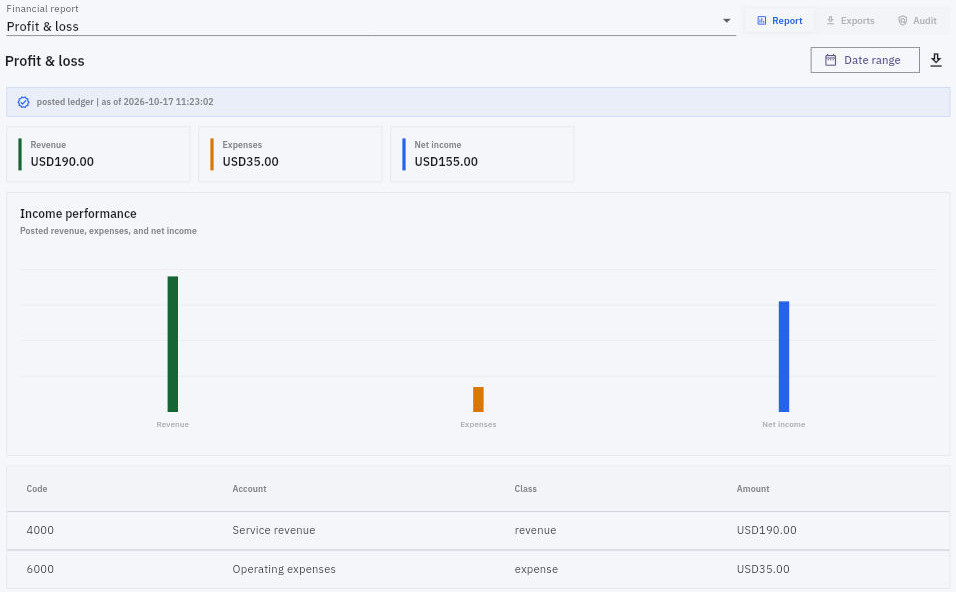
In the intended workroom, open Finance > Reports (under Administration). Confirm Financial report: Profit & loss and the Report tab. General ledger is a different view, and Exports or Audit are separate controls. Do not assume every report shares the same filters.
The training baseline showed Revenue USD190, Expenses USD35 and Net income USD155. Account rows identified 4000 Service revenue and 6000 Operating expenses. The arithmetic is 190 minus 35 equals 155. These are fictional staging figures, not a statement about a real company's finances.
Source grain and period selection
Trace amounts to their source grain
The checked source set contains three journals: a USD190 revenue credit, a USD25 expense debit and a USD10 expense debit, with their balancing lines. All had accounting Entry Date October 15, while posting occurred October 17.
The P&L's two account rows are not the six-line journal listing. The paired receivable, payable and prepaid lines remain part of their journals but answer different accounting questions. Use the source journals and General ledger to reconcile exact references, accounts, debit/credit sides and amounts independently. This course does not claim a demonstrated P&L-to-journal drill-through.
A running balance requires the relevant opening-balance rule and complete included movement. Do not derive a cash balance from this P&L or treat revenue as proof money was received. The check here is bounded to the supplied posted income and expense sources.
Read date input and result formats carefully
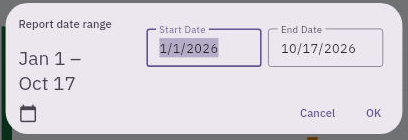
Choose Date range, then the pencil icon in the calendar header to enter text mode. The recorded baseline fields were Start Date 1/1/2026 and End Date 10/17/2026. In that interface, text fields used month/day/year while the applied label used day/month/year.
Applied period checks and reporting practice
Confirm the calendar's named month and both labels before applying a range. Do not transfer this locale convention to every report or user. Cancel if the format is unclear.
Make an excluding and including comparison
Predict before changing the view. If these entries are included by October 15 accounting Entry Date, an October 16–17 range should exclude them despite their October 17 posting timestamps.
In the demonstrated test, entering 10/16/2026 and 10/17/2026, checking the named dates and choosing OK applied the range directly. The settled label read 16/10/2026–17/10/2026, all three summaries were USD0 and the report said no posted income or expense activity.
A zero for that range did not mean the journals were deleted. The next comparison entered 10/15/2026 in both fields. The settled one-day report restored USD190 revenue, USD35 expenses and USD155 net income, with the same account rows. This supports Entry Date inclusion for this report and tested source set, not a universal rule for all reports or timezones.
Restore and verify the original scope
Restore the recorded baseline explicitly: January 1 through October 17, confirm once and wait for the result. Check both the applied range and the USD190/USD35/USD155 summaries with their account rows. Do not assume clearing the range or merely typing old values restores the same view.
An as-of timestamp identifies an observation; its changing value does not establish an automatic refresh interval. If a result is unsettled or unavailable, record the last verified scope and the unresolved check rather than calling it zero or repeating a source posting.
Complete the reporting course
For an independent fictional test, suppose October 31 revenue is USD240 and November expenses are USD60 plus USD15, with all three posted in November. A November accounting-date question has zero supplied revenue, USD75 expenses and net income minus USD75. The broader October–November total is USD165, a correct answer to a different question.
Explain the chosen date basis, population, source references, calculation and restoration checks. Then state which BI implementation gates remain separate: usable dataset, populated widgets, native filter effects, freshness, publication and viewer access. You have learned a reliable reporting method when you can preserve those distinctions while producing a reproducible answer from the sources actually available.
Turn what you learned into the way the team works.
Mark this lesson complete once the workflow exists in your workspace—not simply when you reach the bottom.