Assets course 06 — Financial review depreciation valuation and reconciliation
Asset financial metadata describes a proposed or recorded basis. Financial review, depreciation, valuation and Finance posting are separate outcomes. Read the exact currency, source and period before calculating or approving anything.
Part of Assets module course
In this lesson
Asset value and accounting distinctions
Asset financial metadata describes a proposed or recorded basis. Financial review, depreciation, valuation and Finance posting are separate outcomes. Read the exact currency, source and period before calculating or approving anything.
In this chapter
- Separate registration from financial review
- Calculate only on an explicit policy
- Prepare valuation and impairment separately
- Use Analytics as a reconciliation aid
- Make the result useful and bounded
- Read the module policy before financial decisions
- Locate depreciation history and analytics controls
Separate registration from financial review
Open Assets → Value and inspect Capitalization review. A row can show Review exception and reviewPending with Reject and Approve available even after the asset was accepted into Register. Those actions are financial decisions, not routine navigation. Do not approve merely to clear a pending badge.
In the exact asset's Financial view, compare Acquisition Cost, Incidental Cost, Capitalised Cost, Residual Value, Accumulated Depreciation, Current Book Value, Useful Life, Depreciation Method and Depreciable. Read Settings currency and capitalization policy separately. A method label Straight Line with Depreciable No and zero values is not evidence that depreciation ran.
Acquisition plus qualifying incidental cost may form the supplied teaching basis, but actual accounting treatment requires the authorised Finance policy. Do not double-count delivery if it is already included in the source total. Keep invoice, receipt, approved cost basis and actual payment evidence distinct.
Calculate only on an explicit policy
For a fictional asset costing 500 including delivery, residual 50 and useful life five years, a supplied straight-line policy gives (500 − 50) / 5 = 90 per full year. If the same policy specifies twelve equal monthly charges and a December start, the monthly charge is 7.50 and no November charge is implied. These are paper calculations under stated assumptions, not proof of Workroomly posting or a recommendation for real accounting treatment.
Compare depreciation start, effective date, period and rounding rules before reconciling. An observation date is not an effective date. A revised useful life or residual value needs an authorised treatment and history, not an overwrite to make a report match.
Prepare valuation and impairment separately
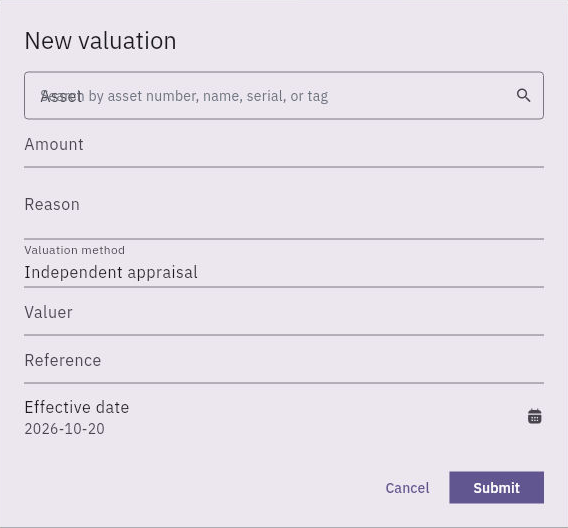
New valuation has Asset, Amount, Reason, Valuation method, Valuer, Reference and Effective date, followed by Cancel and Submit. Independent appraisal and today's date can be defaults.
Financial review and reconciliation checks
Valuation form with amount, method, valuer, source reference and effective date; a submission is not a posted Finance result.
Match the exact asset and measurement evidence. Establish what Amount represents before entry; the inspected form does not establish every amount semantic, currency mapping, validation or posting effect. A valuer name is attribution, not proof an appraisal occurred. Reference should identify the actual approved source.
The separate impairment form contains Asset, Amount, Reason and Effective date, with Cancel and Submit. It does not show a reviewer, currency selector or evidence-attachment control in the initial view. Absence of those fields does not authorise self-approval or omission of the source assessment. Distinguish a triggering observation from the authorised quantified loss and effective date.
Use Analytics as a reconciliation aid
Analytics → Complete Asset Register supplies a generated table. Preserve its exact Generated timestamp and each asset number. The inspected dialog does not expose a historical cutoff or local filter controls, so do not claim an earlier date or department scope was applied. Traverse the horizontal columns to keep lifecycle, operational and custody fields separate.
Finance Reconciliation compares Assets cost basis, Finance capitalized, Assets accumulated depreciation, Finance depreciation, Finance impairment, Finance revaluation, Assets disposal proceeds, Finance disposal proceeds, Assets book value, Finance net asset balance, Book-value variance, Proceeds variance, Pending Finance movements and Rejected Finance movements.
A row of zeros or a reconciled status does not prove capitalization approval, an actual journal or physical readiness. A Pending Finance movements counter is not the master's Financial Review Pending state. Match the same asset and cutoff, inspect the underlying Finance sources and preserve any difference in scope before deciding there is an error.
Make the result useful and bounded
For practice, report a registered asset with financial review pending, a supported paper depreciation calculation and no verified Finance posting. That is a valid explanation of the current state, not a completed capitalization. If a report shows zero variance while review remains pending, state both rather than forcing one status to match the other.
If a value is wrong, preserve source, currency, basis, dates and affected records and seek the Finance owner's supported correction. Never change custody, quantity, condition or cost merely to make a reconciliation green. After an authorised financial action, independently reopen the asset and the actual Finance movement or journal before claiming the result posted.
Read the module policy before financial decisions
Open Assets → Settings → Module policy. Asset currency supplies the module currency and Asset number prefix the numbering prefix. Approval expiry days governs the configured approval interval. Capitalisation threshold and Default depreciation method are policy inputs; the method choices shown are Straight Line and Declining Balance. A method choice does not establish its calculation algorithm, declining-balance rate or an asset-specific approval.
Maintenance approval threshold, Warranty reminder days and Insurance reminder days are separate operational controls. Require assignment acknowledgement, Require maintenance completion evidence and Require disposal approval configure different gates. Read each independently; a policy value is not proof that an individual reminder, acknowledgement or approval occurred. Cancel exits without saving; Save policy changes shared policy and requires administrative authority. Do not change the currency or threshold to make a fictional example fit.
Locate depreciation history and analytics controls
Value → Depreciation provides search and the depreciation history view. The source view has empty history and does not show Run, Create or period controls. Treat that as the observed readback, not permission to invent a depreciation-run route. Paper calculations explain a policy but do not create a native run or posting.
In Analytics, Assets by Category groups assets and displays Group, asset count, Acquisition cost and book value. Compare the category grouping and monetary basis before using totals; a zero book value is not by itself a disposal. Export to Vault and Copy CSV are the shown output controls. Their presence does not prove an export was performed, and neither should be renamed a local Download action. Check authorised destination and data scope before using an export.
Turn what you learned into the way the team works.
Mark this lesson complete once the workflow exists in your workspace—not simply when you reach the bottom.