Assets course 07 — Retirement disposal and complete asset closeout
Retirement removes an asset from service. Disposal concerns its final disposition. Custody closure, data handling, physical handover and financial reconciliation each need their own evidence. One final badge cannot establish them all.
Part of Assets module course
In this lesson
Retirement and disposal boundaries
Retirement removes an asset from service. Disposal concerns its final disposition. Custody closure, data handling, physical handover and financial reconciliation each need their own evidence. One final badge cannot establish them all.
In this chapter
- Start from the exact asset and decision
- Prepare a retirement draft
- Prepare disposal without inventing commercial terms
- Close the entire responsibility chain
- Read the final report without hiding exceptions
Start from the exact asset and decision
Before end-of-life work, match asset number, serial/tag, current assignment, location, condition, open care work, cover obligations and financial state. Confirm the authorised decision and scope. An unserviceable label does not itself approve disposal; a retirement proposal does not authorise a sale or release to a recipient.
Open Assets → End of Life. Retirements, Disposals and Incidents serve different purposes. An incident can exist without retirement; a retired asset can remain physically held pending disposal.
Prepare a retirement draft
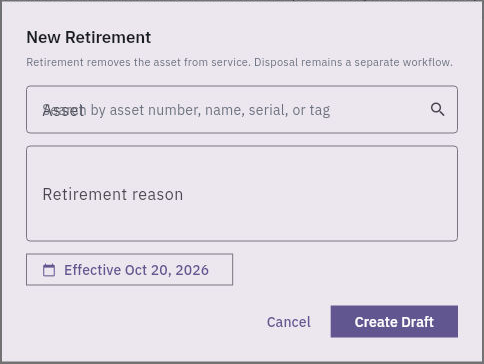
Retirements → New Retirement has an Asset lookup, Retirement reason and Effective date, ending in Create Draft. Search by asset number, name, serial or tag. The helper explicitly says retirement removes the asset from service while disposal remains separate.
Custody data and financial closeout
Retirement form removes an asset from service through its own draft; disposal remains a separate workflow.
Use the approved reason and date rather than the current-date prefill. The initial form does not show evidence-attachment or Finance fields. Keep the complete approval and source bundle in the authorised supporting process; do not invent later controls or claim a draft immediately applies retirement.
After an authorised creation, reopen the exact retirement from the list and compare reference, reason, dates and actual state where exposed. Then reopen the master and inspect lifecycle and operational status separately. Do not stop at a closed modal or success message.
Prepare disposal without inventing commercial terms
Disposals → New Disposal opens New Disposal Request with Asset lookup and Reason, initially Sale, and Submit Request. A disabled button while no asset is selected does not establish every validation condition. Match the intended asset and authorised disposition rather than accepting Sale by default.
The inspected initial stage does not show effective date, price/proceeds, selling cost, recipient, evidence upload or data-erasure attestation. It also does not establish the later saved-detail or approval workflow. Do not infer those functions are absent everywhere, but do not claim the initial request captured them. Preserve the full buyer/recipient, approved terms, exact asset/accessory set, clearance, handover and financial evidence through the supported process.
Submission is not completed sale, transfer of title, receipt of money or physical release. Establish the action's effect before proceeding. Do not use an unrelated asset to reveal later stages or create a duplicate disposal because a list is empty after uncertain feedback.
Close the entire responsibility chain
For a fictional camera, the authorised plan may be retirement from classroom use followed by disposal of camera, bag, cable and remote. Compare the actual returned set before release. If the remote is missing, retain that open obligation even if the disposal record can advance. If the device contains data, the responsible owner must establish the approved handling/erasure result; a generic “done” note is insufficient.
Check the exact assignment and transfer history. A disposal status does not prove the custodian's account was closed or the recipient acknowledged the set. Check actual physical count, destination and receipt separately from the software state. Keep any maintenance fault and incident history; disposal is not a reason to erase them.
Financial closeout needs the authorised proceeds, costs, remaining book value and actual Finance movements. Expected proceeds are not cash received. A zero book-value variance in Analytics does not prove the sale payment cleared. Warranty/insurance or compliance obligations may also require their own owner action; a retired master is not evidence that a provider was notified.
Read the final report without hiding exceptions
Use Analytics → Complete Asset Register at its generated timestamp to inspect the final lifecycle, operational and custody dimensions for the exact asset. A report containing retired assets needs an explicit denominator: two available out of four total is 50%, while two out of three Active is about 66.7%. Neither is wrong when its population is stated; neither proves physical serviceability.
A complete handoff can say: retirement applied, disposal still pending recipient receipt, custody accessory discrepancy open and Finance proceeds not yet reconciled. Do not compress that into “asset closed.” Assign each remaining obligation to its owner and preserve the exact sources and dates.
If an unexpected state appears, inspect the relevant retirement/disposal/assignment/Finance record before another action. Correct the narrow problem through the approved route rather than manufacturing a consistent story by changing unrelated records. The final outcome is accountable disposition and reconciled obligations, not merely disappearance from an Active filter.
Turn what you learned into the way the team works.
Mark this lesson complete once the workflow exists in your workspace—not simply when you reach the bottom.