Assets course 05 — Warranty insurance claims and compliance evidence
Cover records preserve warranty and insurance terms; claims ask a provider to assess an event; compliance records attach evidence to a requirement. A record, an accepted claim, cash reimbursement and restored serviceability are different outcomes.
Part of Assets module course
In this lesson
Cover terms and claim boundaries
Cover records preserve warranty and insurance terms; claims ask a provider to assess an event; compliance records attach evidence to a requirement. A record, an accepted claim, cash reimbursement and restored serviceability are different outcomes.
In this chapter
- Choose the correct Cover and Compliance tab
- Keep insured value distinct from premium and loss
- Prepare the correct claim branch
- Attach compliance evidence to the actual document
- Reconcile a small claim example
Choose the correct Cover and Compliance tab
Open Assets → Cover & Compliance. Tabs are Warranties, Insurance, Claims and Compliance. Match the asset number and source reference before opening a row. A synthetic record labelled as staging metadata is not real cover and must not be reused as evidence for another asset.
Warranties → Add Record → Add Warranty has Asset lookup, Provider, Reference, Coverage, Start / issued and Expiry, with Cancel and Add Warranty. Match provider/reference and actual dates with the agreement. No amount, currency, upload or reminder field is shown. Renew is separate: an existing expiry or visible button does not establish new terms, an automatic period or a retained renewal result.
Keep insured value distinct from premium and loss
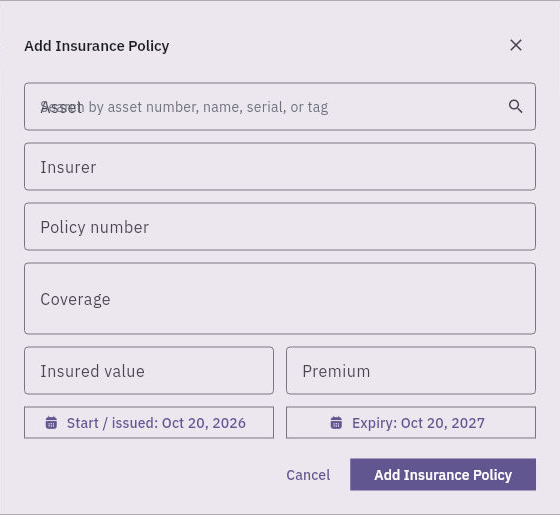
Insurance → Add Record → Add Insurance Policy has Asset, Insurer, Policy number, Coverage, Insured value, Premium, Start / issued and Expiry.
Warranty claims and compliance evidence
Insurance policy form separates coverage, insured value, premium and dates; no currency selector is shown.
Insured value is not the premium, a claim estimate, a payout or accounting book value. Confirm the organisation's mapping and actual coverage/exclusions before entry. No separate named-insured, excess, notification-deadline or currency selector appears in this form. Preserve those necessary terms in the approved supporting record rather than silently dropping them.
Check Assets currency under Settings. Do not paste a GBP scheduled limit into a USD-context field and claim faithful representation, or change the shared module currency just for a teaching case. Unknown premium is not zero. Dates must come from the source rather than the one-year blank-form defaults.
Prepare the correct claim branch
Claims → New Claim → New Cover Claim starts with a Warranty branch containing Active warranty, Issue / claim description and optional Provider reference. Selecting a warranty does not prove the event is covered.
The Insurance branch has Active insurance policy, Covered asset, Issue / claim description, optional Incident reference and Claimed amount. Covered asset is grey before policy selection; verify actual eligibility after choosing the approved policy. Incident reference is not the provider's claim reference. Claimed amount is the amount requested for assessment, not an approved loss or net reimbursement.
Both branches end in Submit Claim. Their initial forms do not show attachment, deadline, excess, approved-loss, payment or reviewer fields. Establish the supported evidence and communication process before submission; an application save does not alone prove provider receipt or external notification. A Closed list row does not expose how assessment, settlement or payment occurred.
Attach compliance evidence to the actual document
Compliance → Add Record → Add Compliance Record has Asset, Document title, Reference, Document type, Select Vault evidence, Start / issued and Expiry. The helper explicitly requires Vault evidence. Types are licence, certificate, permit, inspectionCertificate and other.
A certificate label does not create a certificate or transform a local operating rule into legal certification. Verify the actual Vault item's identity, version, complete contents and permitted reader access. A filename in another row is not proof that the intended evidence was selected. Use actual issue/expiry dates and keep requirement criteria, review responsibility and precise due time in the approved supporting process where no separate field is shown.
Verify on a record is a consequential review action, not a way to make the evidence true. A Superseded record and a newer renewal need their editions and relationship preserved; a later expiry cannot rewrite an earlier missed deadline.
Reconcile a small claim example
In a fictional policy, approved eligible repair cost is 180, limit 500 and excess 50. If the explicitly supplied policy formula is min(loss, limit) minus excess with a zero floor, the calculated reimbursement is 130. That formula belongs to the example, not a universal insurance rule or demonstrated Workroomly calculation. A provider decision for 130 is still not a payment receipt, completed repair or service release.
Keep reported cause, direct observation, proposed repair and approved work separate. If a document or currency mapping is missing, pause the dependent claim entry and ask the responsible owner. Do not invent evidence, zero unknown costs or mark compliance complete merely because a claim or renewal exists.
Turn what you learned into the way the team works.
Mark this lesson complete once the workflow exists in your workspace—not simply when you reach the bottom.