Review a service invoice before issue
Create a service invoice with the correct customer relationships and discount basis, then complete its internal review before issue.
In this lesson
Review a service invoice before issue
Create a service invoice with the correct customer relationships and discount basis, then complete its internal review before issue.
Before you start: Have the agreed and accepted service, exact customer and billing contact, dates, payment terms, currency and Finance-approved coding and tax treatment.
Steps
1. Open Finance → Invoices → Invoices and search for the same customer, source service and date across relevant states. If the intended invoice exists, skip steps 2–6 and continue only with its current review stage below.
2. Select New. Enter Client name and useful Notes, then select the exact Customer and Billing contact references. A typed client-name snapshot is not a substitute for those relationships.
3. Set Issue date, Due date, Payment terms days, Currency and Exchange rate. Check the actual due date after entering terms. Set any header Discount amount only when the agreement calls for a header discount.
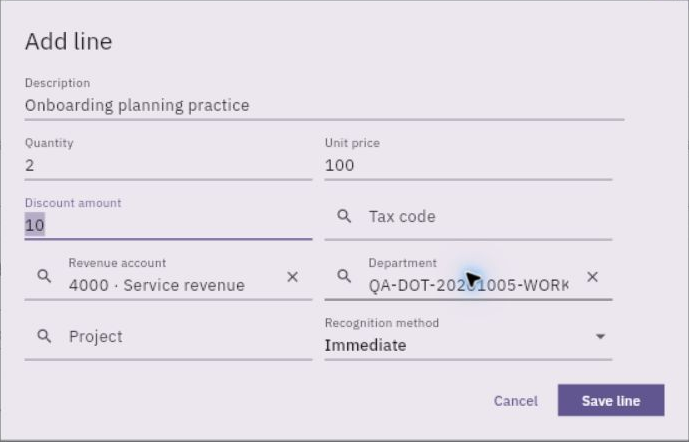
4. Select Add line. Enter the complete service description, Quantity, Unit price and any line Discount amount. Select the appropriate revenue account, department and applicable tax/project references, and check Recognition method against the agreed accounting treatment.
Check the result
5. Calculate the line from its quantity and unit price, applying each intended discount once. A discount amount is not a percentage unless the field says so. Select Save line, then reconcile the complete invoice with the accepted service.
6. Select Create record once. Return to the register and reopen the generated invoice number. Compare the saved header, relationships, lines and current state.
7. For a complete eligible Draft, select Workflow actions → Submit, check the confirmation and confirm once. Reopen the same invoice to inspect its calculated amount and pending review state. Skip submission if already progressed.
8. The designated reviewer checks the source acceptance, customer/contact, dates, terms, coding, tax basis and discount arithmetic. Only while awaiting approval, use Approve and confirm the decision. Respect any independent-review requirement rather than changing access to bypass it.
9. Reopen the invoice and check the retained decision and unchanged values. Keep Issue, customer sending and collection separate from this internal-review result.
Expected result
The service invoice has the correct identities and amount, with its actual internal-review state ready for the issue owner’s next decision.
Common pitfalls
- Do not apply the same intended discount at both the line and header levels.
- A zero draft header or calculated-on-submit message does not excuse unchecked saved line amounts.
- Approval alone is not invoice issue, a posted receivable or a received customer payment.
Continue learning
In this series: Purchasing and financial follow-through — guide 4 of 6.
Turn what you learned into the way the team works.
Mark this lesson complete once the workflow exists in your workspace—not simply when you reach the bottom.