Transport course 04 — Delivery proof failures and returns
Arrival at a destination is not proof of acceptance. Record the delivery's outcome in Deliveries, preserve supporting evidence and keep failed or returned movements separate from successful delivery. Trip completion cannot manufacture missing proof.
Part of Transport module course
In this lesson
Delivery outcome and recipient evidence
Arrival at a destination is not proof of acceptance. Record the delivery's outcome in Deliveries, preserve supporting evidence and keep failed or returned movements separate from successful delivery. Trip completion cannot manufacture missing proof.
In this chapter
- Inspect the exact delivery before confirming
- Record a failure without claiming a delivery
- Separate a returned status from physical stock receipt
- Recover from mismatches with a complete readback
Inspect the exact delivery before confirming
Open Deliveries, locate the exact reference and check its recipient, endpoints, linked trip, packages and current state. Overview, Assignment & Package, Proof & Exception and Activity answer different questions. A trip's route tab is not a substitute for the delivery's acceptance record.
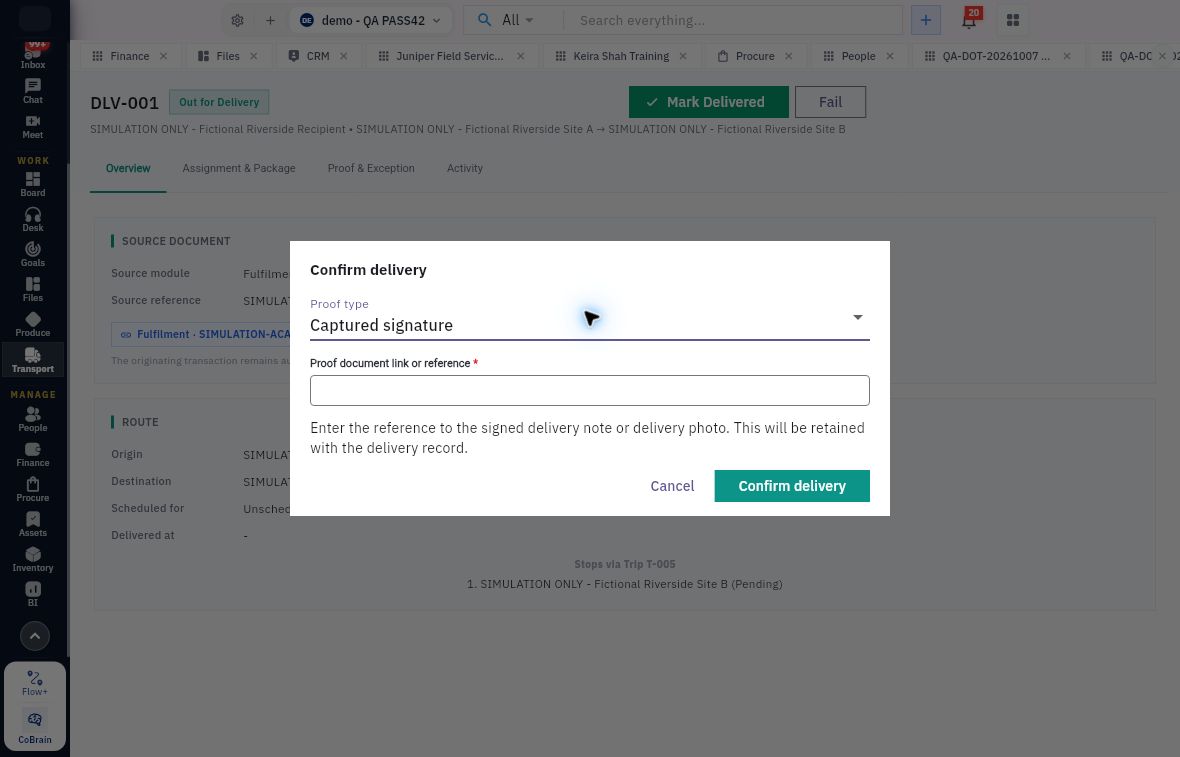
From Out for Delivery, Mark Delivered opens Confirm delivery. Proof type offers Captured signature and Captured photo. Proof document link or reference is required. The helper asks for the signed delivery note or delivery photo and says that reference will remain with the delivery.
Failure retry and returned-goods decisions
Confirm delivery requires a proof reference; the pictured simulated request does not contain a real signature or completed delivery.
Choose the type that matches genuine retained evidence and provide the approved accessible reference. A typed sentence saying delivery occurred is not a captured signature. A photo reference should identify the relevant delivery rather than an unrelated image. Do not expose private customer evidence in public training or fabricate a signature to exercise the form.
The source simulation opened this dialog without submitting real proof. It therefore teaches the form, not a demonstrated successful delivered outcome. For authorised operational work, independently reopen the delivery after confirmation and review its status, delivered time, proof type/reference and Activity. If the confirmation is uncertain, check the record before submitting again.
Record a failure without claiming a delivery
Fail opens Mark Delivery Failed with required Failure reason. State the actual reason and affected request rather than using a vague success-like note. The training example deliberately recorded a software-only simulation, not an attempted real customer delivery.
After the failed transition, Failed exposes Reschedule and Return. These are different next decisions. Rescheduling concerns another attempt; return concerns the failed request's disposition. Choose according to the approved operation, not whichever action clears a dashboard.
In the supported example, Return immediately changed Failed to Returned, without a second form or confirmation. Treat that button as consequential. Reopen to check the resulting state and Activity rather than assuming there will be another opportunity to review.
Separate a returned status from physical stock receipt
Returned does not establish that cargo reached the warehouse, passed inspection or became available stock. The sample retained a blank delivered time and no delivery proof. Inventory receipt, lot reconciliation and quality disposition require their own records.
For a fictional four-carton delivery where three were accepted and one refused, preserve package identities, item quantities, lots and the reason. The demonstrated forms do not establish a native partial-unit split workflow. Do not report a whole-request return as if every unit was refused, or a whole-request delivery as if every unit was accepted, simply because those are available buttons. Escalate the exact discrepancy through the approved operating process.
At return intake, recount the physical goods against the original dispatch and any recipient evidence. If the receiving recount differs from an earlier report, preserve both with their timing and explanation; do not erase the earlier observation. Keep uncertain or damaged goods on the appropriate hold rather than releasing them because Transport says Returned.
Recover from mismatches with a complete readback
A useful exception handover names delivery and trip references, source document, intended recipient, affected packages/items/lots, current native status, actual event, proof or reason, and the unresolved next decision. Distinguish what the interface retained from what physically occurred.
If the wrong record was selected, stop before confirming an outcome. If proof is missing, retain the pending state and obtain authentic evidence or the owner's exception decision. If a return action has already changed the state, preserve its Activity and report the discrepancy; do not invent a compensating successful delivery to hide it.
Turn what you learned into the way the team works.
Mark this lesson complete once the workflow exists in your workspace—not simply when you reach the bottom.