Transport course 05 — Trip closeout incidents expenses and reporting
Closeout reconciles the journey, delivery outcomes, mileage and resource availability. Completed describes the trip record; it does not prove that every package was accepted, a return was received into stock or an expense was paid.
Part of Transport module course
In this lesson
Journey closeout and resource release
Closeout reconciles the journey, delivery outcomes, mileage and resource availability. Completed describes the trip record; it does not prove that every package was accepted, a return was received into stock or an expense was paid.
In this chapter
- Arrive before completing and resolve delivery outcomes
- Record ending mileage on the correct basis
- Verify released resources rather than inferring them
- Log incidents and expenses with their real relationships
- Interpret reports with the underlying populations
Arrive before completing and resolve delivery outcomes
Open the exact trip and review Route, Assignment, Deliveries, Expenses & Incidents and Activity. Check actual departure and arrival separately from planned departure and ETA. Arrive records arrival; Complete closes the journey later.
The completion dialog directs the operator to record delivery outcomes and proof in Deliveries first. Resolve each linked request according to its real result. Do not use trip completion to bypass a missing signature, unresolved failure or unreceived return. A completed zero-package training trip demonstrates a journey lifecycle, not a successful customer delivery.
Incidents costs and operational reporting
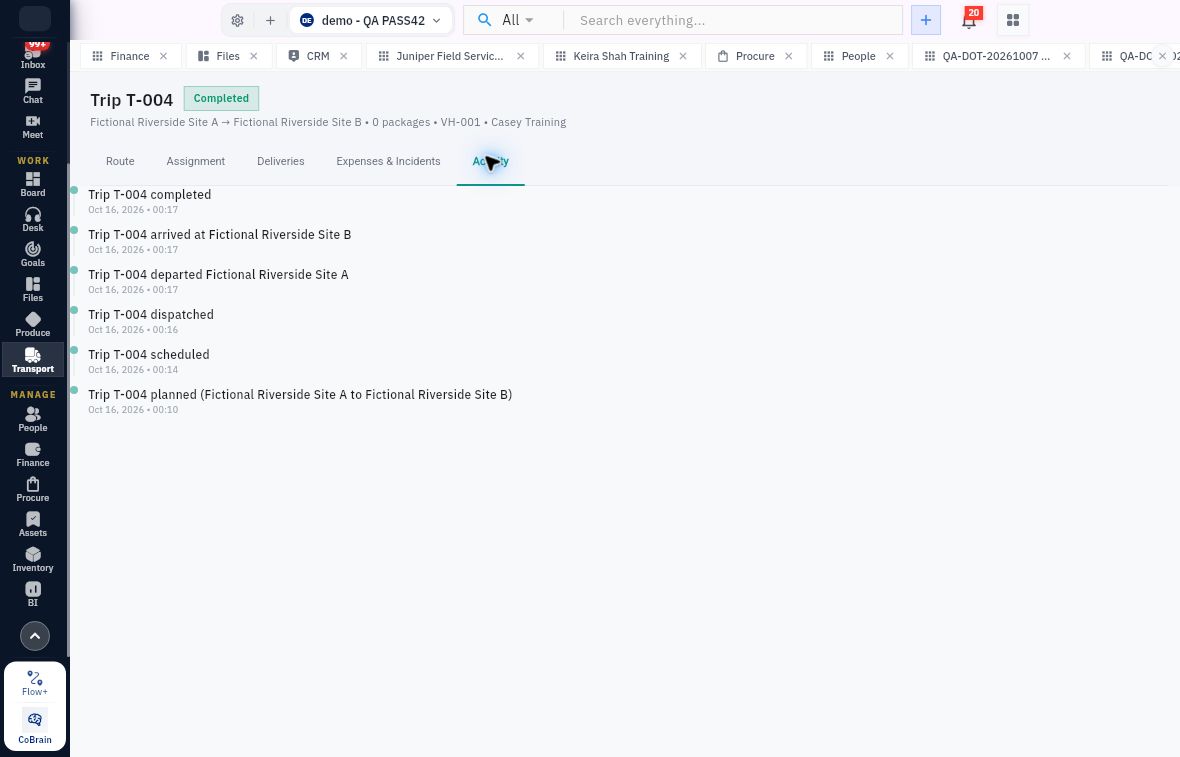
The separate zero-package T-004 example preserves planned, scheduled, dispatched, departed, arrived and completed events in Activity.
The pictured T-004 used VH-001 and zero packages. The separate T-005 example carried DLV-001's one hypothetical package using VH-004. Read each record's own identifiers; their histories cannot be combined into one case.
Record ending mileage on the correct basis
Completion shows Trip starting mileage and requests Ending odometer (km), with an Ending mileage unavailable checkbox. Odometer is cumulative: if the start is 4,200 km and end is 4,253 km, enter 4,253, not the 53-km difference. The difference is useful for reconciliation but is not the requested field.
Use the unavailable option only when that is the truthful result and the approved process permits it. The demonstrated completed trip retained no ending mileage when unavailable was selected; completion did not calculate or invent one. Reopen the trip and verify the resulting status and mileage record. Preserve an unexplained decrease or implausible distance for review instead of editing the start to make arithmetic work.
Verify released resources rather than inferring them
A completed trip may retain its historical vehicle and driver links. Those links are not current assignment. Independently reopen Fleet and inspect current status, current trip and driver. Then open Drivers and inspect availability, current vehicle and current trip. Check the exact resources used, not a similarly named fixture.
A refreshed list is useful after the save settles. If a resource still appears assigned, retain the trip reference and each current readback for investigation rather than repeatedly completing or creating a replacement journey. Availability in the application also does not establish physical readiness for the next load.
Log incidents and expenses with their real relationships
Incidents → Report Incident includes required Type, Severity, Location, Description and Occurred on, with At time and optional Trip, Vehicle and Driver links. Initial choices such as Other and Medium are form defaults, not findings. Choose the actual classification and preserve facts without turning a report into an unproved conclusion. An incident report is separate from resolving the risk or returning a vehicle to service.
Expenses → Record Expense opens Record Transport Expense. Required fields are Category, Amount, Currency and Expense date. Optional Trip, Vehicle, Driver, Carrier and Note connect the cost to its context. Verify amount and currency against the real supporting record; a blank trip means no explicit trip link, not automatic allocation. Transport recording does not establish Finance approval, posting or payment.
Interpret reports with the underlying populations
Reports includes operational counts such as active trips, deliveries moving, open incidents and vehicles due maintenance. Trip performance includes on-time arrival, delivery success, fleet utilisation and completed trips. Open the relevant records and time context before treating a count as a complete operational conclusion.
A sample report could show completed trips and an on-time percentage while delivery success reads No delivery outcomes. This is not contradictory: journeys and delivery results are different populations. Do not convert an absence of outcomes to a zero-percent failure rate or infer an undocumented formula from rounded values. An active-trip count of zero also does not prove every return is reconciled or every expense is posted.
A final readback should identify the trip, each linked delivery and source, actual event sequence, proof or failure/return status, cargo reconciliation, start/end mileage or its declared absence, and current resource assignments. Hand unresolved physical, Inventory, safety or Finance matters to their respective owners rather than treating the green Completed label as universal closure.
Turn what you learned into the way the team works.
Mark this lesson complete once the workflow exists in your workspace—not simply when you reach the bottom.