Prepare a workshop handoff pack
Use Pages, Inbox, Chat, Meet, Goals and People to inspect the right context and assemble a complete, ready-to-review workshop handoff pack.
Part of Your first working workspace
In this lesson
1. Prepare consistent enquiry-page copy
Start with a customer request, not an empty message or page. Riverside Studio is the fictional team preparing a workshop; Cedar Lane Training is the customer. Alex has requested five participants, five practice kits and a 45-minute session on 2 November 2026 at 10:00 UTC. The USD 150 budget is a ceiling, not an approved price or booking.
Create a local working document called Workshop handoff pack. Add the worksheet from Practice materials at the end of this tutorial. You will use it to bring the customer reply, corrected guide, review request, session plan and readiness checks together.
Continue from Get started with Workroomly if you have not yet learned to find your workroom, Board task, Files brief and CRM enquiry. Reuse those existing practice references; do not create another task or lead for this guide. The case inputs needed here are included below.
Use only a workroom and training records you are permitted to inspect. Keep the fictional names out of real recipient searches. This exercise prepares local copy and checks existing screens; it does not publish a page, send a message, book a session or create employee records. If no designated training record is available, use the supplied case rather than another person's private data.
Write the offer and inspect the page
Alex's request has already been received. The page copy you prepare now explains the same offer for future enquiries; Alex did not submit this new draft form.
Pages presents an offer and can collect enquiries. Useful copy promises only the service you can deliver.
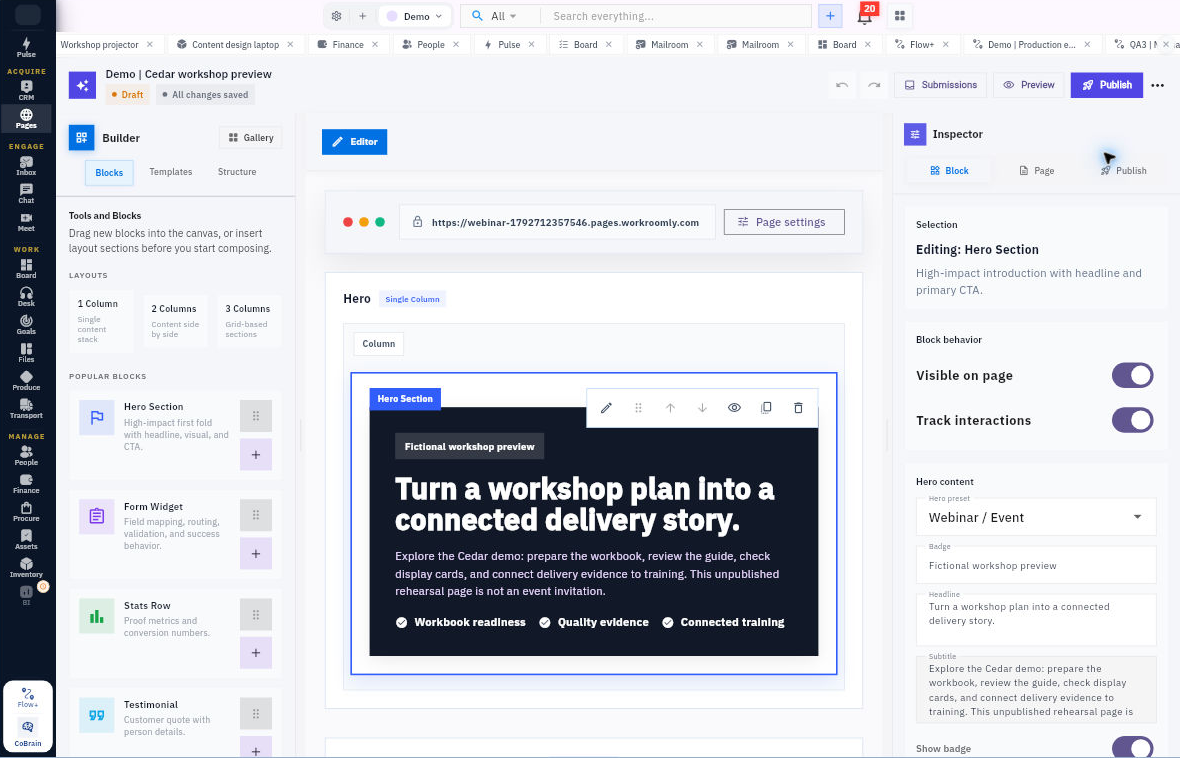
Open in Workroomly: Pages → exact permitted page → Overview → Edit Page. In the builder, use More builder actions → Inspector panel → Page or Block.
- Read A1–A4 in Practice materials, then write the complete page copy in your pack:
- Headline: “Plan a clearer team handover”
- Offer: “A 45-minute workshop and a five-person practice kit”
- Button: “Ask about a workshop”
- Success title: “Enquiry received”
- Success message: “We will review your request and confirm the next step. This is not a booking confirmation.”
- Open an existing permitted training page's Overview, then Edit Page. Locate Page name, a Hero Section's Headline and the Form Widget inspector. Read Draft/Published and the saved state separately. Record the page name and the states you actually see; do not alter or publish the retained page.
- In your pack, specify required First name and Work email, optional Team size, a purpose limited to enquiry follow-up, and a Lead route to the intended CRM space. Write the exact destination as pending until you have verified your own workroom and space.
Expected result: Complete enquiry-page copy and a small field/routing specification, plus the name and visible states of the training page you inspected, if available. This is not a published website or proof that a submission reaches CRM.
Check your result: Explain the four different results: content saved; a visitor can open it; a submission is retained; and that same submission reaches the correct owned CRM record. A saved state alone does not prove the other three.
If you have no permitted page, keep the complete local copy. Do not use Run Current Routes as a refresh.
2. Read the request and prepare a reply
Inbox connects an incoming message to a considered response. A preview or Needs reply flag does not replace the body.
Open in Workroomly, only for a designated training message: Inbox → Mail → Search emails → exact subject/reference → open message.
- Read the complete fictional enquiry in A1 under Practice materials. Do not search a real mailbox for Alex. If you are separately permitted to inspect an existing training message, match its full subject, sender/recipient context and reference before reading the body. Opening mail may change its unread state.
- Write this complete reply in your working pack:
Thanks, Alex. I have recorded five participants, 2 November at 10:00 UTC for 45 minutes, and a USD 150 budget ceiling that still needs approval. The pack will include a clear agenda and five practice kits. Please confirm the scope, agreed price and delivery arrangement before we treat this as a booking. We will use your contact only for this enquiry.
- Label the response Draft not sent and keep it out of a live composer. Beside your existing CRM enquiry and Board task references in the pack, note that scope, price and delivery still need the customer's confirmation. This is a local dependency note, not an instruction to update unrelated records.
Expected result: A complete, accurate reply draft with no outgoing message or new commitment. If you inspected a training message, record the exact message context you checked without copying private content into the exercise.
Check your result: Does the full reply preserve the unapproved budget and avoid saying the workshop is booked? Confirm the five participants, date, UTC time, duration and five kits against A1—not just the subject line.
Do not connect an account to finish this exercise. The guided native action here is reading an existing permitted message, not composing, saving or sending a new one.
3. Prepare the guide and request a focused review
Before asking someone to review guide v2, prepare the complete version they would receive.
Correct the supplied guide
- Use the complete guide v1 text in A3 under Practice materials. Copy its title, start, duration, agenda, kit contents and complete missing-or-damaged-item rule into a local text file. The two final sentences about the deliberate defect and preserving other text are exercise instructions, not guide content.
- Follow A4: change the start from 09:00 UTC to 10:00 UTC and label the corrected version Riverside handover workshop guide v2. Preserve all other guide content, including the full stop rule.
- Save the whole corrected text as Riverside_Workshop_Guide_v2.txt and record its actual local filename in your pack. Check that the agenda still totals 45 minutes. Preparing the correction is not reviewer acceptance.
Inspect the conversation controls and prepare the request
Chat is useful for discussion, but asking for a review does not make the reviewer responsible for every follow-up.
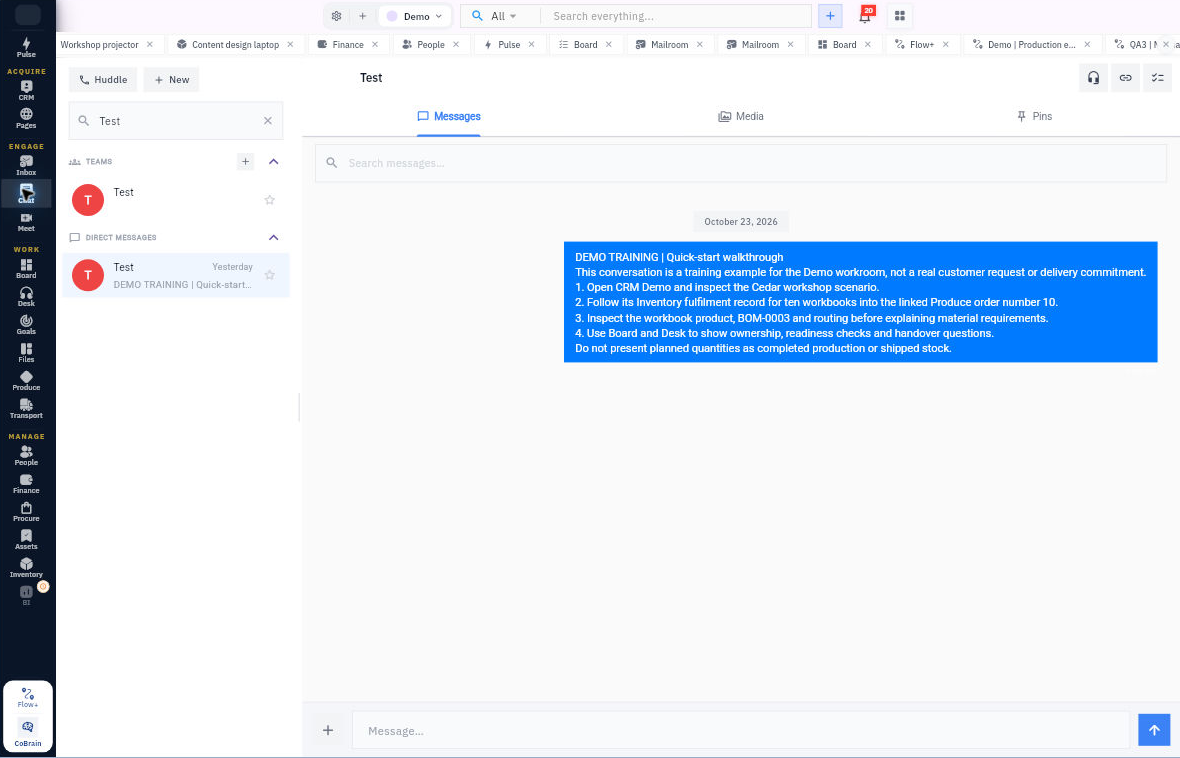
Workroomly route: Chat → + New → New Chat → Search by name or email → verified recipient; the Message composer is at the bottom. This exercise stops before typing or sending. Never use the fictional reviewer as a recipient search.
- If you have an existing designated training conversation, open it and locate its Messages, Media and Pins tabs, as shown in the example below. Read only the permitted training content. Otherwise use the screenshot to identify these controls.
- In your local pack, identify the proposed reviewer role as workshop lead. Rowan is fictional, not a verified Chat recipient. Do not search for or invite a made-up person.
- Keep your complete saved guide v2 beside this complete local request, and record the exact guide filename as its material reference:
TRAINING ONLY. Please review Riverside workshop guide v2 against the 10:00 UTC start, 45-minute agenda and missing-item stop rule. Reply with corrections or acceptance of the content. I retain responsibility for tracking the launch pack; this request does not assign you delivery work.
- Label the request Draft not sent. Leave the review response pending. The later classroom response belongs to the final walkthrough, not this step. Separate an acknowledgement, acceptance of the specific content and acceptance of owned work; they are different results.
Expected result: A complete corrected guide and a review request with an explicit object, version, criteria and responsibility boundary. The current guide filename connects the request to its actual material.
Check your result: Can you state who owns follow-through before anyone replies? You retain responsibility for your practice task. A request does not transfer that responsibility or prove a response has arrived.
Live sending belongs to deeper Chat practice with a consenting, verified practice partner. No real exchange is required here.
4. Plan the workshop and inspect the room
Meet separates an appointment, room, live session and history. Each answers a different question.
Open in Workroomly: Meet → Rooms. Inspect labels such as Details, Access and Schedule only when authorised. Appointment creation is a different route—Inbox → Calendar → New Event—and is not used in this exercise.
- Write the complete appointment plan locally: TRAINING Riverside workshop, 2 November 2026, 10:00–10:45 UTC, 45 minutes, does not repeat, organiser learner role, zero real guests, approved room pending. Include the agenda: 5-minute welcome, 10-minute demonstration, 20-minute exercise, 10-minute review.
- If you can view a permitted training room, match its name and note its available labels. Record the exact room name you inspected. Do not select Meet or Join, copy or distribute a link, change media permissions or create an appointment.
- Keep four separate slots in your pack: planned interval; permitted room and audience; actual media/session result; matching ended history. Leave unperformed slots not demonstrated.
Expected result: A usable session plan and a clear list of the checks needed before real participants rely on it. A room observation is separate from the local appointment plan.
Check your result: Does a Schedule row prove attendance or working audio? No. Does a room name alone prove its audience? No. Your plan must not imply that either check has already passed.
If the room is unavailable or permissions differ, keep the plan local. Navigation alone cannot establish a successful live session.
5. Define the readiness baseline and inspect its measure
Goals describes the result the work supports. Use five specific readiness checks, not a vague percentage feeling.
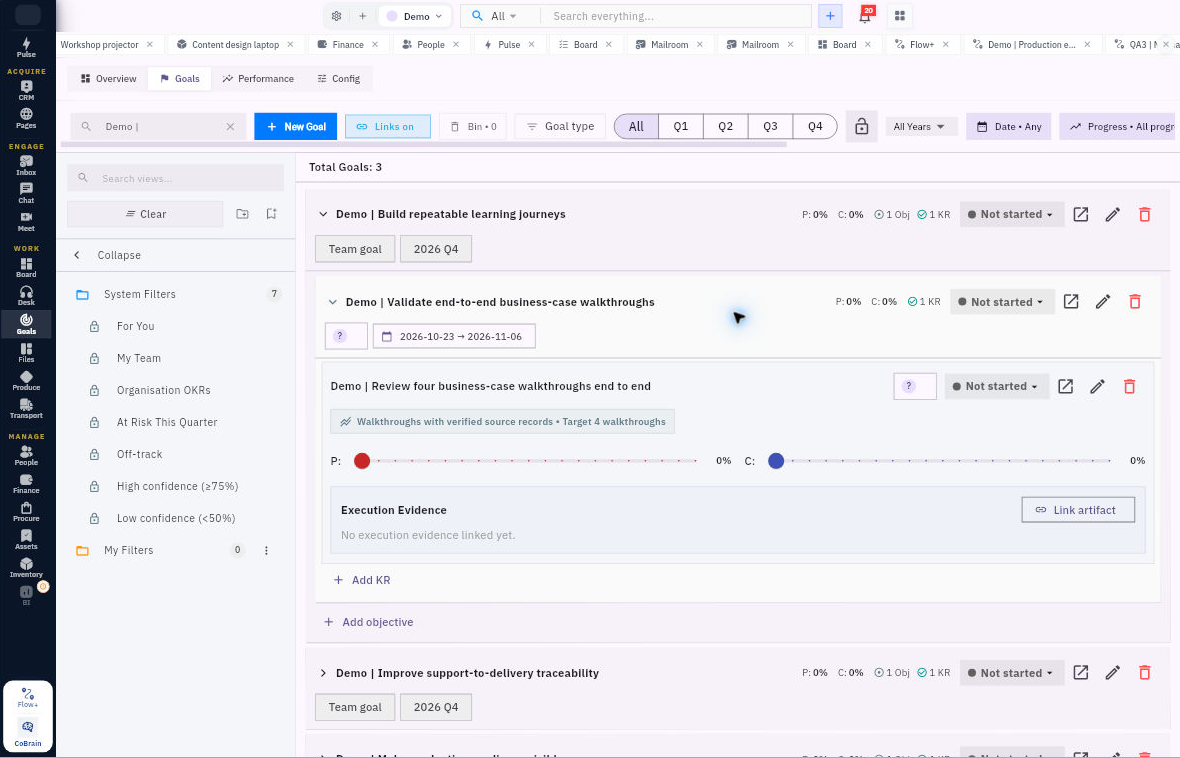
Open in Workroomly: Goals → Goals tab → exact permitted goal → objective → key result Open detail.
- Use A9 under Practice materials to define the goal “Prepare a dependable workshop”, objective “Make the launch pack ready”, and key result “Five readiness checks pass before delivery”. The target is 5 checks; the initial baseline is 2 passed of 5, or 40%.
- Label that baseline 26 October 2026 at 09:30 UTC—before the guide correction. It is a starting snapshot, not the current readiness of the draft you have just prepared. Record your corrected guide separately; review acceptance, customer confirmation and later delivery evidence remain separate checks.
- For a permitted native read, open a training key result and inspect Measurement, Target, Parent chain, Owner and Team. Read Progress, Confidence and Status separately and record the values you actually see. Do not move sliders or create a hierarchy in this exercise.
- In your pack, link the idea manually to your existing Board task: the task produces the pack, while checklist evidence determines readiness. At the later final walkthrough, recompute from the additional facts rather than copying a saved percentage.
Expected result: A complete measure definition with denominator, target, dated baseline and evidence source. If you inspected a native key result, its actual values are recorded separately from the fictional case.
Check your result: Q1 and Q2 pass in the initial snapshot. Can you explain from A1–A5 and A8 why Q3 and Q4 fail and Q5 is pending? Only Pass counts toward the fixed denominator of five.
A completed status badge or another key result's percentage is not evidence for this case or for automatic parent rollup. Do not present the sample hierarchy below as your saved Riverside result.
6. Prepare the facilitator and inspect employee access
People holds workforce context. A facilitator named in the case is not automatically a created employee, an active workspace member or a trained operator.
Open in Workroomly: People → Directory → Employees → Search by name or email → exact permitted employee profile.
- Read the full fictional role card: Casey Training is the facilitator, has accepted the 45-minute workshop preparation role, and has no real contact address or software account supplied. Their next preparation action is to read guide v2 and explain the missing-item rule.
- If a designated training employee is available, inspect its complete identity, Type, Status and Workspace access separately. Record only the permitted training context. Do not create a person to populate this exercise or link an account.
- Add a two-item facilitator brief to your pack: read the exact guide version and demonstrate the exception rule before leading the exercise. Name your actual saved v2 file, not just “the guide”. Record acceptance of the preparation role separately from completion of these learning checks; no such completion has been supplied in this part of the case.
Expected result: A concise facilitator-readiness plan and a correct distinction between an employee record and workspace membership. The brief points to a complete guide that now exists locally.
Check your result: Can Active plus Unlinked be a valid displayed combination? Yes. Neither a profile nor an assigned course proves learning was completed.
If no designated training employee is available, use the complete role card above. Do not use a real employee's private details or create a substitute identity.
Finish your workshop handoff pack
Read the pack from the customer's request through to the facilitator's next action. Confirm that it contains:
- The complete enquiry-page copy and form/routing specification, without calling the draft published or the enquiry a booking.
- The complete Draft not sent reply, preserving the five participants, five kits, 10:00 UTC start, 45-minute duration and unapproved USD 150 ceiling.
- The whole saved guide v2, with only the required start-time correction and version label changed, plus the full review request and exact filename. Reviewer acceptance is still pending.
- The session interval and four separate evidence slots; no appointment, attendance or working media is claimed.
- A five-check measure with the explicitly dated 2/5 = 40% initial baseline, not a fabricated current total.
- A facilitator brief naming v2 and the missing-item rule, with role acceptance separate from demonstrated learning.
Keep any native observations beside the training records you actually inspected; do not substitute the fictional case or screenshots for a saved result. Your output is a complete ready-to-review local handoff pack, not an approved workshop. Reuse the foundation task reference and do not mark that task complete merely because these drafts are assembled; guide review and the remaining readiness work are still open.
Your pack should make the next actions clear: review the exact guide version, check the facilitator’s preparation and obtain the outstanding customer confirmation before relying on the workshop plan.
Practice materials
Case inputs
These are the complete source paragraphs needed for this guide, selected from Packet A. The full packet remains in the foundation tutorial's practice materials. Sections A6–A7 and A11–A13 support later work and are not required here. Packet B is reserved for the final walkthrough; no later acceptance or successful delivery is assumed in this guide.
All names, dates, places, identifiers and events in packets A and B are fictional teaching facts. They are not existing Workroomly records, real contacts, bookings, stock, invoices or proof of physical activity. Case currency is USD and every case clock is UTC. No real addresses or credentials are needed. The fictional dates stay fixed for the case; do not create past-due native reminders from them.
A1 Customer enquiry received on 26 October 2026 at 09:00 UTC. Alex Morgan, Cedar Lane Training: “Please plan a 45-minute handover workshop for five participants on 2 November at 10:00 UTC, with five practice kits. Our budget ceiling is USD 150 but I still need to approve the price and delivery arrangement. Please reply about this enquiry only, not marketing.” No email or telephone is supplied.
A2 Proposed scope and roles. Riverside Studio prepares one workshop guide and five kits. The guide teaches a responsible person, next action and exception rule. Rowan is the fictional workshop lead and content reviewer. Mina is the fictional coordinator. Casey Training has explicitly accepted the facilitator preparation role in this paper case. Alex must accept price and delivery. These are paper role agreements, not actual accounts or saved assignments.
A3 Agenda and guide v1. Title: Riverside handover workshop guide v1. Start: 2 November 2026 at 09:00 UTC. Duration: 45 minutes. Agenda: welcome and purpose 5 minutes; demonstrate responsible person, next action and exceptions 10 minutes; five-person practice exercise 20 minutes; review and next steps 10 minutes. Each kit contains two prompt cards and one sleeve. If a kit item is missing or damaged, stop that kit’s exercise, keep the result unresolved and tell the facilitator; do not invent a count or mark it complete. The start time is the deliberate defect. All other text must be preserved in the correction.
A4 Correction request on 26 October at 09:15 UTC. Mina asks: “The enquiry says 10:00 UTC but guide v1 says 09:00. Correct the guide’s start to 10:00 UTC, keep the rest of the content and the complete exception rule, then return the whole v2 for review. Content review is not a test of a real meeting or stock.”
A5 Recipe and stock at 26 October 09:20 UTC. RIV-KIT v1 makes one kit from two RIV-CARD and one RIV-SLEEVE, zero scrap. Five kits are needed; there are no finished opening kits. Cards: 11 on hand, two held, one reserved for another job, eight eligible. Sleeves: five on hand, one held, four eligible. No incoming receipt is yet accepted. Unit cost is USD 0.50 per card and USD 0.40 per sleeve. Buy only the exact gap. All units are each; no tax, freight or discount applies in this simplified purchase exercise.
A8 Asset and delivery requirement. One projector RIV-P01 and one cable RIV-C01 are required for Casey’s session, with exact identity, accessories and working-sample checks before use and after return. One fictional bundle contains five kits; origin Riverside prep desk; destination Cedar Lane training room; intended recipient Alex; required arrival before 09:45 UTC on 2 November. Vehicle, driver, weight and volume are not supplied at this planning checkpoint. Do not infer dispatch readiness.
A9 Readiness register at 26 October 09:30 UTC. Q1 Scope and agenda accurately documented: Pass, supported by A1–A2 and the agenda duration. Q2 Facilitator accepts preparation role: Pass, supported by A2. Q3 Guide time matches 10:00 UTC: Fail, A3–A4. Q4 Eligible material covers ten cards and five sleeves: Fail, A5. Q5 Customer accepts price and delivery plan: Pending, A1 and A8. The fixed denominator is five checks; only Pass counts. Target is five before delivery.
A10 Local practice boundary. Use your own run suffix and verified practice workroom for the optional Board task, harmless Files upload and lead. Fictional names are not invitees, recipients or payment destinations. If no approved practice route exists, retain the local specifications and mark native work not performed.
Workshop handoff pack worksheet
Copy the following into your local working document. Use the source module entries to record what you prepared and, separately, what you actually inspected. Keep your existing foundation references rather than making duplicate records.
Workshop handoff pack working copy

Run suffix: __________
Actual observation date/time: __________
Existing foundation task / lead / brief references, or local-only: __________
Corrected guide v2 actual local filename: __________
Reviewer request: Draft not sent; acceptance pending
Facilitator learning checks: __________

Meeting evidence slots
Planned interval: __________
Permitted room and audience, or not demonstrated: __________
Actual media/session result, or not demonstrated: __________
Matching ended history, or not demonstrated: __________

Readiness snapshot date/time: 26 October 2026 at 09:30 UTC
Initial passed checks / fixed denominator / percentage: __________
Source evidence and subsequent work kept separate: __________

05 Pages Prepare an honest invitation to enquire
What I produced or concluded: __________
Native action/observation or not performed: __________
Source and next check: __________

06 Inbox Read the full request and prepare a reply
What I produced or concluded: __________
Native action/observation or not performed: __________
Source and next check: __________

07 Chat Ask for one clear internal review
What I produced or concluded: __________
Native action/observation or not performed: __________
Source and next check: __________

08 Meet Plan a session rather than claim one happened
What I produced or concluded: __________
Native action/observation or not performed: __________
Source and next check: __________

09 Goals Define a measure you can actually check
What I produced or concluded: __________
Native action/observation or not performed: __________
Source and next check: __________

10 People Separate the person from their access
What I produced or concluded: __________
Native action/observation or not performed: __________
Source and next check: __________
Turn what you learned into the way the team works.
Mark this lesson complete once the workflow exists in your workspace—not simply when you reach the bottom.