Desk course 04 — Maintaining the conversation and coordinating supporting work
A useful response tells the requester what was understood and what happens next. A useful internal contribution gives the handler or specialist enough information to act. Choose the correct audience and control before entering content.
Part of Desk module course
In this lesson
Requester communication and supporting work
A useful response tells the requester what was understood and what happens next. A useful internal contribution gives the handler or specialist enough information to act. Choose the correct audience and control before entering content.
In this chapter
- Distinguish the conversation surfaces
- Write a complete, bounded response
- Keep a usable handling note
- Create or link supporting Board work deliberately
- Verify the handoff, not just the link
Distinguish the conversation surfaces
The ticket has Ticket thread, labelled customer-facing conversation and follow-ups, and Respond to the customer with a response box, CC others on this response, Add files and Send response. A separate Comments area supports asynchronous collaboration and handoffs.
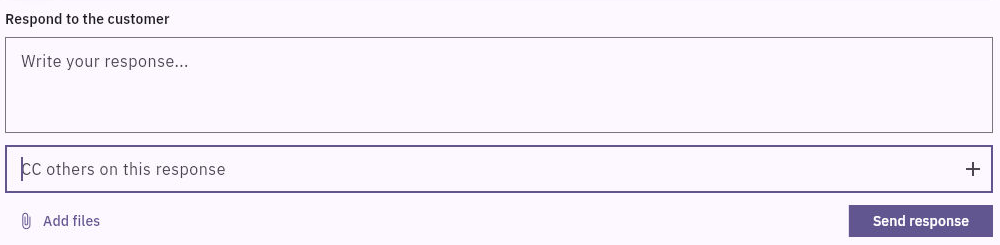
Comments visibility and specialist handoff
Do not assume Comments is confidential merely because a contribution displays Internal. In an inspected example, the same saved comment appeared in the owner-visible Ticket thread without the badge. That does not prove external delivery, but it means a label alone is insufficient to certify audience boundaries. Use only content appropriate for the verified surface and approved audience.
A watcher is not automatically a response recipient. A CC expands the communication audience. A stored attachment may carry different access from the ticket itself. Confirm these separately instead of assuming the service makes every relationship equivalent.
Write a complete, bounded response
For the fictional guide request, a suitable draft is: “We understand that ‘the usual materials’ does not identify what to bring. The approved materials are one sheet of paper and a pen. We will review a revised version that preserves the instruction to draw Output, Owner and Check boxes. After that review, please check the final text through the agreed route and tell us whether the materials and first action are clear.”
This states the issue, proposed correction and requested check without falsely claiming the work is already done. If no delivery time is agreed, do not invent one. Keep a draft as a draft until the destination, body and attachments are approved for sending.
Before Send response, verify the exact ticket, actual requester destination, every CC, complete text and files. A successful send action is not the same as retained body, received copy, human reading or acceptance. After an authorized send, reopen the same record and check the complete message. Verify delivery through an authorized receiving route only when that is required and available.
If delivery is uncertain, inspect the existing thread and permitted destination before sending again. Duplicate messages can confuse the requester and obscure which version was intended.
Keep a usable handling note
A handling note should preserve the source/version, observation, next action, owner and remaining limits. For example: “Guide v1 uses an undefined materials phrase. Approved replacement is ‘one sheet of paper and a pen’; retain the existing first action. Source correction and complete-text review are pending. Requester readability and acceptance must be checked afterward.”
Do not paste private account data, unrelated conversation or speculative personal information into a note. Record only what the handling decision needs. A note describing work is not proof the work happened; update the result only after checking it.
Create or link supporting Board work deliberately
The ticket's Linked tickets section describes Board tasks tied to the Desk ticket. It provides Create task and Link board task. Linked Entities is a separate generic linking area; do not confuse the two.
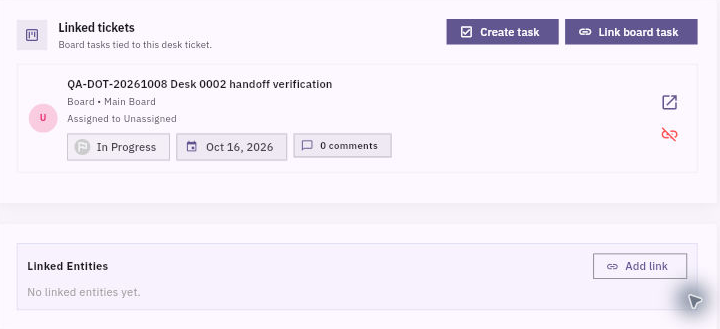
Specialist coordination and requester updates
Use a separate task when specialist ownership, production or review needs its own work item. A tiny correction may stay within the ticket if another task adds no useful coordination.
Create task opens a Board choice and then the Board task form. The inspected form did not automatically copy the ticket title or context. Enter a complete Task Title and Description rather than assuming the relationship supplies a usable brief.
For the example, the specialist brief is: “Revise welcome guide v1 by replacing ‘the usual materials’ with ‘one sheet of paper and a pen.’ Preserve the Output, Owner and Check instruction exactly. Return the complete revised text with a new version identifier. Acceptance: materials are specific, the first action is unchanged, and the support agent can compare the complete result. Requester acceptance remains a separate support step.”
Choose only the authorized Board and actual specialist account when assignment is intended. Dates, status and assignee on the Board task are separate from the support ticket. If an appropriate task already exists, use the supported Link board task route rather than creating another one. Verify the retained card after returning to the ticket and open the task to compare the complete brief.
Verify the handoff, not just the link
A saved relationship means the records are associated. It does not establish that the specialist accepted the work, can read the source, or produced the correction. Confirm the human agreement and usable inputs through the permitted process.
When the specialist returns the revised text, inspect it against the unchanged criteria, record findings and coordinate any correction. Only then ask the requester to perform the original receiving check. A Done Board task does not automatically resolve the support ticket or establish that the requester's problem is gone.
Turn what you learned into the way the team works.
Mark this lesson complete once the workflow exists in your workspace—not simply when you reach the bottom.