Desk course 05 — Reviewing the solution and using the ticket lifecycle
Desk lifecycle controls record progress through a service process. The correct transition follows the request's evidence and the actor's authority. It should not be used to hide missing work or repair an unexplained clock display.
Part of Desk module course
In this lesson
Solution review and lifecycle decisions
Desk lifecycle controls record progress through a service process. The correct transition follows the request's evidence and the actor's authority. It should not be used to hide missing work or repair an unexplained clock display.
In this chapter
- Read status meaning before moving the ticket
- Review the complete corrected source
- Record a justified resolution
- Understand lifecycle configuration without inventing enforcement
- Close or reopen only through a supported decision
- Test your decision
Read status meaning before moving the ticket
The observed service includes New, Open, Waiting on Customer, Customer responded, Resolved and Closed, plus a separately named synthetic status. The actual choices in your service may differ; use the supported configuration and the exact ticket's offered actions.
| State | Service meaning illustrated by the interface | Decision to keep separate |
|---|---|---|
| New | Intake has captured the request | A handler may still be unassigned |
| Open | Agents own and work on the request | The outcome is not yet established |
| Waiting on Customer | Input is awaited | Which exact input and next review point? |
| Customer responded | Requester input awaits follow-up | The reply is not automatically a satisfactory outcome |
| Resolved | Work complete and awaiting closure | Does the original finish condition actually hold? |
| Closed | Administrative final/archive stage | Does the policy permit final closure now? |
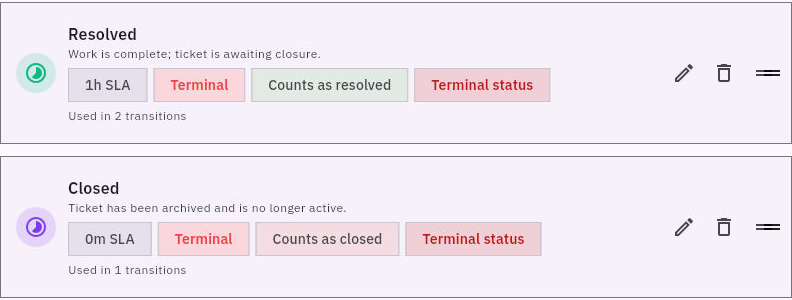
Offered transitions and required evidence
The ticket's Lifecycle Rules area shows its current state and supported actions such as Move to Open or Move to Resolved. An offered action proves availability to the current interface, not business justification to use it.
Review the complete corrected source
For the welcome-guide example, the proposed corrected text is: “Bring one sheet of paper and a pen. Start by drawing Output, Owner and Check boxes.” Compare both sentences with the original agreement. The ambiguous phrase is replaced, the first action remains intact, and no unapproved instruction has been added.
A full review result should name the version, checks, observations and remaining condition: “Version 2 names paper and pen and preserves the three box labels. The complete text meets the source-correction criteria. The practice requester still needs to open and assess this version.”
This is stronger than “fixed,” but it is not yet requester acceptance. If the requester cannot read the stored copy, retain the passed source review and keep the access/outcome issue open. Do not substitute the support agent's own successful view for the intended reader's check.
Record a justified resolution
Resolution should follow the original finish criterion. If the service agreement requires requester confirmation, obtain the specific result through the approved route. A message saying “thanks” without identifying the required check may not settle whether the corrected guide is usable.
When the evidence supports resolution and the actor is authorized, use the supported transition once. Leave and re-enter the same ticket, match reference and full title, and read the retained state, original context and complete review/receiving result. Compare activity and clocks separately.
Do not assume a mandatory resolution-note dialog or automatic customer notice; those behaviors need actual verification. Record the substantive result before changing state rather than relying on the transition to manufacture it.
If an earlier view still shows the old state, retrieve independently before repeating the action. If detail, list or activity disagree, preserve the discrepancy. A repeated transition can introduce additional effects without resolving the original uncertainty.
Understand lifecycle configuration without inventing enforcement
Config > Statuses > New status exposes Status name, optional Description, Target SLA minutes, Color hex, Category, Pause SLA in this status, Counts as resolved and Counts as closed/final. Categories are Active, Waiting and Terminal.
A state can be terminal without you having established the customer's result. A Pause SLA setting is not proof that a specific ticket clock paused. Status-level targets and policy-level targets have separate controls; do not assume precedence or that manual-pause permission overrides status-based behavior.
The lifecycle transition editor includes From status, To status, Enabled, Restrict to assignee, Allowed roles, Required fields, Priority conditions and SLA state. Required fields is a comma-separated text area, not a verified dictionary of field keys. Do not type display labels and claim that the rule enforces correct evidence.
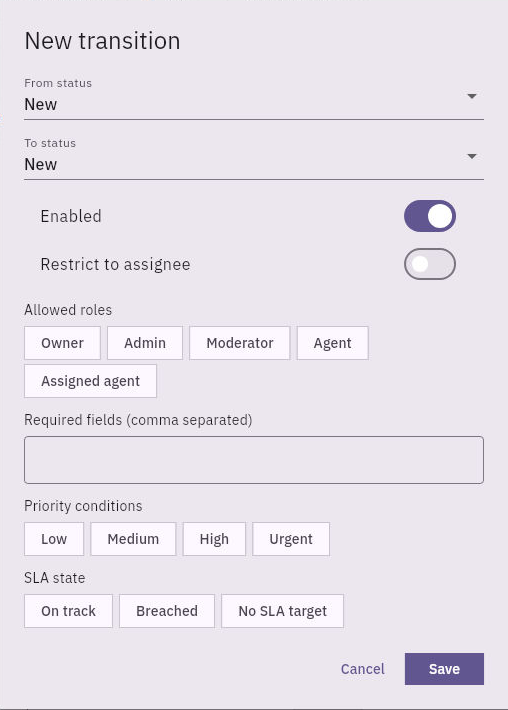
Roles conditions and lifecycle readback
Allowed roles include Owner, Admin, Moderator, Agent and Assigned agent in the inspected form. Empty selections and condition combinations have not been established as “everyone” or “nobody.” Save and the outer Save rules controls are distinct; their staged behavior should not be guessed. Shared lifecycle changes require their own approved plan and tests, not ordinary ticket practice.
Close or reopen only through a supported decision
Resolved and Closed are different stages. Close only when the service's closure criteria hold and the current action is supported. Keep the original context and resolution evidence after closure; administrative completion is not permission to erase history.
If the requester reports that the problem remains, first identify the same request and its original criterion. Determine the authorized supported continuation route. Do not invent a terminal-to-active transition or create a duplicate to avoid finding the correct route. Reopening and its clock/notification effects require their own verification.
A Closed label with a Running resolution clock is a discrepancy to investigate, not a reason to cycle states repeatedly. Preserve the request's business result and report timing separately.
Test your decision
The specialist task is Done, the source text passes review, and the intended reader receives an access denial. The correct conclusion is “source correction reviewed; requester outcome pending.” Keep the original request open under the supported process, identify the permitted access-resolution action and do not broaden sharing without approval. Neither Resolved nor Closed can make the inaccessible source usable.
Turn what you learned into the way the team works.
Mark this lesson complete once the workflow exists in your workspace—not simply when you reach the bottom.