Desk course 02 — Configuring service identity, routing and classification
Desk configuration defines a shared service. Understand the fields before changing them: a department, agent, ticket type, topic and custom field each answer a different question. Ordinary handling should use the agreed definitions rather than redesign them for one request.
Part of Desk module course
In this lesson
Desk administration and shared service boundaries
Desk configuration defines a shared service. Understand the fields before changing them: a department, agent, ticket type, topic and custom field each answer a different question. Ordinary handling should use the agreed definitions rather than redesign them for one request.
In this chapter
- Read the service identity and intake channels
- Define departments and handling responsibility
- Keep classification useful
- Design custom fields around information needs
- Apply a minimal setup decision
Read the service identity and intake channels
Open Config > Info. The service name, description, Desk Key and Desk UUID distinguish this desk. Edit opens an Edit desk form with Desk name and Description (optional), followed by Cancel and Save changes. A description should explain the requests the service owns and the expectations it sets.
Channels includes Public page, Email channel and API channel. Treat each as a separate intake route with its own configuration, audience and verification. An Email channel labelled Verified or Primary does not prove that a particular message created the correct ticket. Do not change forwarding or expose a public page as a side effect of practicing manual intake.
The API payload guide differs from the manual form: it marks requester_email required and documents conditional title/subject/message requirements. It also distinguishes ticket_reference from external_message_id and in_reply_to. A ticket reference identifies the request; external message identifiers concern messages and threading. Do not transfer the manual form's optional email label to API use, invent IDs, or assume a guaranteed retry/deduplication contract for new tickets. This course does not submit API intake.
The visible API guide maps these fields; it is documentation, not an executed request or a complete integration contract:
| Guide field | Meaning and requirement |
|---|---|
| requester_email | Required customer email; actual approved destination needed for real use |
| requester_name | Optional displayed requester name |
| title | Short title; required if subject and message are empty |
| subject | Alternate title with reference-parsing support; parsing syntax/precedence not established |
| message | Customer body; required if title and subject are empty |
| summary | Optional summary override; broader precedence untested |
| priority | Optional low, medium, high or urgent |
| ticket_type | Optional incident, request, change, question or training |
| department_id / topic_id | Optional actual destination identifiers, not display names |
| ticket_reference | Existing ticket reference for appending a reply |
| external_message_id | External message identity for reply deduplication; no new-ticket guarantee inferred |
| in_reply_to / references | External message relationship and related-message list, not ticket identities |
| attachments | Optional payload list using file_id or file_base64; full object shape and limits not supplied |
Keep the full request body even when a minimal conditional field combination might satisfy the guide. Do not invent attachment objects, authorization headers, retry semantics or undocumented IDs.
Define departments and handling responsibility
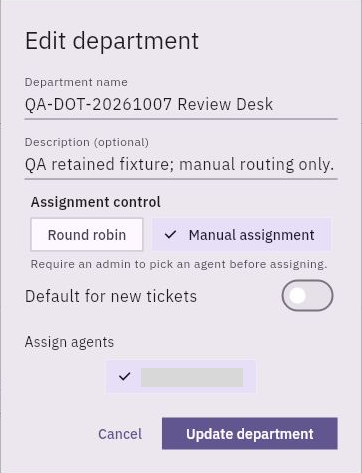
Open the service's Departments configuration. Existing department cards expose Manage routing & agents; New department opens a separate creation form.
| Control | Meaning and decision |
|---|---|
| Department name | The handling area, not a person's name |
| Description | Scope and routing expectations |
| Assignment control | Round robin or Manual assignment |
| Default for new tickets | Whether this department is intended as the default; verify behavior separately |
| Assign agents | The eligible people associated with the department |
Ticket classification and field definitions
The Manual assignment helper says an admin must pick an agent before assigning. A blank new form can display a helper without a definite selected-mode checkmark; do not infer a policy from helper text alone. Round robin's presence does not establish its distribution algorithm or that a particular ticket was routed automatically.
For the welcome-guide request, a guide-support department may be appropriate if that is an existing agreed scope. Department membership or a queue name does not fill the ticket's Assigned agent field. Check the request's actual owner separately after assignment.
Keep classification useful
Department answers “which handling area?” Topic answers “what subject?” Ticket type answers “what kind of request?” Priority answers “how urgently should it be handled under this service's definitions?” A source correction may differ from a question asking how to use already-correct text.
Use the complete request to choose values. For the example, the ambiguous materials wording supports a wording issue, not evidence of a broken link or a system incident. If the requester has not supplied the intended materials, preserve that unknown rather than invent a correct replacement.
Changing classification does not authorize a broader correction, audience or deadline. A better label cannot repair an incomplete context body.
Design custom fields around information needs
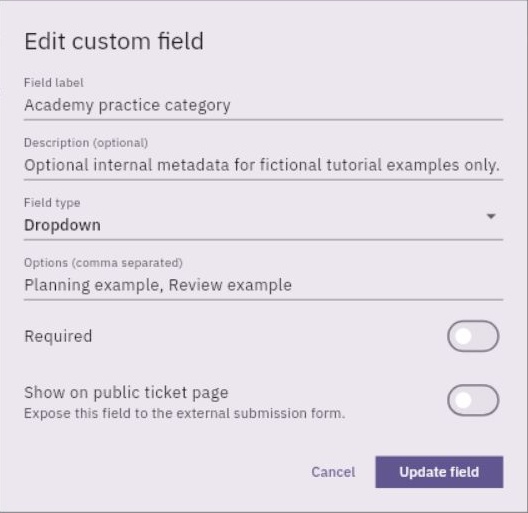
Open Config > Custom fields. The field editor separates Field label, Description, Field type, Required and Show on public ticket page. Dropdown adds Options comma separated. The public-page switch concerns an external submission surface; off is not a universal confidentiality guarantee for every view, export or notification.
Field types exposure and configuration checks
The observed type menu offers Short text, Long text, Dropdown, Number, Date, Checkbox and File upload. Choose Short text for a compact identifier, Long text for a fuller explanation, Number for a defined quantity, Date for a relevant date, Checkbox for one explicit yes/no condition, and File upload only when a file is genuinely needed. Dropdown exposes Options comma separated. The other inspected definition forms showed the common controls without extra visible type-specific settings; do not infer numeric precision, date/timezone rules, checkbox defaults or file-size/type limits from that absence. The separate ticket Attachments area is not the File upload field definition.
A simple dropdown such as “Planning example, Review example” provides controlled choices. The definition should explain what each choice means and how to treat blank. Blank means not recorded, not automatically No or a default. A source-version field should identify the actual version; a value saying Checked cannot supply the missing source or review result.
Definition and use are separate checks. After an authorized change, reopen the definition and compare label, type, choices and switches. Then inspect the intended ticket form, enter a permitted value only when needed, and reopen that ticket to verify retention. Do not claim value persistence from a saved definition alone.
A required business condition and a software Required switch are also distinct. Effects on existing tickets and different intake surfaces need their own supported tests. Do not assume renaming or deleting a shared field is reversible or lossless.
Apply a minimal setup decision
The welcome-guide request needs a complete source body, a handling department, an accountable agent and an agreed requester check. It may not need any new custom field. Prefer existing well-defined fields and a clear context body to configuration that duplicates information and creates maintenance work.
Before making a shared configuration change, identify the owner, affected records, expected result and recovery plan. If the supported behavior is unknown, keep the request's facts in its permitted context and obtain the service owner's decision rather than experimenting on live definitions.
Turn what you learned into the way the team works.
Mark this lesson complete once the workflow exists in your workspace—not simply when you reach the bottom.