Use CoBrain in a complete working routine
Combine a clear request, source checking and a useful final result without unnecessary complexity.
In this lesson
Use CoBrain in a complete working routine
Use CoBrain for one understandable job at a time. A short writing task needs a lighter process than a customer message, payment or change to shared records.
Work through one useful request
1. Choose the outcome. Decide whether you need draft text, information from a saved record or an action. Split a mixed request into these parts when necessary.
2. Choose the source. Use General for facts you supply, Workroom for accessible workroom records, or Current page for the exact attached page. Check the attachment before asking about it.
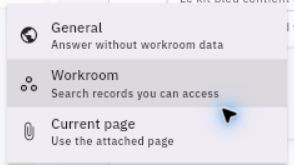
Write and check the request
3. Write and send a clear prompt. State the desired output, relevant facts and important limits in Message CoBrain, then select Send message.
In the Demo worked example, the exact task Demo | Review Cedar booklet layout against BOM-0002 was opened from Board → Client Delivery → Table in the Cedar workshop welcome guide project. Its attached page was checked before selecting Current page. One question was sent: “Using only the attached Demo task, what is its exact title, current status and due date? Cite or identify the attached task as your source. If any field is unavailable, say so. Do not change any record.”
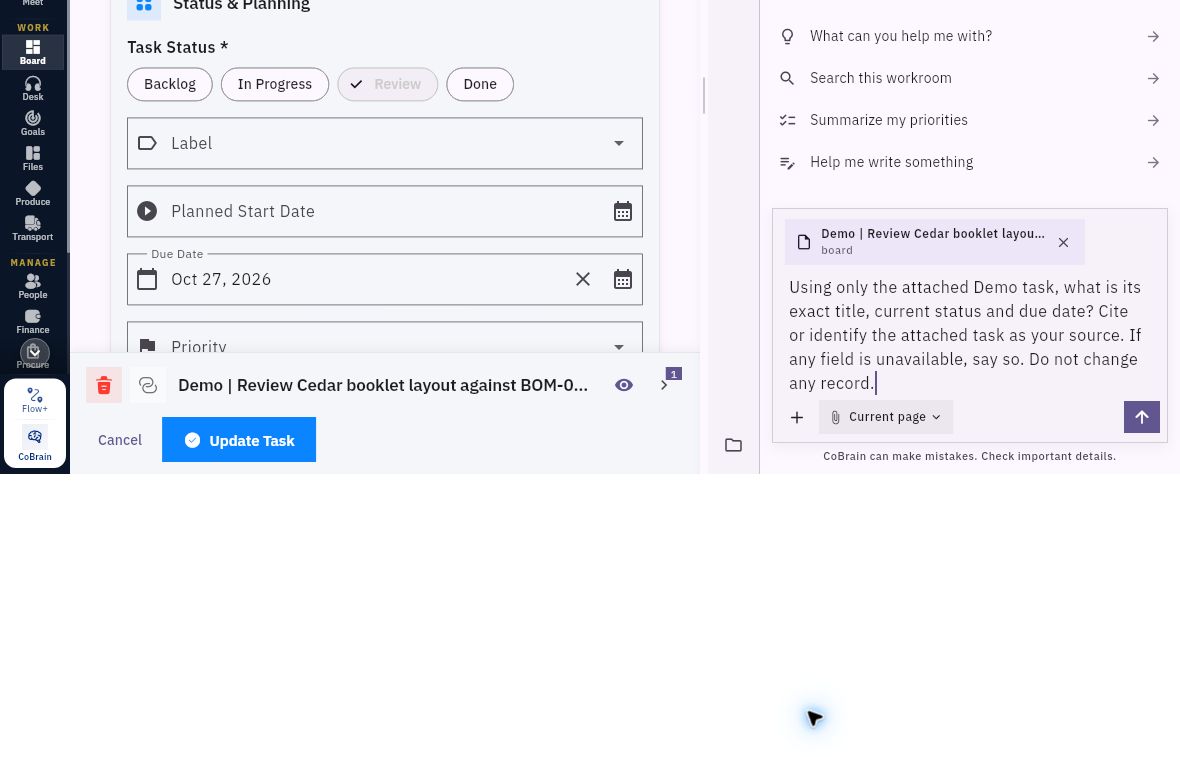
Compare the answer with the current task
4. Review the answer. Compare the whole response with the facts. Correct unsupported dates, people, promises or completion claims. Open the actual source when the answer needs to describe a current record.
5. Finish at the right point. A reviewed draft may be all you need. If you also need an action, check its destination and consequences separately, then confirm the actual result before repeating it.
The answer returned the exact task title, Review and 2026-10-27. The open task’s Task Status was Review and Due Date was Oct 27, 2026, so these fields matched. The source chip identified the attached task. For this check, compare the answer with the task already open beside it. If the link fails without an access-denied message, open the task through Board or global search. If access is denied, ask the owner for the appropriate access.
A suitable worked status summary is: “The Demo Cedar booklet-layout task is in Review and is due 27 October 2026. The title, status and date were checked against the attached Board task.” This is reviewed wording for the example, not a sent update. No Update Task, Act on this or Track a promise action was used; the verified answer was the useful endpoint. A Review label alone does not certify the booklet’s quality or delivery readiness.
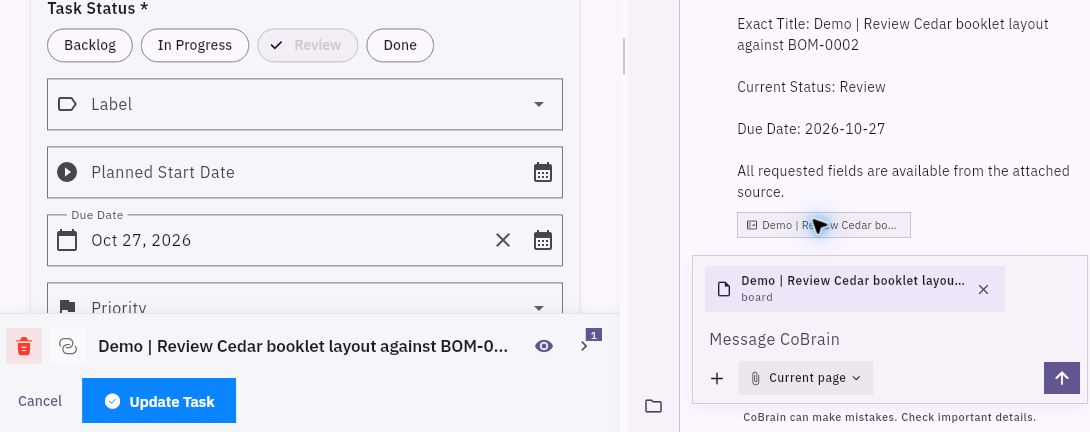
Finish without guessing
Handle a problem without guessing
If the source cannot be accessed, ask the appropriate owner for access or clarification. If the service does not return an answer, keep the prompt and the exact error so support can investigate. If the available facts do not answer the question, say what is missing rather than filling the gap with an assumption.
An old conversation opening successfully does not guarantee that a fresh request will work. Equally, a generic error does not explain whether the cause is a plan, permission or availability issue.
You should finish with something useful and accurate: reviewed wording, a source-backed answer or a checked saved result. Do not turn an incomplete response into an unsupported business decision.
Continue learning
In this series: Work with CoBrain — guide 7 of 7.
Turn what you learned into the way the team works.
Mark this lesson complete once the workflow exists in your workspace—not simply when you reach the bottom.