Board course 04 — Planning responsibility, dates, dependencies and sprints
A plan becomes usable when responsibility, sequence and capacity agree. Board stores these as separate values. This chapter explains how to choose them and how to avoid making the screen look complete while the underlying plan remains impossible.
Part of Board module course
In this lesson
Responsibility, timing and capacity
A plan becomes usable when responsibility, sequence and capacity agree. Board stores these as separate values. This chapter explains how to choose them and how to avoid making the screen look complete while the underlying plan remains impossible.
In this chapter
- Assign responsibility deliberately
- Separate the different kinds of time and effort
- Read dependency direction as a sentence
- Use a sprint as a timebox
- Review unfinished work without hiding it
- Try the planning check
Assign responsibility deliberately
Open the exact task from Table, Kanban, or Board-scoped global search. Read the full title and Board. Relationships > Assign Members records task responsibility; it is not the same as Board membership or a watcher.
Select only a verified account approved for the practice. A fictional role such as “Reviewer” is a planning role, not a name to search and match to a convenient real person. Do not replace an existing assignee without authority. After Update Task, reopen the task and compare the Assignee column in Table; horizontally scroll only after identifying the row.
A selected chip is input until retained. If the editor and list disagree, record the discrepancy and retrieve again rather than assigning repeatedly. Assignment does not prove that the person received a notification, agreed to the work or can read its file. Those are separate checks.
Separate the different kinds of time and effort
Planned Start Date says when work is intended to begin; Due Date says when that task is due. A project end date does not automatically supply either. Estimated Hours is planned labor. Logged Hours should reflect actual work, not a copied estimate. Story Points is relative sizing rather than a conversion to hours.
Suppose the draft needs 30 minutes, review 15 minutes and delivery handling 10 minutes. Planned labor is 55 minutes. If the reviewer has no available time before the deadline, spare author capacity does not remove that role-specific bottleneck. A five-minute delivery action also does not prove that a recipient will respond in five minutes.
In Status & Planning, choose a Priority for a reason. High can mean that the review threatens the delivery deadline; it is not proof that review has begun. Use the Due Date calendar, select the intended date and confirm OK where shown. Save once, then reread the task and the list's due-date value. Do not move a date merely to make a filtered view display the task.
Read dependency direction as a sentence
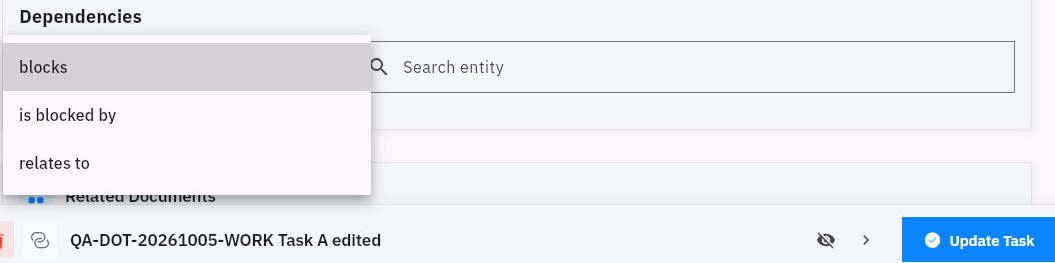
Dependencies offers Relation and Search entity. Observed choices are blocks, is blocked by and relates to.
For the note example, “Draft blocks Review” means Review needs the draft. Open the prerequisite draft task, choose blocks, search for the exact review task and read source, relation and target together before saving. Starting from Review would instead require the inverse meaning, “Review is blocked by Draft.” Do not add both directions to compensate for an ambiguous heading.
Context links and sprint planning
Relates to is contextual association, not a prerequisite. A useful reference example may relate to the draft without blocking it. Conversely, a required input should not be reduced to a loose contextual link merely because that choice is convenient.
After saving, reopen the source and inspect its retained relation and target. Inspect the target too where supported, but do not infer automatic unblocking, scheduling, cycle detection or transition enforcement from the relationship's presence. If a reverse-side heading is unclear, retain the exact observation and check the source direction instead of “repairing” it with another link.
Use a sprint as a timebox
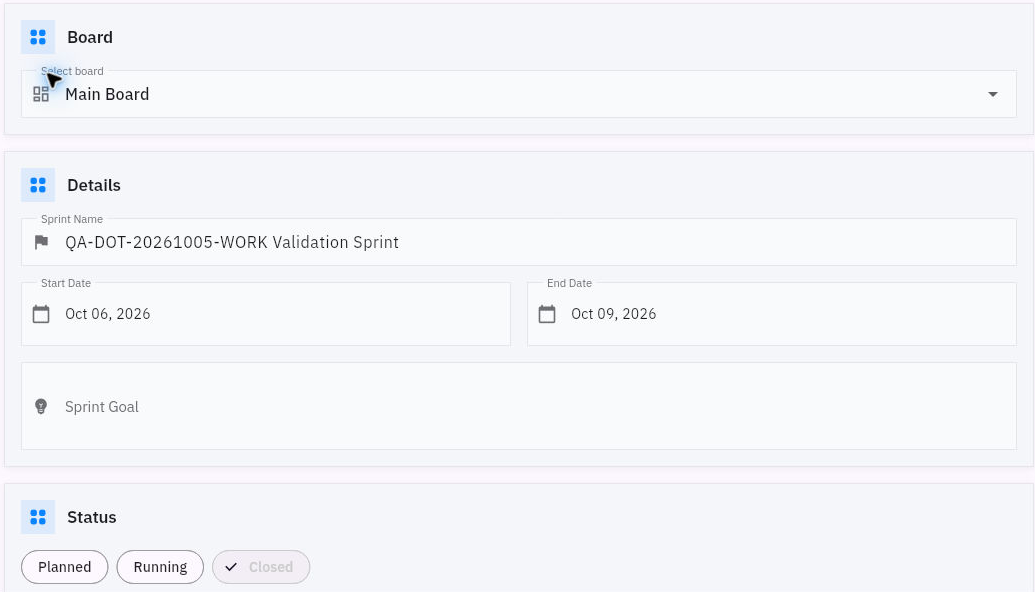
Open Board > Sprints. Search for the intended cycle before choosing New Sprint; an empty state may also offer Create Sprint. The form includes Select board, Sprint Name, Start Date, End Date, Sprint Goal and status. The observed states are Planned, Running and Closed.
A useful sprint goal for the example is “Prepare and review one usable welcome note.” The date range identifies the timebox; it does not guarantee that every task will fit. Choose a scope that matches available role-specific capacity and dependencies. Keep unstarted cycles Planned.
Sprint membership and planning checks
Save only when authorized, then return through Sprints and compare the exact record's name, Board, dates, goal and state. To include a task, open Relationships > Sprint on that task, select the intended cycle and Update Task. Reopen the task and then expand the sprint's left chevron to compare its task list. Project and Sprint are separate relationships; selecting one does not establish the other.
Review unfinished work without hiding it
At the end of a timebox, review the actual task states, outputs and remaining obligations. A Closed sprint can legitimately contain unfinished work, but that work needs an explicit next plan. Do not mark tasks Done simply to make the timebox clean or assume closure moves them automatically.
For the note example, the draft may be finished and the review may identify an unclear materials sentence. The appropriate next action is correction and re-review of that sentence. Closing the sprint does not turn the note into an accepted delivery. Preserve the unfinished task and its original acceptance condition.
Try the planning check
The draft is Done, review is Backlog, the delivery task is High priority, and all three belong to a Closed sprint. Is the note ready to deliver?
Not from those facts. The review has not been established as complete; High is only priority, and Closed describes the cycle. Read the actual draft and review requirement, arrange the permitted review, then decide delivery readiness from the resulting version and decision. The correct next step follows the work, not the most impressive badge.
Turn what you learned into the way the team works.
Mark this lesson complete once the workflow exists in your workspace—not simply when you reach the bottom.