Inbox course 02 — Prepare a complete reply and verify draft state
A reliable reply uses the right sending account, reaches only the intended people and answers the actual request with the correct material. Preparing text, saving a draft and sending are different stages. This chapter explains the observed composer fields and the checks that keep an incomplete or uncertain draft from becoming an accidental communication.
Part of Inbox module course
In this lesson
Reply audience and action choice
A reliable reply uses the right sending account, reaches only the intended people and answers the actual request with the correct material. Preparing text, saving a draft and sending are different stages. This chapter explains the observed composer fields and the checks that keep an incomplete or uncertain draft from becoming an accidental communication.
In this chapter
- Choose reply scope deliberately
- Understand the New Message composer
- Draft the answer from the source
- Check material and recipient access
- Verify the entire saved draft
- Separate send scheduling and delivery
- Practise the draft decision
Choose reply scope deliberately
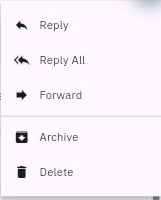
On the exact message, the action menu offers Reply, Reply All and Forward. Reply targets the appropriate response context; Reply All can include additional people from the conversation; Forward introduces a new destination. Inspect the resulting recipients rather than assuming the action selected the right audience.
Complete composer fields draft checks and sending
If the sender asks for a response only to them, do not include an unrelated copied supplier merely because Reply All is convenient. Check complete addresses, not display names alone. Resolve duplicates or unclear identities before entering sensitive content.
Forwarding can expose the quoted history, attachments and signature as well as your new paragraph. Review the entire material and its audience. An address appearing in an old thread does not automatically authorise that person to receive a new document or internal discussion.
Understand the New Message composer
Mail → Compose opens New Message in the observed route. The form provides Back, Save draft, a selected From account, To, a Cc/Bcc affordance, Subject, the Message editor and a signature selector. Lower controls include Attach, assistance, formatting, Schedule and Send.
Read From first. The connected account determines the sender identity; the correct workroom does not by itself settle it. Enter or verify To, then deliberately decide Cc and Bcc. Cc exposes recipients to the other visible recipients; Bcc is a separate addressing choice, not a remedy for sending to people who should not receive the content at all.
Keep a reference-bearing Subject that identifies the request and version. In Message, answer every required point and distinguish findings from promises. Check the signature as part of the full outgoing text. A familiar saved signature can carry a role, phone number or statement inappropriate for this account or audience.
Opening a blank composer establishes available fields, not a successful draft or send. A disabled-looking Send or an unresponsive Schedule control does not justify inventing missing prerequisites. Inspect the actual current flow within your approved scope; do not enter a real recipient merely to force a scheduling dialog to appear.
Draft the answer from the source
For practice, suppose version B contains ten minutes of introduction, fifteen minutes of practice and five minutes of questions. The requester asks whether it lasts 30 minutes, begins with a materials check and includes a recap. They explicitly ask you not to revise or book anything.
The timing totals 30 minutes, but a question period is not necessarily a recap, and no materials check is stated. A useful response says “Changes needed,” quotes the timing, identifies the two missing elements and preserves the no-revision/no-booking boundary. Do not say “I have fixed it” when you have only found the issue.
Prepare From, To, deliberate Cc/Bcc, Subject, all paragraphs and signature locally before a live practical. Include enough information to make the answer useful without an unnecessary attachment. A short complete response is safer than a subject-only draft with an assumed document behind it.
Check material and recipient access
Use Attach only for the exact approved file and version. Compare its body, not just the filename. A newer-looking filename is not proof that it contains the agreed revision. Do not attach an old agenda solely because it is convenient in a recent-files list.
A link and an attachment have different access implications. A link does not grant permission by itself; an attachment can send a separate copy that may remain with the recipient. Confirm the intended audience and disclosure before either. Review quoted text, hidden recipients and signature along with the new body.
Assistance can help with wording, but do not let it change a finding into a commitment, add a deadline or include people who were not approved. Re-read the full result against the source after using any assistance.
Verify the entire saved draft
For an authorised save-only practical, compare every field before Save draft. Save once, leave the composer and retrieve the exact item through Drafts. Read the full body, subject, sender, recipients, signature and material decision. A badge count or first-line preview is not enough.
Then inspect the supported resume/edit view. A readable draft and an editable draft are separate checks. If the read view contains the full response but Resume exposes an empty Message editor, preserve the local complete text and the existing item. Do not save the empty editor over it or send from that uncertain state.
Report precisely what is known: the read view retained the response, while editable continuity remains unresolved. Do not call this delivery failure or proof that the whole mailbox is disconnected. Reconcile the exact item through the responsible owner or support process before further changes.
Separate send scheduling and delivery
A save-only exercise must remain save-only. If sending is separately authorised, review the current complete draft and recipients immediately before the actual Send or scheduling action. Schedule is not a harmless preview; a successfully configured schedule can create a future external communication.
After a send attempt, inspect the exact outgoing item in the appropriate Sent or scheduled view and compare its identity and content. A disappearing composer is not proof of recipient delivery. Sent, delivered, read and accepted are progressively different outcomes and need their own evidence.
If an action's outcome is uncertain, inspect before retrying. Do not send again merely because an acknowledgment is absent. An older message with a similar subject cannot prove the new response was submitted. Preserve the exact draft/message, action time and observed state when seeking help.
Practise the draft decision
You can read the complete prepared reply in Drafts, but the edit view is empty. A colleague says to send again, although no first send is established. The correct response is to preserve the existing item and local text, avoid saving or sending the empty form, and resolve editable continuity. Your result remains a prepared response with a specific practical gap—not a sent message or a completed customer exchange.
Turn what you learned into the way the team works.
Mark this lesson complete once the workflow exists in your workspace—not simply when you reach the bottom.