Flow+ course 03 — Distinguishing Preview, Test Run and verified outcomes
Execution evidence must include the mode and revision. A completed simulation does not prove a message was sent; a completed test does not prove the destination matches; and a saved draft is not a deployment. This chapter explains those distinctions without starting a run.
Part of Flow+ module course
In this lesson
Execution modes and evidence limits
Execution evidence must include the mode and revision. A completed simulation does not prove a message was sent; a completed test does not prove the destination matches; and a saved draft is not a deployment. This chapter explains those distinctions without starting a run.
In this chapter
- Read the mode before the green status
- Inspect Run History without creating another run
- Interpret output as the result of the actual rule
- Verify a business effect at its destination
- Keep release and activation separate
- Check your conclusion
Read the mode before the green status
| Mode or state | What it establishes when verified | What it does not establish |
|---|---|---|
| Saved draft | A retained definition | Execution or business result |
| Preview | Evaluation under its simulation contract | Real action effects when the result says none were dispatched |
| Test Run | Evaluation that may include real effects | Safety merely because the workflow is inactive |
| Release / deployment / activation | Separate operating/version decisions | A completed business outcome merely from the labels |
The retained Preview confirmation describes simulated action effects. The illustrated result explicitly says Actions use sample outputs. No action effects were dispatched. That boundary must remain attached to a Completed result.
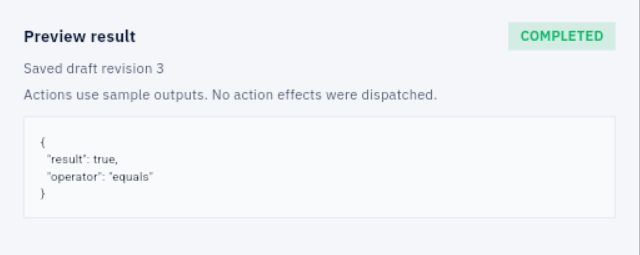
Test-run boundaries and revision evidence
Test Run warns that it may change records and contact providers. The historical inert example was limited to a manual trigger and literal comparison with no actions. Its safe effect boundary cannot be transferred to an action-bearing graph.
Inspect Run History without creating another run
Open Run History for the exact workflow. Do not choose Preview draft, Test Run draft or Start new run merely to learn the history view. Identify each entry's mode, saved draft revision, state, duration and displayed time.
The retained training history has separate Completed Preview and Test Run entries for revision 3. A duration such as 541 ms is an observation for that run, not a performance guarantee. If the display timezone is unstated, do not convert it into a precise UTC event time.

Run inspection and destination verification
Open the intended entry and compare its details with the current definition. A history result belongs to the revision it ran, not automatically the latest canvas. Zero overview runs this month does not erase local draft history; the views may have different scope.
Interpret output as the result of the actual rule
For Number 4 equals Number 5, false is the expected result. A Completed run returning false can therefore be correct. Changing the inputs to force true would change the question rather than repair a failure.
For the historical 5 equals 5 graph, true establishes that literal comparison at that revision and mode. It does not establish that five real checklist steps were reviewed, that a file was read or that a participant can perform the process.
If a graph uses sample outputs during Preview, inspect how those samples differ from the intended real data. Do not describe a simulated provider success as a delivered message or a saved record.
Verify a business effect at its destination
For a separately authorized effectful workflow, define the exact intended record or recipient, before/after state and independent check before execution. Keep workflow identity, saved revision, mode and input/source identity with the result.
Suppose a Test Run reports that task TASK-A changed to Review, but the permitted source read still shows Backlog. Preserve both observations and mark the effect mismatched or unverified. Do not prefer the green run status or immediately rerun. First reconcile identity, timing and destination state.
A sent-message record establishes a different stage from recipient receipt, reading, acceptance or completed requested work. Verify only the stage your evidence supports. No automatic idempotency or duplicate prevention is established merely because the plan includes a unique operation reference.
Keep release and activation separate
The interface exposes Releases and Deploy, and an earlier inspected state had no releases with Run published disabled. Those observations do not establish the exact current mechanics or ordering of release, deployment and activation for every workflow.
A release can identify a version intended for use; deployment concerns its operating context; activation concerns allowing configured starts. Each needs its own supported procedure and approval. Do not click through them to discover their consequences during a draft lesson.
Check your conclusion
An action-bearing Preview says Completed with no effects dispatched. The correct conclusion is “simulation completed,” not “reminder delivered.” An inert Test Run returns false for 4 equals 5. The correct conclusion is “expected comparison result,” not “test failed.” A destination cannot be inspected after an effect-capable timeout. The correct conclusion is “effect unknown; reconcile before retry,” not “nothing happened.”
Turn what you learned into the way the team works.
Mark this lesson complete once the workflow exists in your workspace—not simply when you reach the bottom.