Desk course 03 — Triage, assignment and service-time expectations
Triage establishes who needs to act next, why the request matters and which service target applies. Queue position, a department name and a clock are useful signals, but none alone establishes accountable handling.
Part of Desk module course
In this lesson
Triage ownership and service targets
Triage establishes who needs to act next, why the request matters and which service target applies. Queue position, a department name and a clock are useful signals, but none alone establishes accountable handling.
In this chapter
- Read the queue's scope
- Compare the whole request before prioritizing
- Establish the actual assigned agent
- Understand the SLA policy form
- Read clock evidence without rewriting history
Read the queue's scope
Open Desk > Tickets and choose Table or Kanban. Confirm the selected service, search text and every relevant filter. Observed date choices are Any time, Past 24h, Past 7 days, Past 30 days and Custom range. The custom form offers Start Date and End Date; its date basis, timezone and endpoint convention are not established just by those labels.
Department, Assignee, SLA state and Status filters narrow the result. SLA choices include Responding soon, At risk, Breached and Paused. The selected All option and individual checkmarks must be read carefully; a summary label alone may not tell you the complete condition.
An empty filtered list is not proof that no requests exist. Clear only your own temporary search or filter when appropriate, let loading settle, then open the exact ticket from a supported list. Preserve a loading failure as a loading failure rather than reporting zero work.
Compare the whole request before prioritizing
Match the ticket's reference, title, requester and full context. For the welcome-guide example, the impact is inability to identify materials. If no personal deadline is supplied, it remains unknown. Do not turn an agent's hoped-for response time into the requester's commitment.
Choose priority under the service's definitions. The interface offers Low, Medium, High and Urgent in relevant controls; their business thresholds need agreement. A higher priority does not establish that the request is assigned or that its source has been corrected.
For each request, retain a practical triage statement: the need, impact, next action, responsible handler and next review point. If the handler has not agreed or cannot meet the target, surface that constraint instead of relying on the selected field.
Establish the actual assigned agent
The ticket's Assigned agent panel provides Assign a desk member and may indicate Manual assignment. Search for the exact approved person, verify eligibility and select only that account. A department's eligible agent list, the ticket creator and its watchers are not substitutes for the request's assignment.
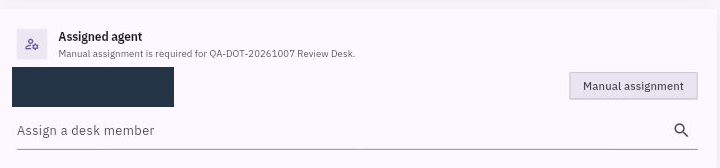
Assignment readback and SLA configuration
Save through the supported control when required, then leave and reopen the same ticket to compare the retained agent. If the selection times out, retrieve before retrying. A timeout can coexist with a retained assignment. Do not assign a second person merely because the immediate display is uncertain.
Support ownership and a linked Board task's assignee are separate. The support agent remains responsible for coordinating the requester outcome even when a specialist owns the correction task.
Understand the SLA policy form
Open Config > SLA rules for the service's policies. Identify the exact policy applied to the ticket before interpreting its clocks; another policy with a similar name is not the ticket's policy.
| Policy control | Interpretation |
|---|---|
| Response target (hours) | Target for the qualifying first-response event; event meaning must be agreed and verified |
| Next response target (hours) | A separate subsequent-response target; zero's runtime meaning must not be guessed |
| Resolution target (hours) | A timing target, not the requester's substantive acceptance condition |
| Timing mode | 24x7 calendar or Business hours |
| Business timezone / Business hours JSON | Conditional business-hours settings; do not invent an undocumented JSON schema |
| Allow manual SLA pause/resume | A policy permission setting, not proof a particular clock was paused |
| Warning threshold (%) | A configured threshold, not a delivered warning |
| Post-breach escalation delay | Delay setting; verify the actual escalation switch and effects separately |
| Mark ticket as escalated on breach | A separate switch |
| Upgrade priority on escalation | No upgrade, Medium, High or Urgent in the inspected choices |
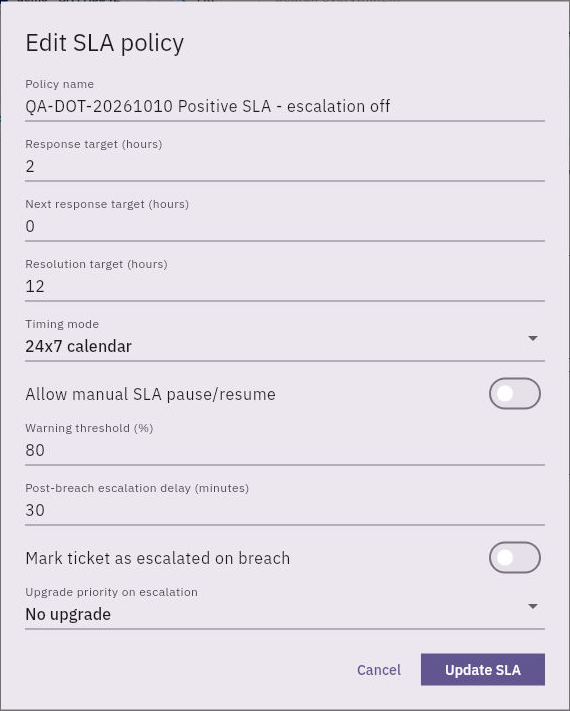
Timing states and policy effects
Do not copy values from an example policy into production. A new-policy form can have different defaults from an existing policy, including next-response target and escalation state. Inspect every intended value and use explicit owner-approved policy.
Read clock evidence without rewriting history
The ticket shows First response, Next response and Resolution cards with state, remaining time, elapsed and paused values. Activity contains events that should be compared with those cards.
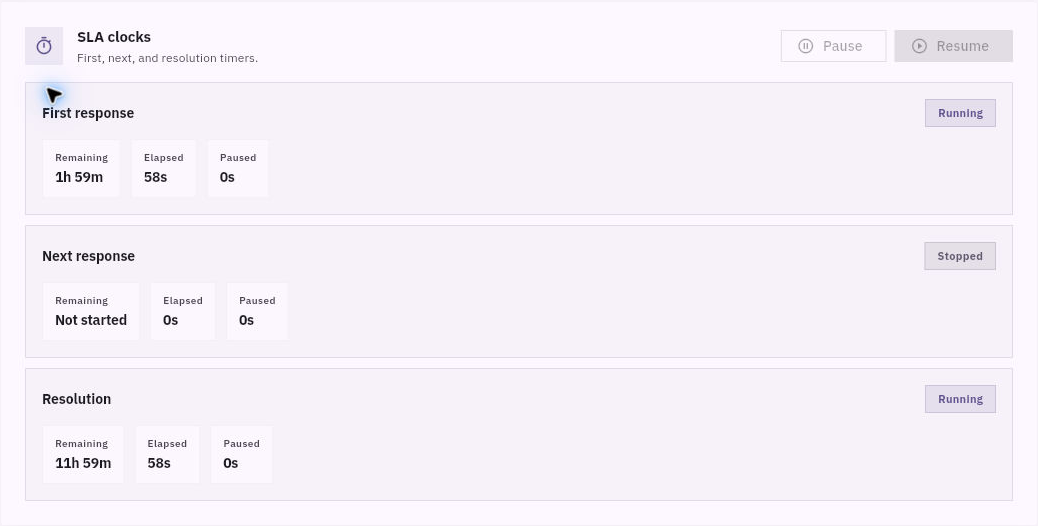
Escalation evidence and triage practice
Stopped with Not started and zero counters after a transition does not prove instant work or clean compliance. Training records have shown earlier breaches followed by stopped/zero displays and conflicting stopped, met and resumed activity labels. Preserve both observations and report timing as unresolved rather than selecting a favorable label.
A paper calculation can still be useful when its policy is fully specified. Under a fictional continuous 60-minute first-response target starting at 09:00, a qualifying response at 09:45 is 15 minutes inside the target. That calculation does not establish the native qualifying event, timezone, pause behavior or displayed implementation.
Keep policy configuration, native clock behavior and substantive requester outcome as three separate checks. This lets the service continue handling the issue while an ambiguous timing result is investigated.
Turn what you learned into the way the team works.
Mark this lesson complete once the workflow exists in your workspace—not simply when you reach the bottom.