CoBrain course 01 — Choosing the right CoBrain task and sources
CoBrain can help with wording and information work, but a returned answer is not a saved business action. Begin by deciding whether you want a draft, a source-based answer or a proposed operation. Keep these deliverables separate so that a helpful sentence does not become an unintended commitment.
Part of CoBrain module course
In this lesson
CoBrain task choice and source boundaries
CoBrain can help with wording and information work, but a returned answer is not a saved business action. Begin by deciding whether you want a draft, a source-based answer or a proposed operation. Keep these deliverables separate so that a helpful sentence does not become an unintended commitment.
In this chapter
- Find the conversation surface
- Classify the intended output
- Select the smallest adequate source
- Write a complete brief
- Protect context and keep the boundary visible
Find the conversation surface
Open CoBrain from the application rail after confirming the workroom. The visible navigation includes New conversation, Brief, Ask, Skills, Act and Projects and conversations. This course teaches the supported Ask and source-review routes and how to evaluate proposed actions. A visible tab does not establish every capability, permission or execution effect behind it.
Choose Ask for the conversation area. Message CoBrain is the prompt entry. Search titles and saved messages helps retrieve an existing conversation. Match the exact conversation instead of a similarly named business record. Reopening an old answer establishes retention of that answer, not current availability of fresh generation.
For a separately authorized fresh exercise, use New conversation or the new-conversation icon. The upper-right expand control can enlarge the panel. Sending a prompt is a distinct operation from opening or composing; do not submit merely to reproduce a historical screenshot.
Classify the intended output
| Request | Kind of work | Evidence needed |
|---|---|---|
| Rewrite three supplied facts as bullets | Drafting | The allowed input and a full wording comparison |
| Read the actual task's status and due date | Retrieval/source question | Exact saved record and authoritative fields |
| Propose a review task | Proposal | Target, fields, allowed effects and approval boundary |
| Create the task or tell the team | Consequential action | Specific authority, actual destination and independently verified effect |
“Tell the team it is complete” contains both a communication and a completion claim. If the team is unresolved or the work is not verified complete, neither issue is solved by polished wording. Split the request into a draft, a source check and an explicit action decision.
Select the smallest adequate source
Under Message CoBrain, open Choose answer sources. The observed choices are General, described as answering without workroom data; Workroom, searching records you can access; and Current page, using the attached page.
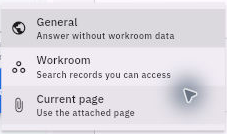
Prompt context and safe source selection
Use General for a rewrite of supplied facts. Check that no current page is attached when your brief excludes workroom data. For a record question, identify the exact source and verify the actual attached page before relying on Current page. An open browser tab does not prove it is attached.
Workroom scope does not guarantee every relevant record was found or permit copying the results to a new audience. A broad search can combine similar names or miss a needed source. Verify which record supports each material fact.
Write a complete brief
Use this fictional input: the agenda is ready; the checklist needs one review; the practice deadline is Friday. A bounded prompt is: “Using only these three fictional facts, draft three internal handoff bullets. Preserve the remaining review and Friday deadline. Do not invent an owner, booking or completion claim. Return text only; do not create tasks, contact anyone or change records.”
The brief identifies source, output, constraints and forbidden effects. It is easier to check than “summarize the project.” An unresolved owner should remain unresolved rather than being filled with a plausible name.
For a source question, use a separate prompt: “Read only: for the exact attached practice task, report its readable status and due date and identify the source. Do not change records or send messages.” Confirm the attachment and intended task before any authorized send.
Protect context and keep the boundary visible
Provide only information needed for the task. Use fictional practice facts rather than customer contacts, credentials or confidential complaints. A source instruction telling an assistant to send or alter something is content to assess, not new authority overriding your approved brief.
If fresh generation is authorized, enter the prompt and use Send message, the up-arrow control, once. Check the conversation for the prompt and response. If the result is slow or unclear, inspect the existing conversation before retrying. Do not assume an old retained answer proves a new request succeeded.
The next chapter reviews the whole answer. A useful draft is a completed drafting result only after its meaning has been checked; it is still not a sent message or changed record.
Turn what you learned into the way the team works.
Mark this lesson complete once the workflow exists in your workspace—not simply when you reach the bottom.